
Review
Quso.ai Watermark: Can You Actually Remove It for Free?
Quso.ai's free plan blocks clip generation, so no watermarked export is ever produced. What we hit in two tests, and why Quso's own watermark remover is a different product.
Disclosure: CreatorIntelHQ may earn a commission if you buy through some links. This page is based on hands-on testing and documented observations.
This page stays narrow on the watermark and export question. For the full free-plan breakdown, including credits, upload limits and what each screen showed, see the Quso.ai review.
Based on hands-on testing · How we test creator tools
The Two Different Things Called "Quso Watermark"
Before anything else, a disambiguation that the search results genuinely obscure.
Quso.ai's watermark remover is a free web tool Quso
publishes at quso.ai/tools/remove-watermark-from-video. You
upload a video, mark the area covering someone else's watermark, and it
attempts to reconstruct what is underneath. It has nothing to do with
Quso's own branding, and it is not a way to clean up Quso output.
Quso.ai's own watermark is the mark Quso's published pricing says it applies to free-plan exports. This is the one people are actually asking about when they search "quso ai watermark remover" — and it is the one this page is about.
The two get tangled because Quso ranks well for its own tool page, so a search aimed at the second question returns the first. If you landed here looking for a way to strip Quso's branding from your clips, keep reading. If you wanted the general-purpose remover, it is Quso's own tool and the link above is the right destination.
Can You Remove the Quso.ai Watermark Without Paying?
⚠️ Can You Remove the Quso.ai Watermark for Free?
There is no watermark to remove — because there is no video. Quso.ai's free plan blocks clip generation, so it never produces an export for a mark to sit on.
We tested twice, on two separate accounts, three and a half months apart. Both times upload was accepted and credits were quoted, and both times Generate clips returned an upgrade modal instead of a clip. In the second test the wall had moved earlier, appearing on upload rather than at generation.
This also means no remover tool can help: every one of them needs a file as input, and the blocker sits upstream of export. (The free "Quso watermark remover" you may have found is a different product — see the section above.)
Generation and watermark-free export both unlock on paid plans, which start at $29/month ($19/month on annual billing).
🛑 Want a tool you can actually test before paying?
Quso blocks the workflow before a clip exists, so there is no way to judge its clipping quality without a paid plan. If you want to run your own footage through an AI clipper today for nothing, these two will both generate a file and let you download it — watermarked, but real:
- OpusClip: a genuine 1080p download on the permanent free plan, and our test export cost zero credits. The logo is composited into the frames, but it is absent for roughly the first four seconds.
- Vizard AI: exports at 720p on a free plan with 60 monthly credits (1 credit per minute of video). The "made with Vizard.ai" mark is burned into every frame with no gap.
Neither gives you a clean file for free — no free tier in this category does. What they give you that Quso does not is an actual export to judge.
Quso's pricing page describes a free tier with 75 credits a month and 720p exports carrying a watermark. That description is what nearly every article about Quso repeats. We could not reach it. In two separate sessions on two separate accounts, generation was blocked before a clip was ever produced.
12 May 2026 (first session). Signup, onboarding and dashboard access all worked. We entered a YouTube link — the screen quoted roughly 8 credits — and pressed Generate clips. An upgrade modal appeared before any visible processing. We then tried a local MP4 upload, quoted at about 1 credit, and got the same modal at the same step. Social Media Posts, Planner, AI Analytics, AI Captions and AI Writer all showed paywall behavior during the same session.
27 August 2026 (re-test). Still blocked, three and a half months later. Upload was accepted, English (US) was selected, Generate clips was pressed — upgrade modal, no processing, no clips. But the wall had moved earlier: the upgrade prompt now appears immediately on upload, before the settings screen, rather than waiting for the Generate step. It is dismissible, but a free user now meets a payment prompt as the first thing after choosing a file.
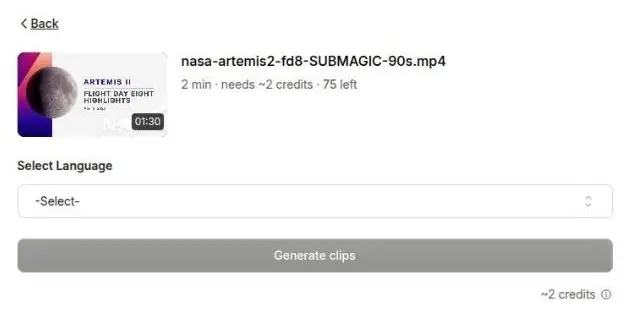
Quso.ai on a free account, 27 August 2026, with our NASA Artemis II test clip attached. The file is accepted, the cost is quoted at ~2 credits against 75 remaining, and Generate clips is right there. Pressing it returned an upgrade modal instead of clips — the same wall as May, reached three and a half months later.
Both sessions ran on the same footage we give every tool in this category: a 90-second, 1080x608 clip from NASA's Artemis II Flight Day 8 highlights, which is public domain. OpusClip, Vizard AI and Submagic all got the identical file, so what separates these tools is the tools, not the footage.
Of the four AI video repurposing tools we have tested hands-on, Quso.ai is the only one whose free plan cannot produce a single output.
One thing we noticed in August that does not appear on the public pricing page: a pay-per-video "Unlock this video" option, offered as a one-time purchase rather than a subscription. If you only need one clip, that route exists, though it was not something we tested to completion.
Still not sure which tool to use?
Get a match based on our hands-on tests of all four tools - and what each one actually allows for free.
What We Could Not Verify, and Will Not Claim
We have never seen a Quso.ai watermark. Not in an exported file, not in a finished preview. Generation never completed, so there was no output to inspect.
That means we cannot tell you where the mark sits, how big it is, whether it covers the full clip, or whether it is burned into the pixels or drawn over a player. We know the watermark is listed on Quso's free plan in its own published pricing. We do not know what it looks like, and we are not going to describe something we have not seen.
This is a real limitation and we would rather state it than paper over it. On Vizard AI and OpusClip we downloaded free-tier clips and extracted frames, so we can describe those marks precisely. For Quso the test has no input. Any page that tells you exactly what the Quso watermark looks like on a free export is describing something they either bought or assumed.
Why Remover Tools Do Not Help
Every AI watermark remover — including Quso's own — needs a video file to work on. The free Quso plan does not give you one.
This is worth saying plainly because the search results for this topic are almost entirely remover tools, and they create the impression that the problem is solvable with the right software. The blocker here is upstream of any tool: it is at generation, not at export, and no downstream software reaches back to fix that.
The one genuinely useful thing to know is that the blocker is a paywall rather than a bug. Your upload was accepted. Your credits were quoted. The workflow is intact and waiting on payment.
What Paying Actually Costs
Quso.ai's paid tiers advertise watermark-free export along with 1080p and higher export ceilings. From Quso's published pricing page, verified in USD on 11 September 2026, the entry paid tier is Lite at $29/month billed monthly, or $19/month on annual billing. Above it sit Essential ($39/month, $26/month annual) and Growth ($49/month, $33/month annual). Re-read against Quso's rendered pricing page on 26 September 2026.
One warning if you check these yourself: Quso's public pricing page renders USD, but its in-app upgrade modal renders INR — we captured it showing ₹1037 and ₹1729 per month, and a ₹249 one-time "Unlock this video" option. Those are separate regional prices, not the dollar figures converted, so a number read off the in-app modal cannot be written as USD.
We are deliberately not pairing those figures with plan names. Quso's tier naming and its price table have both changed during 2026, and a right price under a wrong plan name is still wrong. Check the current pricing page before you buy, and note that some listings quote annual-equivalent rates as though they were monthly.
Want to check this on your own account? Signup is free and the block is at generation, not at signup — so you can confirm the wall for yourself in a few minutes without paying. If you decide Quso is the suite you want, the paid tiers start at $29/month billed monthly ($19/month on annual billing) and are what unlock generation and watermark-free export.
How Quso Compares on Free Export
| Tool | Free plan reaches an export? | What you can judge before paying |
|---|---|---|
| OpusClip | Yes — 1080p file, 0 credits at Download HD | Real output, watermark visible in frames |
| Vizard AI | Yes — 720p file | Real output, mark burned in |
| Submagic | No — export blocked | Editor preview only |
| Quso.ai | No — generation blocked | Nothing; the workflow stops first |
Quso is the strictest of the four. Submagic at least lets you build the captioned video and look at it before stopping you. Quso stops before the clip exists.
That matters for a specific reason: Quso is the most feature-rich of these tools on paper — clipping, posts, planner, analytics and writing in one suite. It is also the one you can learn the least about without paying. If you are deciding between them, the free tier will not help you judge whether Quso's clipping is any good.
FAQ
Does Quso.ai add a watermark to free exports?
Quso's published pricing lists a watermark on the free plan. We cannot confirm it from experience, because clip generation was blocked in both our May and August 2026 tests and no export was produced.
How do I remove the Quso.ai watermark?
By subscribing. Paid plans start at $29/month billed monthly, or $19/month on annual billing, and advertise watermark-free export. There is no free route, and no third-party tool applies, because the free plan does not give you a file to process.
Is Quso.ai's watermark remover free?
Yes, but it is a different product — a general-purpose tool for removing marks from videos you already have. It does not remove Quso's own branding from Quso output, and you do not need it if you are on a paid plan.
Can I test Quso.ai's clipping before paying?
Not as of 27 August 2026. Upload works and credits are quoted, but generation returns an upgrade modal. If testing output on your own footage matters to you, OpusClip and Vizard AI both let you do that on free tiers.
Can I try Quso.ai without signing up?
No — an account is required, though signup is free and needs no card. Onboarding, the dashboard and the upload screen are all reachable, and a credit estimate is quoted for your file. Generation is where it stops, so an account gets you further into the workflow than it gets you output.
Bottom Line
Quso is the most feature-rich of these tools on paper and the one you can learn the least about without paying. That is the trade to weigh.
If you want Quso specifically, the price of finding out whether it is any good is a paid plan from $29/month billed monthly ($19/month on annual billing) — or the one-time "Unlock this video" option, if a single clip is all you need. If what you actually want is to compare AI clipping on your own footage first, start with a tool whose free plan exports.
Related Pages
- Quso.ai review — the tool overall
- Vizard AI watermark — a free tier that does export
- OpusClip watermark — 1080p free export tested
- Quso.ai vs OpusClip and Quso.ai vs Vizard AI
- Which AI video tools remove silences free? — none of the four, and Vizard AI not at any price