
Guide
Which AI Video Tools Remove Silences Free? (2026)
None of the four major AI clipping tools include silence or filler-word removal on a free plan — and Vizard AI does not offer it at any price. What each tier actually unlocks.
Disclosure: CreatorIntelHQ may earn a commission if you buy through some links. This page is based on vendor documentation and our own hands-on free-plan testing.
Based on CreatorIntelHQ methodology · How we test creator tools
Which AI Video Tools Remove Silences for Free?
⚠️ Which AI Video Tools Remove Silences for Free?
None of them. Of the four AI clipping tools we track, not one includes silence or filler-word removal on a free plan — and Vizard AI does not offer it at any price.
Cutting dead air is treated as a paid feature across the category. On Submagic it is not even included in the first paid tier: you have to reach the second one.
The practical consequence is that you cannot evaluate silence-removal quality before paying. Every other thing we test on these tools — export, watermark, captions, reframing — can be checked on a free account. This one cannot.
If you are cutting a podcast or a talking-head recording into shorts, automatic removal of pauses and filler words is one of the features people most expect to find. It is also one of the most consistently gated.
We checked each vendor's own published plan-comparison table, rendered in a browser on 26 September 2026. What follows is what they sell, tier by tier.
Where the feature actually lives
| Tool | What the vendor calls it | Cheapest tier that includes it |
|---|---|---|
| OpusClip | "Filler & silence removal" | Starter — $15/month, the first paid tier |
| Submagic | "AI Remove Silences", "AI Remove bad takes", "AI Filler words" | Pro — $39/month ($23/month on annual billing). Excluded from Starter |
| Quso.ai | "AI filler & silence removal" | Essential — $39/month ($26/month on annual billing) |
| Vizard AI | — | Not offered on any plan |
OpusClip is the cheapest route to it at $15/month, and the only one of the four where the entry paid tier includes it.
Vizard AI does not offer this at all
This is the finding most likely to catch someone out, because Vizard is otherwise a reasonable free-tier starting point.
We searched Vizard's full rendered pricing page for nine separate terms — filler, bad take, silence, silent, trim, dead air, pause, auto-cut and clean audio. Every one was absent.
Vizard's complete AI feature list, as published, is: AI clipping, AI processing speed, Auto reframe, AI emojis, AI highlight keywords, AI B-rolls and AI post suggestions. Audio cleanup is not part of the product.
So if your actual bottleneck is a messy talking track full of pauses, Vizard will not solve it at any tier — not because you picked the wrong plan, but because the feature does not exist. That is worth knowing before you subscribe for something else it does well.
Submagic gates it hardest
Submagic's Starter plan is a paid plan, and it still shows a dash against AI Remove Silences, AI Remove bad takes, AI Filler words, AI Clean audio and AI Hook title in the vendor's own comparison table. All of those begin at Pro.
So on Submagic the pacing tools are two purchases away from free, not one. If silence removal is the reason you are considering it, price the Pro tier, not the Starter one.
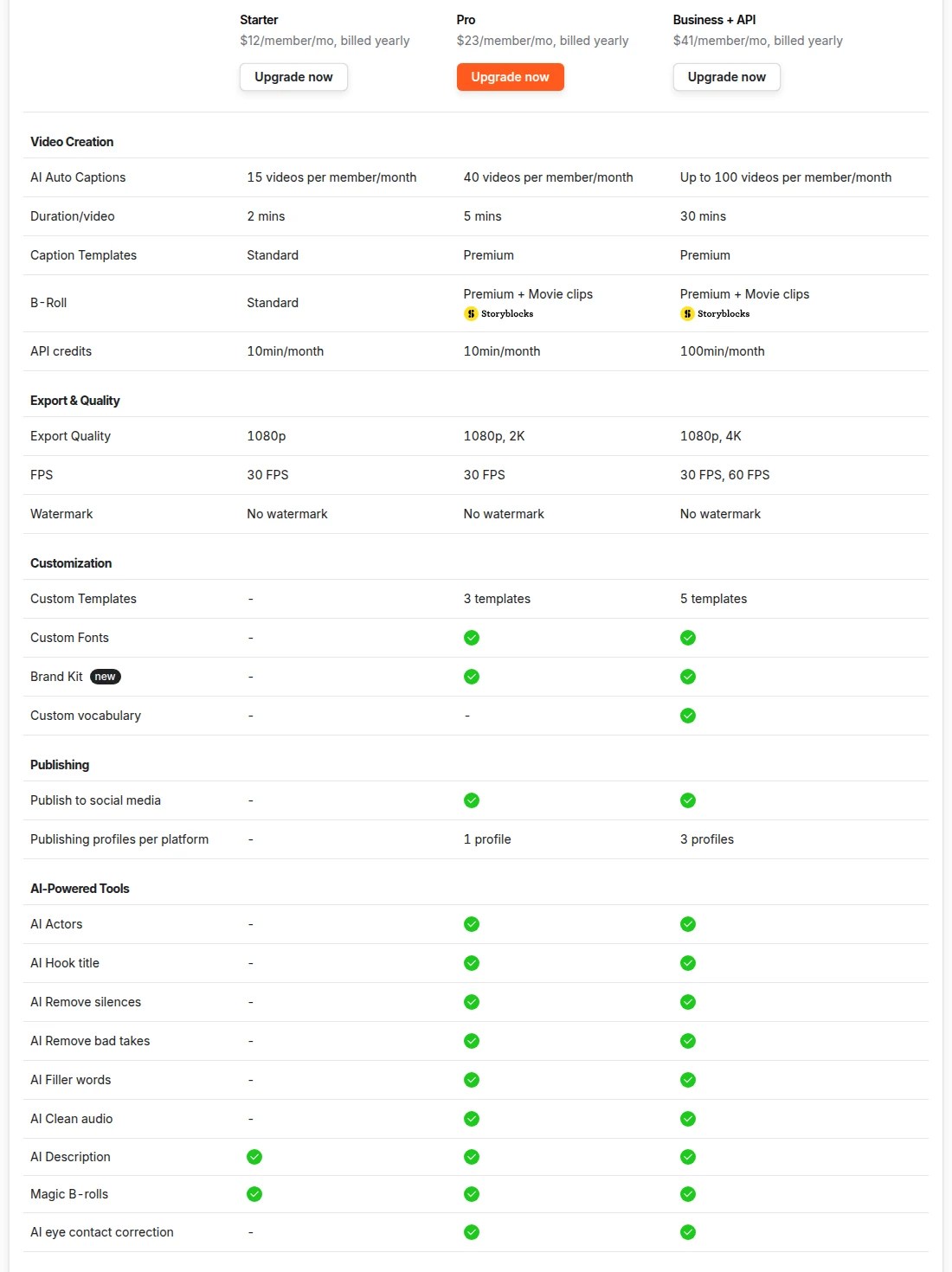
Submagic's own comparison table, captured 26 September 2026 from a US connection. Under AI-Powered Tools, the Starter column shows a dash against AI Remove silences, AI Remove bad takes, AI Filler words and AI Clean audio — all four begin at Pro. Note the header rates are per member and billed yearly; monthly rates are higher. Vendors reprice without notice, so treat the figures in this image as of the capture date and the text above as current.
Every free plan runs out somewhere. Know where first.
The Free-Plan Reality Check: what OpusClip, Vizard AI, Submagic and Quso.ai actually let you do for $0 - from real signups, real uploads and real paywall hits.
What this means if you are still evaluating
Here is the awkward part, and we would rather state it than work around it.
Everything else worth checking on these tools can be checked without paying. You can confirm whether the free plan exports at all, what the watermark looks like, whether the captions are accurate, how the reframing handles your footage. Silence removal is the one thing you cannot try before buying — on any of the four.
That does not make it a bad feature. It means the honest advice is to judge a tool on what you can verify, and treat audio cleanup as an unverified extra rather than the reason you choose one.
🛠️ What you can test for free first
Silence removal is paid everywhere, so evaluate the parts you can actually check. Both of these hand you a real file on a free account — watermarked, but real:
- OpusClip: a genuine 1080p download on the permanent free plan, and our test export cost zero credits. The logo is composited into the frames, though it is absent for roughly the first four seconds. It is also the cheapest route to silence removal if you do decide to pay.
- Vizard AI: exports at 720p on a free plan with 60 monthly credits, and it is the only one of the four that runs without an account at all. The "made with Vizard.ai" mark is burned into every frame with no gap — and remember it has no silence removal at any tier.
Neither gives you a clean file for free. What they give you is an actual export to judge, which Submagic's editor and Quso's free plan do not.
Decided silence removal is what you need? OpusClip includes it on the cheapest paid tier of the four. Submagic has the widest set of pacing tools — remove silences, bad takes, filler words and clean audio — but only from Pro upward.
FAQ
Does any AI video tool remove silences on a free plan?
Not among the four we track. OpusClip, Submagic and Quso.ai all place silence and filler-word removal behind a paid tier, and Vizard AI does not offer it at all. We checked each vendor's published plan comparison on 26 September 2026.
What is the cheapest way to get automatic silence removal?
OpusClip's Starter plan at $15/month, which is the first paid tier and includes "Filler & silence removal". Submagic requires Pro at $39/month ($23/month on annual billing), and Quso.ai requires Essential at $39/month ($26/month on annual billing).
Does Vizard AI remove silences or filler words?
No. We searched Vizard's full pricing page for nine terms covering silence, pauses, filler words, bad takes, trimming and auto-cut, and none appear. Its published AI features are clipping, processing speed, auto reframe, emojis, highlight keywords, B-rolls and post suggestions. If audio cleanup is what you need, Vizard is not the tool.
Can I test silence removal before paying?
No, and this is the exception on these tools. Export behaviour, watermarks, caption accuracy and reframing can all be checked on a free account. Silence removal cannot be checked on any of the four without a subscription, so you are buying it unseen.
Is Submagic's Starter plan enough for silence removal?
No. Starter is a paid plan but Submagic's own comparison table shows a dash against AI Remove Silences, AI Remove bad takes, AI Filler words and AI Clean audio. Those start at Pro.
Bottom Line
Silence removal is sold, not sampled. Every tool that offers it puts it behind a subscription, Submagic puts it behind the second one, and Vizard does not sell it at all.
If it is genuinely your main bottleneck, OpusClip at $15/month is the cheapest entry and Submagic Pro is the most complete set. If it is one item on a longer list, judge the tool on what you can verify for free first — because this is the one feature none of them will let you try.
Related Pages
- Vizard AI watermark — a free tier that exports, watermarked
- OpusClip watermark and export limits — 1080p free export tested
- Submagic watermark — why its editor will not export free
- Quso.ai watermark — the free plan that blocks generation
- How to test an AI video tool before paying