
Review
Submagic Watermark: Can You Actually Remove It for Free? (2026)
Submagic's free editor blocks export entirely. Its API does return a file, though, and we inspected it frame by frame: there is no watermark to remove.
Disclosure: CreatorIntelHQ may earn a commission if you buy through some links. This page is based on hands-on testing and documented observations.
This page answers one narrow question in depth: does Submagic watermark your videos, and can you get a clean file without paying? If you want the full plan breakdown — credits, video length caps, caption features — see what Submagic's free trial allows in the Submagic review.
Based on hands-on testing · How we test creator tools
Can You Remove the Submagic Watermark Without Paying?
⚠️ Can You Remove the Submagic Watermark for Free?
Yes — through Submagic's API, there is no watermark to remove. We ran our test clip through it on a free trial account and inspected the download frame by frame: no logo, no wordmark, nothing in any corner.
The editor is the catch. Press Export in the web app on a free account and you get an upgrade wall, not a file — so the API route is the only free way out, and it asks for an API key and a publicly reachable video URL. The trial's allowance covers roughly two ninety-second clips a month.
That is also why watermark-remover tools are beside the point here: the editor gives you no file to clean, and the API gives you no mark to clean off. Almost every other page says the free plan grants three watermarked exports a month — it does not.
For watermark-free export from the editor, paid plans start at $19/month billed monthly ($12/month on annual billing).
That answer changed in September 2026, and it is worth understanding why.
The usual framing is that Submagic hands free users a watermarked file, and your job is to find something that strips the mark. That framing assumes a file exists. Click Export in the web editor on a trial account and it still does not: you get an upgrade wall, not a download. That has been true across every re-test below.
But the editor is not the only way out of Submagic, and the other way is Submagic's own. Its documented API — which the product actively advertises inside the dashboard — rendered our test clip on the same trial account and handed back a working download link. We inspected that file. It carries no watermark at all. Details in the API route below.
What We Tested, and What Changed
We ran Submagic's free tier twice, three and a half months apart, and the two sessions do not agree with each other.
May 2026 (first session). Signup completed with no credit card. Captions generated. The editor opened and displayed a caption preview with a visible watermark indicator. At Export, an upgrade popup appeared, followed by a referral popup offering free videos for invites. Our conclusion at the time was hedged: a determined person might be able to grind out a watermarked file, but we could not confirm a clean download.
27 August 2026 (re-test). On a fresh free account, the wall was no longer ambiguous. The message read "Your video's ready — upgrade to export." Submagic's own Pro feature list sells "Export your videos" as a paid benefit. The upgrade popup and the referral popup loop into each other with no path through. No file, no partial file — and, from inside the editor, no workaround.
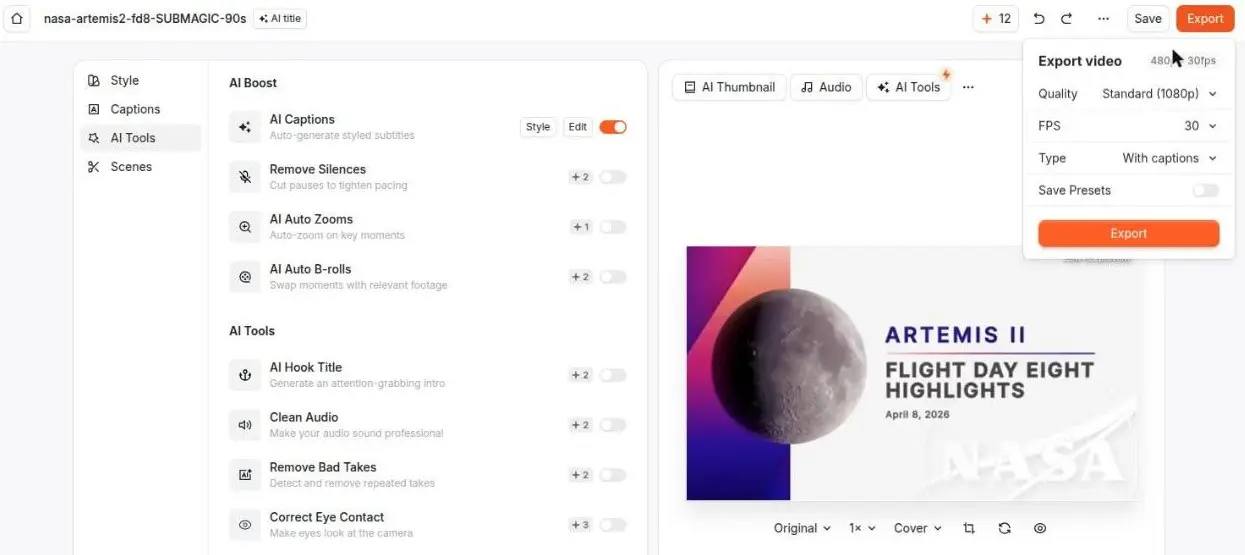
Submagic's editor on a free account, 27 August 2026, with our NASA Artemis II test clip loaded and 12 credits left. The export panel offers Standard (1080p), 30 FPS, With captions — and an Export button. Pressing it returned "Your video's ready — upgrade to export," not a file.
We treat the August session as authoritative, and we are flagging the disagreement rather than quietly overwriting the older result. Either our May reading was too generous, or Submagic tightened the free tier between May and August 2026. We cannot tell which from the outside, and we are not going to guess.
The free allowance changed in the same window. In May the account showed discrete counters — three video projects, one Magic Clip, ten API minutes. In August it was a monthly renewing pool of 15 credits, and the tier had been renamed from a free plan to a "Trial plan." That rename is consistent with what we hit at export: a trial is something that ends, not a tier you live on.
Both sessions ran on the same footage we use across every tool in this category: a 90-second, 1080x608 clip from NASA's Artemis II Flight Day 8 highlights, which is public domain. OpusClip, Vizard AI and Quso.ai were all given that identical file, so differences between the tools are differences in the tools rather than in what we fed them.
The API route: a free file, and no watermark on it
On 22 September 2026 we tested the one path we had never tried: Submagic's own API.
This is not a workaround we invented. Submagic promotes it inside the product — the API & Integrations page in the dashboard leads with "Connect your AI agent in one click," offers setup guides for Claude, Cursor and Windsurf, and prints the connection command ready to copy. The trial account carries its own API allowance, separate from the editor's credit balance: 10 credits per month, with the rule stated plainly on that page — "Each minute of video processing consumes 1 credit. Upon exceeding this limit, your API access will be suspended until the next month."
We sent the same 90-second NASA clip through it with no extra options set. It downloaded, transcribed, rendered, and returned a download URL. The allowance moved from 10 to 8 — two credits for ninety seconds, rounded up to the minute, exactly as documented.
The file is real and it is clean. 16MB, 1080x608, 90.0 seconds, H.264 video with AAC audio, captions burned into the frames. We sampled frames at 2, 12, 30, 60 and 89 seconds and cropped all four corners at full resolution on two of them. There is no Submagic logo, wordmark or bug anywhere in it. The only marks in frame are NASA's, which came with the source footage.

A frame taken straight out of the downloaded file at 30 seconds. Submagic's captions are burned into the picture; Submagic's branding is not. The NASA lower-third and logos are from the source footage.
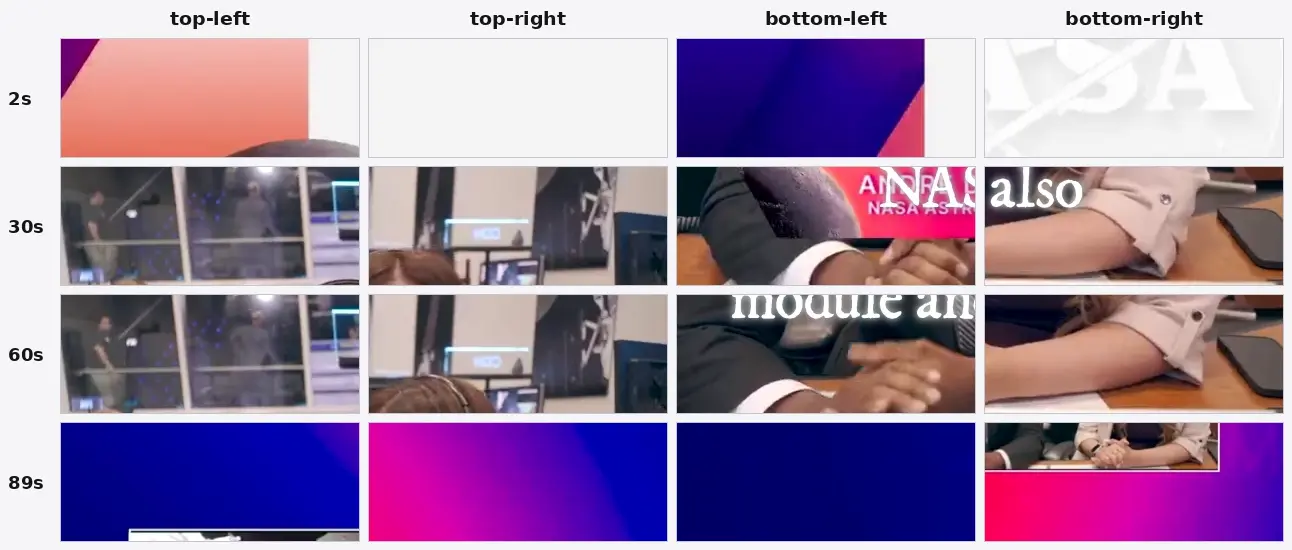
Where a watermark would be: all four corners at 2s, 30s, 60s and 89s, cropped at identical size from the full-resolution file rather than scaled down. OpusClip's mark sits top-left and Vizard's top-right, so those corners are the ones that matter most — both are clean here. The white text crossing the bottom row is the burned-in caption we asked Submagic for, not branding; the NASA lower-thirds and logos are from the source footage.
Then the editor changed its mind about us. The project the API had rendered appeared in the dashboard badged "Exported" — and its page now offered Download, Publish and Share, on the same trial account that had refused to export the clip sitting next to it. The API did not sneak a file out around the gate. It moved the project into a state the editor then treated as paid-for.
What this does and does not mean. Two clips of roughly ninety seconds a month, captioned and watermark-free, is a real allowance and not a trick — but it is small, it needs an API key and a public URL for your video, and it is metered separately from the credits you see in the app. We checked a second, separate trial account on 24 September 2026: it also carried 10 API minutes, untouched, before an API key had even been generated — so the allowance is issued at signup rather than earned, and it is not a quirk of the account we tested first. Submagic now shows the two balances side by side in My Account › Profile: Credits 0/15 and API Minutes 0/10. What we still have not seen is either pool actually renew — our first account's credit balance has not moved in a month, so treat "per month" as Submagic's stated rule rather than something we have watched happen.
Still not sure which tool to use?
Get a match based on our hands-on tests of all four tools - and what each one actually allows for free.
What We Could Not Verify, and Will Not Claim
This is the part other pages skip, so we will be explicit.
We still cannot describe a Submagic watermark's position, size, or whether it is composited into the pixels — the API file had none, and the editor has never handed us one to inspect. What follows is what the editor route leaves unresolved.
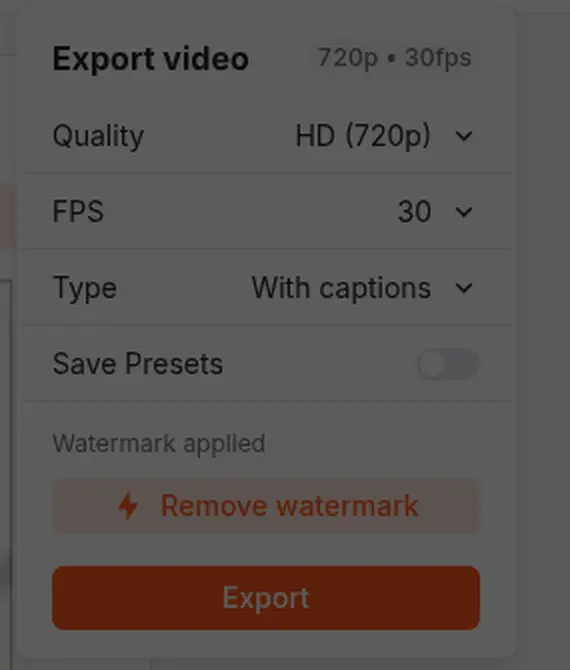
The May 2026 export panel stated "Watermark applied" and offered "Remove watermark" as a paid action. By August that row was no longer showing in the same panel. Either way, this is the editor telling us a watermark exists — not a file we inspected.
What we did see is a watermark indicator inside the editor preview — the browser-side view of your captioned video, before export. A preview overlay and a burned-in mark are different things, and we are not going to describe one as the other. On Vizard AI and OpusClip we could make that determination, because both of those tools let a free account download something. We extracted frames and confirmed the mark was in the pixel data. For Submagic, that test has no input.
If you see a page that describes the Submagic watermark's position and appearance in a downloaded file, it is worth asking how they got the file.
Why Watermark Remover Tools Do Not Apply Here
Search results for this topic are full of AI watermark removers, and for Submagic specifically they are solving a problem you do not have.
A watermark remover takes a video you possess and attempts to reconstruct the pixels underneath a mark. Every one of them needs a video file as input. If your free Submagic project never leaves the browser, there is nothing to feed them — and if you take the API route instead, the file that comes back has no mark in it to reconstruct. Either way the tools are pointed at the wrong step of your problem.
The same goes for the screen-recording suggestion that comes up in forums. Recording your editor preview does technically produce a file, but you are capturing a browser window: you inherit the preview's watermark indicator, you lose the export's encoding quality, you pick up your own screen's frame rate and compression, and you still do not have the clean render Submagic would have produced. It is worse than the free output of tools that simply let you download.
What Removing the Watermark Actually Costs
Submagic's paid tiers all advertise watermark-free export. Verified from Submagic's pricing page in USD on 25 August 2026:
| Plan | Billed monthly | Billed annually |
|---|---|---|
| Starter | $19/month | $12/month on annual billing |
| Pro | $39/month | $23/month on annual billing |
| Business + API | $69/month | $41/month on annual billing |
One warning if you check these yourself. Submagic's in-app upgrade modal rendered prices in INR during our August session, while the public pricing page rendered USD with a working currency selector. Those are different numbers, not the same number converted, and transcribing the modal figure as a dollar amount will be wrong. Read prices from the pricing page with the currency set deliberately.
Decided the captions are worth it? Watermark-free export starts on Starter at $19/month billed monthly. If you are still evaluating, note that the free tier will not show you an exported file — so the thing you would be judging is the editor, not the output.
How Submagic Compares to Vizard AI and OpusClip
This is where Submagic stands out, though not in the way we first reported. Among the three AI video tools we have tested hands-on, it is the only one whose editor will not produce a file on a free account — and the only one whose free output, once you get it, carries no watermark.
| Tool | Free export | Watermark on free output |
|---|---|---|
| OpusClip | Yes — 1080p file, verified with ffprobe | Logo composited into the frames |
| Vizard AI | Yes — 720p file, verified with ffprobe | "made with Vizard.ai" burned into the file |
| Submagic | Editor: no — export blocked. API: yes — 10 credits/month on the trial, verified with ffprobe | None — no mark anywhere in the API export, confirmed by frame extraction |
If your goal is to see what a tool's free output actually looks like before you spend money, Submagic is the one that will not show you through its editor — you have to go through its API, which costs nothing but does require an API key and a publicly reachable video URL. That is a real difference in friction: with the other two you click Download. It is also a difference in result, because what Submagic hands back is clean where theirs are branded.
Who Should Pay Anyway
None of this means Submagic is a bad product, and we want to be fair about that.
Its captions were the fastest and cleanest of the tools we tested. If you already know you want styled, animated captions and you are producing short-form video regularly, the $19/month Starter tier is not an unreasonable price for a tool that does one job well. The complaint here is not about quality — it is that the free tier functions as a demo of the editor rather than a trial of the workflow, and it does not tell you that up front.
Where we would push back is on treating the free plan as an evaluation. You cannot evaluate an export you cannot perform. If you want to compare caption quality across tools on your own footage before paying, start with a tool that lets you hold the output in your hand.
FAQ
Does Submagic put a watermark on free videos?
The editor preview shows a watermark indicator on free accounts, and Submagic sells watermark-free export as a paid feature. But the file we obtained through Submagic's API on a trial account, on 22 September 2026, had no watermark in it at all — we checked frame by frame. The editor still will not export one, so the preview indicator is the only mark we have ever seen.
How many free exports does Submagic give you?
Other sources say three per month. In our 27 August 2026 test the answer was zero — the free tier showed 15 monthly credits and blocked export entirely. If you are relying on a three-export figure, verify it on your own account before planning around it.
Can I remove the Submagic watermark with an AI tool?
There is nothing to remove. The editor will not export a file on a free account, and the file Submagic's API does return on the trial allowance has no watermark in it. Paid exports have no watermark either.
Is there a free Submagic alternative that exports?
Yes. Both OpusClip and Vizard AI produce downloadable files on their free tiers — watermarked, but real. Our comparison of AI video repurposing tools covers how they differ.
Can I try Submagic without signing up?
No — an account is required before you can upload, and signup was free with no credit card in both our sessions. But an account is not what unlocks an export: the editor blocks that on the free tier regardless of how you signed up. The API route described above runs on the same trial account.
Bottom Line
So the decision is not about watermark removal at all — it is about how much friction you will accept for a free file.
Comfortable with an API key and a public URL for your video? The trial allowance is genuinely enough to evaluate Submagic's captions on your own footage. Want to click Download instead? OpusClip and Vizard AI will both give you one from the browser today, watermarked. Already sold on the captions and producing regularly? Pay, and skip the whole question.
Related Pages
- Submagic review — the tool overall
- Vizard AI watermark — a free tier that does export
- OpusClip watermark — 1080p free export, mark in the frames
- Submagic vs OpusClip — caption editor or clipping tool
- Which AI video tools remove silences free? — none of the four, and Vizard AI not at any price