
Quso.ai vs OpusClip: Which AI Clip Tool Is Better for Small Creators?
Weighing more than two tools? See all 4 tools compared in our AI video repurposing guide.
If you're a small YouTuber or podcaster trying to decide between Quso.ai and OpusClip for turning long videos into short-form clips, you're probably wondering which tool actually works on a free plan—and which one will hit you with upgrade prompts before you can test anything useful.
This comparison is based on hands-on testing of Quso.ai's free-plan workflow and available CreatorIntelHQ evidence for OpusClip. In this test, I could verify Quso.ai's signup, dashboard access, YouTube link entry, MP4 upload setup, and pre-generation credit estimates. However, both attempts to generate clips opened a paid upgrade modal before visible processing started, so I could not verify free export, download, final watermark behavior, or generated clip quality.
For OpusClip, available CreatorIntelHQ evidence confirms that AI Reframe completed successfully with visible transcript analysis and post-generation editing actions, but the same-video benchmark and free-plan export behavior still need direct comparison.
This article explains which tool fits which workflow, what could and could not be verified, and what you should test yourself before paying.
Disclosure: This page may contain affiliate links. If you choose a tool through those links, CreatorIntelHQ may earn a commission at no extra cost to you. Reviews are written to focus on practical fit, workflow value, and real creator use. This article is based on hands-on testing and documented evidence.
Based on hands-on testing · How we test creator tools
Quick Winner
Choose Quso.ai if: You want to test whether a free-plan AI clip tool can accept YouTube links and local MP4 uploads, and you're willing to verify export and download behavior with your own workflow before paying.
Choose OpusClip if: You want to test AI Reframe for converting horizontal footage into vertical short-form clips, and available evidence suggests the workflow completes with visible transcript analysis and editing actions.
Use neither blindly: Both tools still need manual review for captions, reframing accuracy, and export quality. Treat this as a workflow comparison, not a final benchmark.
Best first test: Run the same source video through both tools, verify whether free-plan export works, and compare downloaded outputs before upgrading.
Decision guide
Choose Quso.ai if: You want to test whether the free plan allows YouTube link import and MP4 upload setup, and you're prepared to verify export and download behavior yourself before paying.
Choose OpusClip if: You want to test AI Reframe for horizontal-to-vertical conversion, and available evidence suggests the workflow completes with visible transcript and editing actions.
Compare both first if: You need to verify which tool actually exports usable clips on the free plan, or if you want to benchmark reframing quality and caption accuracy with the same source video.
Best next step: Test both tools with your own video file, verify whether free-plan export works without watermark or upgrade friction, and compare downloaded outputs before upgrading. For more context on Quso.ai's free-plan limits, see [what Quso.ai's free plan allows](/reviews/quso-ai-review/#what-the-free-plan-allows-tested-twice). For OpusClip's free-plan behavior, see the [OpusClip review](/reviews/opusclip-review/).
Starting with Quso.ai? Our test hit an upgrade modal before clip generation finished, so export and watermark behavior are still unverified — check those stages on your own account before paying. We re-tested in August 2026 and hit the same wall: the watermark question in full.
Evidence Confidence Table
| Tool | Evidence Strength | What Was Verified | What Could Not Be Verified |
|---|---|---|---|
| Quso.ai | Strong for signup, dashboard access, upload/import setup, credit estimates, and paywall/blocker behavior | Free-plan signup, dashboard access, YouTube link entry, MP4 upload setup, MKV rejection, pre-generation credit estimates (~8 credits for YouTube, ~1 credit for MP4), and upgrade-modal behavior before generation | Generated clip output, export/download behavior, final watermark status, caption accuracy, and whether paid plans export cleanly |
| OpusClip | Strong for tested AI Reframe/result-preview workflow | AI Reframe workflow completion, vertical reframed clip, transcript/scene analysis, score breakdown, and additional actions like Download HD, Edit clip, AI hook, Enhance speech, and Add B-Roll | Same-video benchmark with Quso.ai, free-plan export quality without watermark, and whether paid upgrade meaningfully improves reframing or export quality |
In this test, Quso.ai allowed dashboard access, YouTube link entry, and MP4 upload setup, but both Generate clips attempts opened a paid upgrade modal before visible processing. Because clip generation did not complete, free export, download, and final watermark behavior could not be verified.
For OpusClip, available CreatorIntelHQ evidence confirms that AI Reframe completed and opened a result view with transcript analysis and additional edit/export actions, but the same-video benchmark is still needed.
Comparison Snapshot Table
| Feature | Quso.ai | OpusClip |
|---|---|---|
| Best for | Small YouTube creators who want to test whether Quso.ai's free plan can accept YouTube links and MP4 uploads before paying | Small creators who want to test whether OpusClip's AI Reframe workflow is useful before upgrading |
| Free plan availability | Free plan visible with no-credit-card messaging and trial credits | Free plan visible with no-credit-card messaging and trial credits |
| Trial credits/limits | Pre-generation credit estimates visible (~8 credits for YouTube, ~1 credit for MP4), but final credit balance not clearly displayed on billing page | Dashboard popup showed 10 free credits for 7 days, no credit card required, full features except Fast queue — this is a trial of the Pro plan. A separate permanent free plan is advertised at 60 credits/month (untested) |
| Watermark/export limitation | Upgrade modal appeared before generation completed; export/download not confirmed | Watermark messaging visible in result preview; free download/export not confirmed after upgrade prompts |
| Upload/import options | YouTube link entry and local MP4 upload tested; MKV rejected | Local upload, pasted links, and cloud/recording inputs visible in tested workflow |
| Supported formats | MKV unsupported; video/mp4, video/webm, and video/quicktime accepted | Not confirmed in current evidence |
| Output quality observations | Generated output not visible because generation did not complete | Generated output visible after processing, with result-screen and preview evidence |
| Caption/transcript quality | Not confirmed because generation did not complete | Captions/transcripts visible in output workflow, but accuracy still needs manual review |
| Reframing/format options | Not confirmed in current evidence | AI Reframe workflow tested with 9:16 aspect ratio, Fill layout, and Original ratio crop; output framing still needs review |
| Editing control | Not confirmed because generation did not complete | Result view showed post-generation editing actions such as editing, AI hooks, speech cleanup, and B-roll |
| Social publishing/integrations | Publishing/integration options visible in pricing evidence, but tested features (Social Media Posts, Planner, AI Analytics, AI Captions, AI Writer) showed paywall or limited-sample behavior | Publishing/integration options visible in current evidence |
| Team/collaboration features | Team/collaboration features appear in higher-tier plan evidence | Pricing page shows Free, Starter, Pro, and Business plans with credits, feature differences, and some free-plan limits |
| Pricing evidence status | Human-reviewed pricing evidence present; pricing should be verified before purchase | Human-reviewed pricing evidence present; pricing should be verified before purchase |
| Main strength | Dashboard access, YouTube link entry, and MP4 upload setup worked on free plan | AI Reframe workflow completed with visible transcript analysis and editing actions |
| Main limitation | Upgrade modal appeared before generation completed; export/download not confirmed | Free-plan download and export limitations remain a key drawback |
| Evidence confidence | Strong for signup, dashboard access, upload/import setup, credit estimates, and paywall behavior; generated output, export/download, and final watermark not confirmed | Strong for tested AI Reframe/result-preview workflow; export/download and same-video benchmark still need confirmation |
Free Plan Comparison
Quso.ai Free Plan
In this test, Quso.ai's free plan allowed signup, dashboard access, YouTube link entry, and MP4 upload setup. The billing page confirmed the account was on a Free Plan, but it did not clearly display a 75-credit balance.
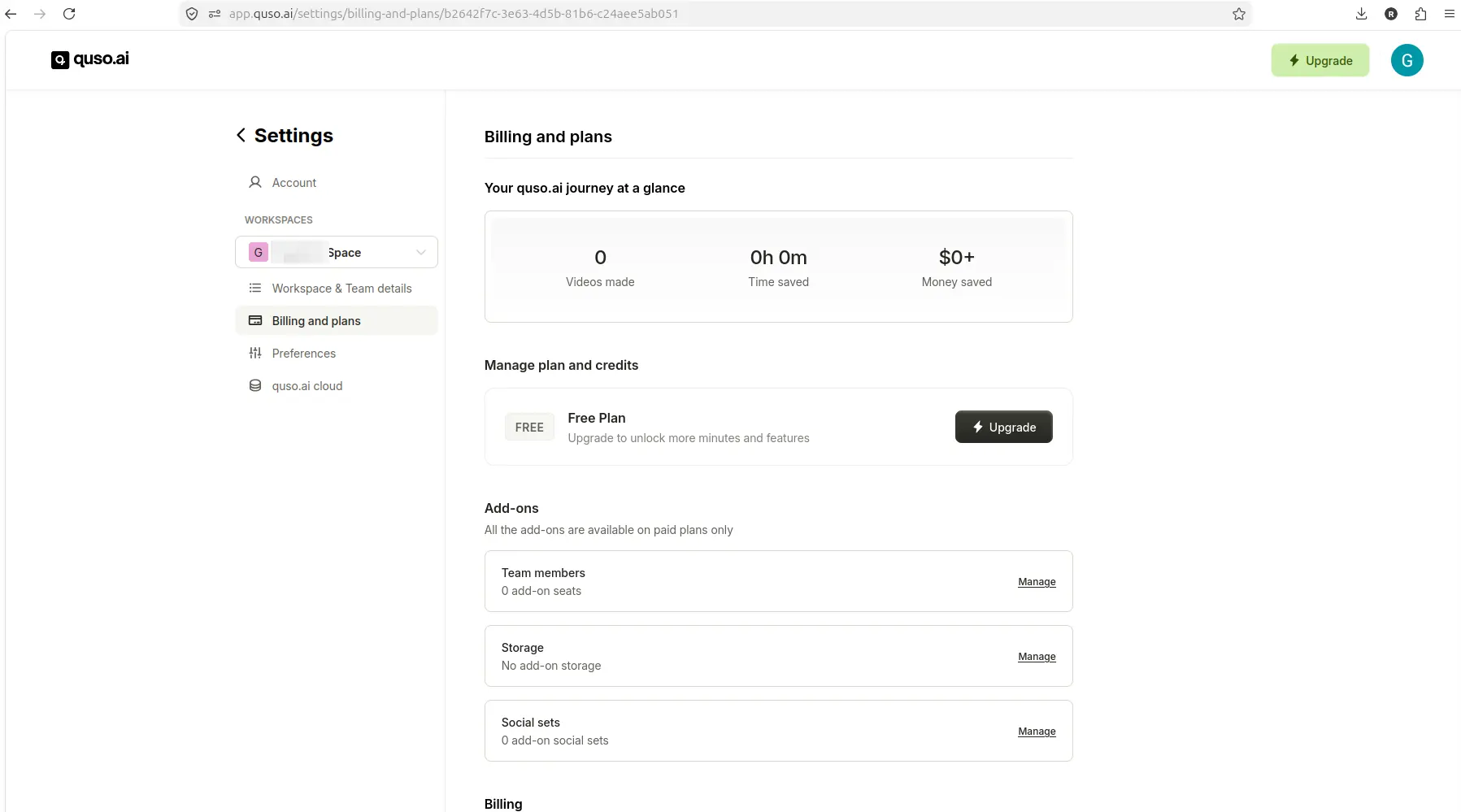
The tested Quso.ai account showed Free Plan status, but the billing page did not clearly show the advertised 75-credit balance.
During the YouTube workflow, the pre-generation screen showed an imported video and an estimated cost of about 8 credits. During the MP4 workflow, the pre-generation screen showed an uploaded file and an estimated cost of about 1 credit.
However, clicking Generate clips in both workflows opened a paid upgrade modal before visible processing started. Because clip generation did not complete, I could not verify free export, download, final watermark behavior, or generated clip quality.
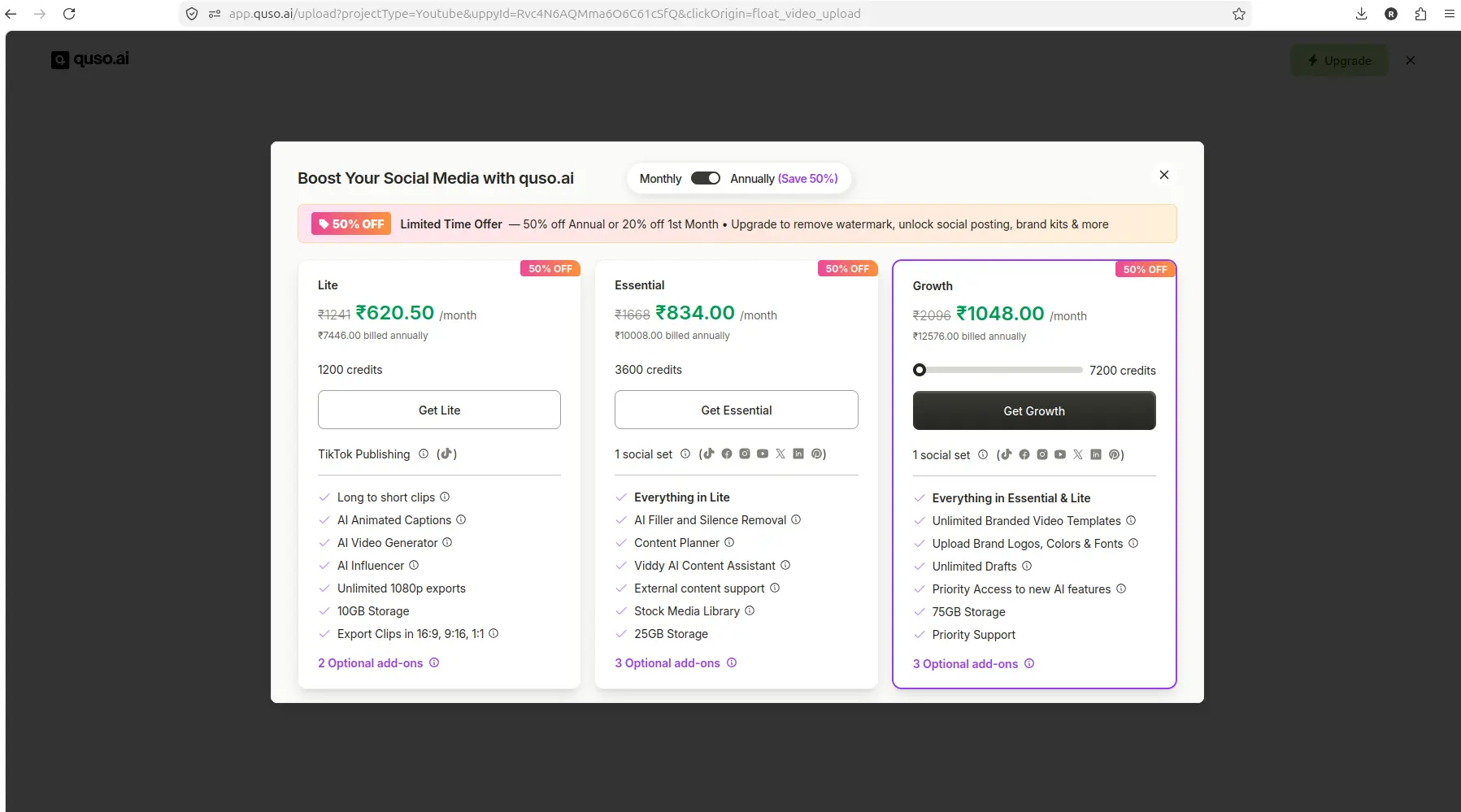
The Quso.ai free workflow hit an upgrade modal after Generate clips in the YouTube-link test.
⚠️ The figures in this modal are ₹ INR, not USD — Quso's in-app upgrade screens render in the local currency of the session they were captured from, and this one also shows a 50% off promotion rather than list prices. Read Quso's USD pricing from its public pricing page, never from a modal like this.
Quso.ai's homepage FAQ states that the free trial includes limited credits, and the pricing page shows the Free plan includes 75 credits per month, 720p render quality, AI Clips & Captions, YouTube Chapters, Direct TikTok Publishing, and Watermark. Pricing should be verified before purchase because plan details can change.
For more details on Quso.ai's free-plan limits, see what Quso.ai's free plan allows.
OpusClip Free Plan
OpusClip has two free entry points. The one we tested is a 7-day trial of the Pro plan: 10 free credits, no credit card, full features except Fast queue. Separately, OpusClip runs a permanent free plan at 60 credits per month with a watermark, no editing, and clips that stop being exportable after 3 days — tested 14 September 2026, and it exports a watermarked 1080p file. Both carry a watermark on export — the detail is in what the OpusClip watermark does to your clips.
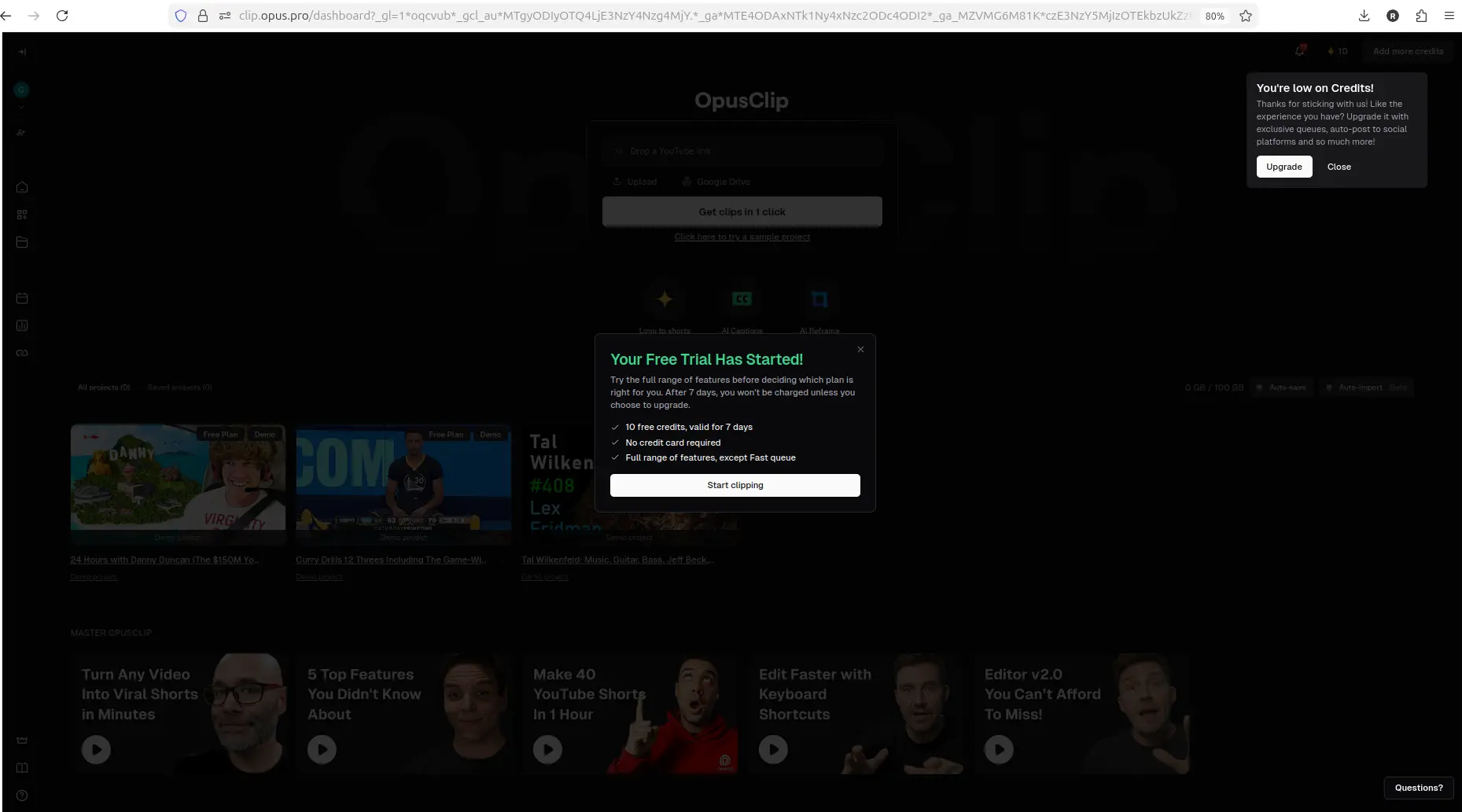
Available CreatorIntelHQ evidence for OpusClip included a free-plan dashboard state with a trial-credits popup.
The AI Reframe workflow completed successfully and opened a result view with visible transcript analysis, score breakdown, and additional actions such as Download HD, Edit clip, AI hook, Enhance speech, and Add B-Roll. However, the preview shown retained a free/trial watermark state, and free-plan export behavior was not fully confirmed.
OpusClip's pricing page shows Free, Starter, Pro, and Business plans with credits, feature differences, and some free-plan limits. Pricing should be verified before purchase. We also track both tools' current prices side by side.
For more details on OpusClip's free-plan behavior, see OpusClip's free plan and Pro trial.
Free Plan Winner
In this test, OpusClip's free plan allowed a workflow to complete and reach a result view with visible transcript and editing actions, while Quso.ai's free plan opened an upgrade modal before generation completed.
However, neither tool's free-plan export behavior was fully confirmed, so the safest next step is to test both tools with your own video file and verify whether free-plan export works without watermark or upgrade friction before paying.
Every free plan runs out somewhere. Know where first.
The Free-Plan Reality Check: what OpusClip, Vizard AI, Submagic and Quso.ai actually let you do for $0 - from real signups, real uploads and real paywall hits.
Workflow Comparison
Quso.ai Workflow
In this test, Quso.ai's workflow started from the dashboard, where YouTube link entry and local MP4 upload options were visible.
The YouTube workflow accepted a pasted link, displayed an imported video preview, and showed an estimated cost of about 8 credits before generation. The MP4 workflow accepted a local upload, displayed a file preview, and showed an estimated cost of about 1 credit before generation.
However, clicking Generate clips in both workflows opened a paid upgrade modal before visible processing started. Because clip generation did not complete, I could not verify the full workflow, including generated clip output, caption accuracy, or export behavior.
Quso.ai's homepage advertises AI Clips Generator, AI Content Repurposing, AI Influencer, and AI Subtitle Generator, but this test did not confirm whether these features worked on the free plan.
OpusClip Workflow
Based on available CreatorIntelHQ evidence, OpusClip's AI Reframe workflow started from the main dashboard, where the feature was visible alongside other tools and the input box offered link, upload, and Google Drive options.
The workflow accepted a local horizontal file, showed upload progress with percentage complete and time remaining, and allowed the user to select 9:16 aspect ratio, Fill layout, and Original ratio crop before starting reframing.
After generation, the dashboard showed a new processing project card with visible progress and an estimated time remaining of 6 minutes. The visible credit count dropped from 10 to 7, suggesting credits were consumed.
AI Reframe completed successfully and opened a result view with visible transcript analysis, score breakdown, and additional actions such as Download HD, Edit clip, AI hook, Enhance speech, and Add B-Roll. However, the preview shown retained a free/trial watermark state, and free-plan export behavior was not fully confirmed.
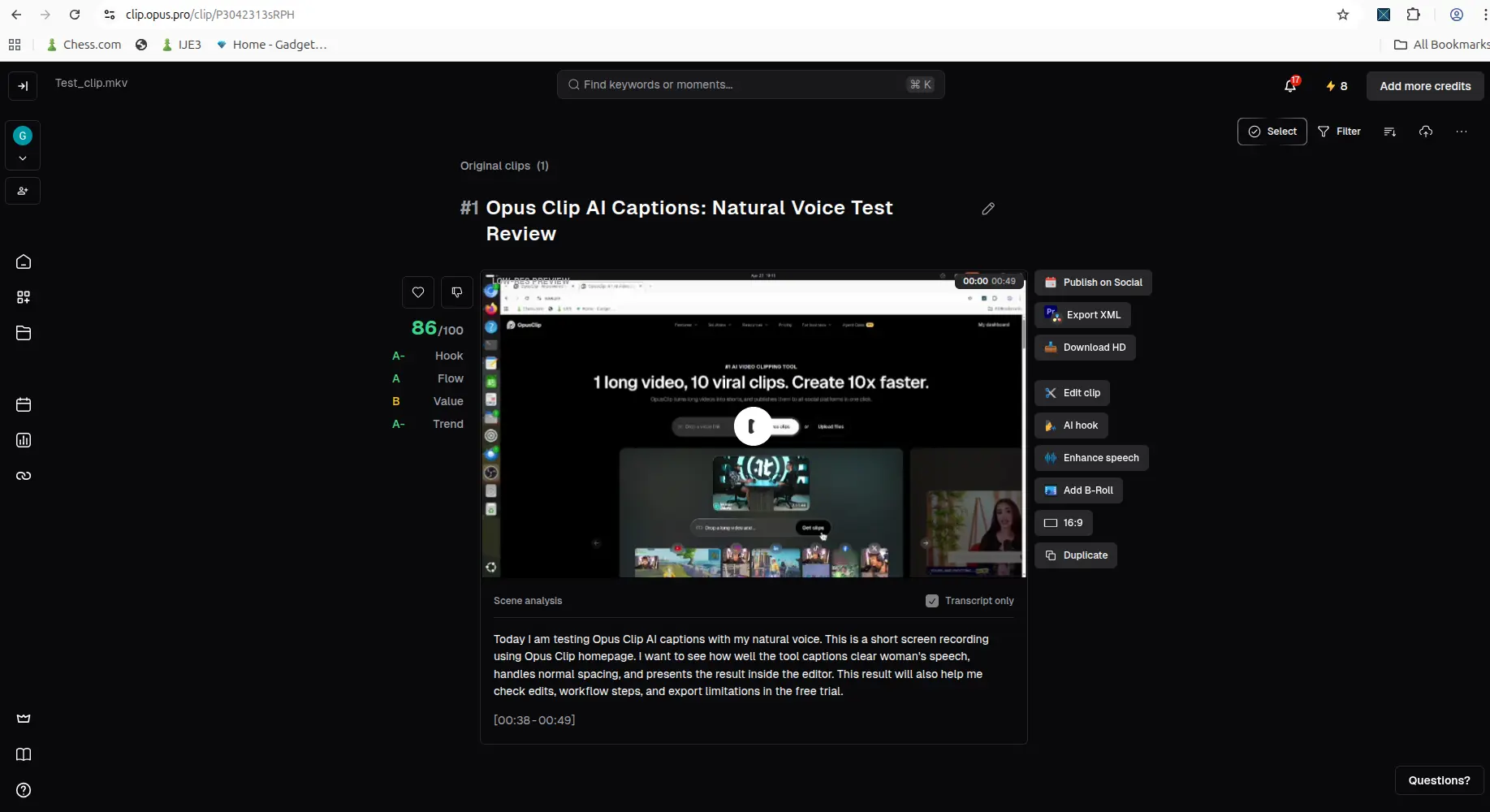
Available CreatorIntelHQ evidence showed OpusClip reaching a generated result with natural speech output.
Workflow Winner
In this test, OpusClip's workflow completed and reached a result view with visible transcript and editing actions, while Quso.ai's workflow opened an upgrade modal before generation completed.
However, this comparison is based on separate tests, not a controlled same-video benchmark. The next fair test is to run the same source video through both tools and compare downloaded outputs.
Output Quality Comparison
Quso.ai Output Quality
In this test, Quso.ai did not complete clip generation, so I could not verify generated clip output, caption accuracy, reframing quality, or export quality.
Quso.ai's homepage advertises AI Clips, AI Captions, AI Video Editor, Brand Kit, and Social Media Scheduling, but this test did not confirm whether these features produced usable output on the free plan.
OpusClip Output Quality
Based on available CreatorIntelHQ evidence, OpusClip's AI Reframe workflow completed and opened a result view with a vertical reframed clip, visible transcript analysis, score breakdown, and additional actions such as Download HD, Edit clip, AI hook, Enhance speech, and Add B-Roll.
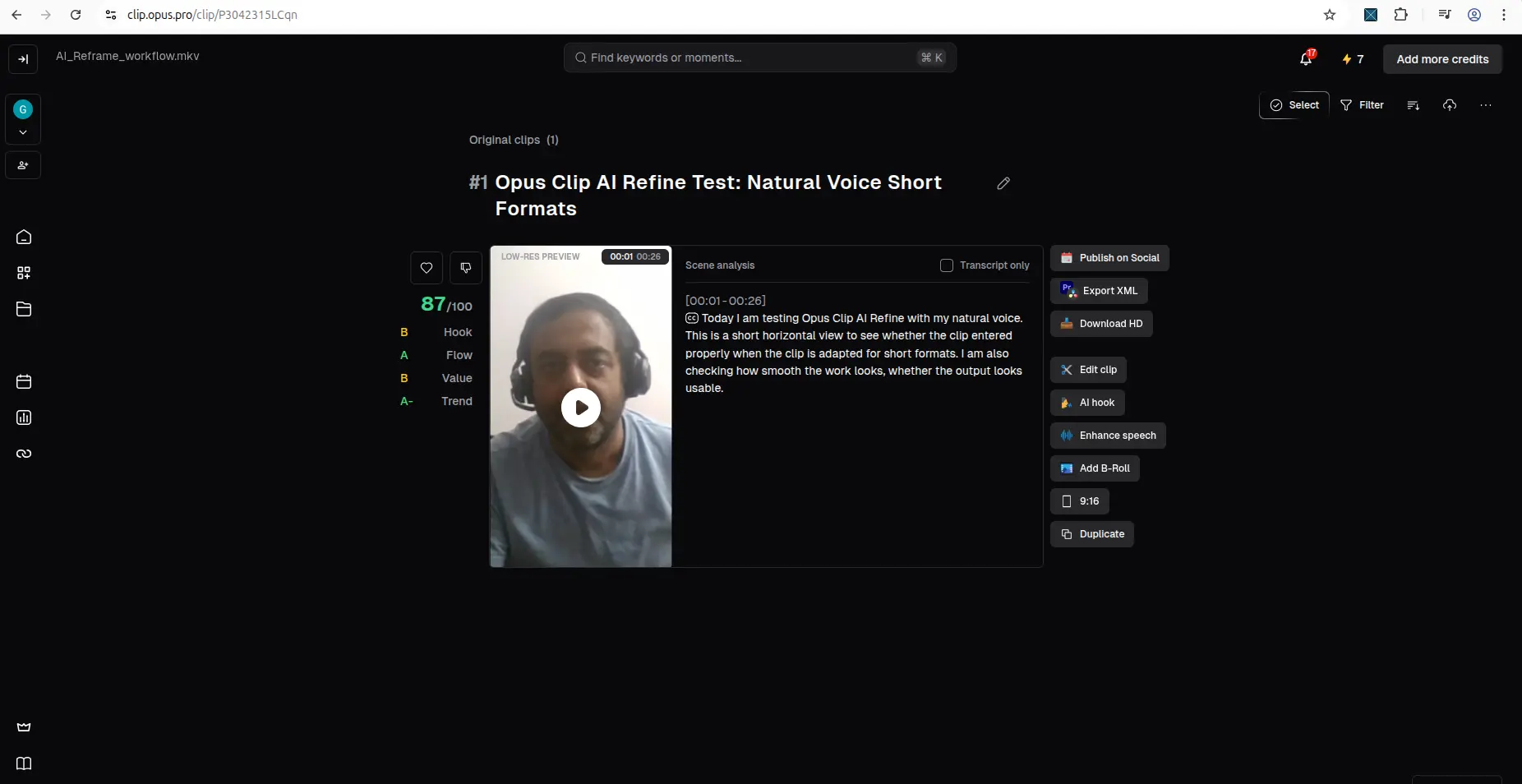
Available CreatorIntelHQ evidence showed OpusClip reaching a completed result-edit view with AI reframing controls.
The preview shown retained a free/trial watermark state, and the transcript introduced some wording errors such as "human speech" becoming "woman's speech" and "normal pacing" becoming "normal spacing." This suggests captions and transcripts still need manual review before publishing.
Auto-reframe results also appear to need manual review for subject framing, especially for clips with complex motion, multiple subjects, or chaotic scenes.
Output Quality Winner
In this test, OpusClip completed generation and opened a result view with visible transcript and editing actions, while Quso.ai did not complete generation.
However, this comparison is based on separate tests, not a controlled same-video benchmark. The next fair test is to run the same source video through both tools and compare downloaded outputs for caption accuracy, reframing quality, and export quality.
Pricing and Limits Comparison
Quso.ai Pricing
Quso.ai's pricing page shows monthly plan cards for Free, Lite, Essential, and Growth.
The Free plan is shown as $0/month and includes 75 credits per month, 720p render quality, AI Clips & Captions, YouTube Chapters, Direct TikTok Publishing, and Watermark.
Lite is shown as $29/month, or $19/month billed yearly (rechecked 12 August 2026), with AI Clips & Captions, AI Video Generator, resizing, and 1080p exports.
Essential and Growth cards show additional tools, scheduling, analytics, templates, and support.
Quso.ai's pricing FAQ states that the top-up feature for extra credits is currently exclusive to all paid plans, and users can upgrade through account settings or the Upgrade button.
Pricing should be verified before purchase because plan details can change.
OpusClip Pricing
Based on available CreatorIntelHQ evidence, OpusClip's pricing page shows Free, Starter, Pro, and Business plans with credits, feature differences, and some free-plan limits.
The pricing page includes a calculator that links credits, clip views, category, and posting platform to OpusClip's value framing.
Pricing should be verified before purchase because plan details can change.
Pricing Winner
Both tools offer free plans with visible credits and trial messaging, but neither tool's free-plan export behavior was fully confirmed in this test.
The safest next step is to test both tools with your own video file and verify whether free-plan export works without watermark or upgrade friction before paying.
Watermark and Export Comparison
Quso.ai Watermark and Export
In this test, Quso.ai's free plan allowed dashboard access, YouTube link entry, and MP4 upload setup, but clicking Generate clips in both workflows opened a paid upgrade modal before visible processing started.
Because clip generation did not complete, I could not verify free export, download, final watermark behavior, or whether paid plans export cleanly.
Quso.ai's pricing page states that the Free plan includes Watermark, but this test did not confirm whether the watermark appears in the final exported file or whether free-plan export is blocked entirely.
OpusClip Watermark and Export
Based on available CreatorIntelHQ evidence, OpusClip's AI Reframe workflow completed and opened a result view with visible transcript analysis and additional actions such as Download HD, Edit clip, AI hook, Enhance speech, and Add B-Roll.
However, the preview shown retained a free/trial watermark state, and free-plan export behavior was not fully confirmed after upgrade prompts.
Watermark and Export Winner
In this test, neither tool's free-plan export behavior was fully confirmed.
The safest next step is to test both tools with your own video file and verify whether free-plan export works without watermark or upgrade friction before paying.
Pros and Cons
Quso.ai
Pros
- Free-plan signup worked with no credit card required
- Dashboard access was available after onboarding
- YouTube link entry worked and showed an imported video preview
- MP4 upload setup worked and showed a file preview
- Pre-generation credit estimates were visible (~8 credits for YouTube, ~1 credit for MP4)
- MKV rejection message was clear and suggested supported formats (video/mp4, video/webm, video/quicktime)
- Homepage advertises AI Clips, AI Captions, AI Video Editor, Brand Kit, and Social Media Scheduling
Cons
- Upgrade modal appeared before generation completed in both YouTube and MP4 workflows
- Generated clip output, export/download behavior, and final watermark status could not be verified
- Billing page confirmed Free Plan but did not clearly display a 75-credit balance
- Social Media Posts, Planner, AI Analytics, AI Captions, and AI Writer showed paywall or limited-sample behavior during testing
- Free-plan export flow appears to add watermark or upgrade friction before download
- Caption accuracy and reframing quality could not be tested because generation did not complete
OpusClip
Pros
- Free-plan signup worked with no credit card required
- Dashboard popup showed 10 free credits for 7 days, full features except Fast queue
- AI Reframe workflow accepted local upload, pasted links, and cloud/recording inputs
- AI Reframe completed successfully and opened a result view with visible transcript analysis and editing actions
- Result view showed additional actions such as Download HD, Edit clip, AI hook, Enhance speech, and Add B-Roll
- Visible credit count dropped after generation, suggesting credits were consumed
- Homepage claims OpusClip can turn one long video into multiple viral clips faster
Cons
- Free-plan export behavior was not fully confirmed after upgrade prompts
- Preview shown retained a free/trial watermark state
- Transcript introduced some wording errors such as "human speech" becoming "woman's speech" and "normal pacing" becoming "normal spacing"
- Auto-reframe results appear to need manual review for subject framing
- Processing screen does not clearly communicate an ETA
- Caption and transcript output still need manual review for accuracy
- Free plan appears to have meaningful credit, export, or storage limits
Best for Small Creators
Choose Quso.ai if:
- You want to test whether a free-plan AI clip tool can accept YouTube links and local MP4 uploads
- You're willing to verify export and download behavior with your own workflow before paying
- You need a tool that advertises AI Clips, AI Captions, AI Video Editor, Brand Kit, and Social Media Scheduling
- You're prepared to manually review captions and reframing before publishing
Choose OpusClip if:
- You want to test AI Reframe for converting horizontal footage into vertical short-form clips
- Available evidence suggests the workflow completes with visible transcript analysis and editing actions
- You need a tool that offers post-generation editing actions such as AI hooks, speech cleanup, and B-roll
- You're prepared to manually review captions, transcripts, and reframing accuracy before publishing
Compare both first if:
- You need to verify which tool actually exports usable clips on the free plan
- You want to benchmark reframing quality and caption accuracy with the same source video
- You need to verify current pricing, credit limits, and export behavior before paying
- You're deciding between caption-first editing and AI Reframe/long-video-to-Shorts workflows
For more AI video repurposing tool comparisons, see the best AI video repurposing tools for small creators.
Which Should You Choose?
If you're a small YouTuber or podcaster trying to decide between Quso.ai and OpusClip, the answer depends on which workflow you need to test first—and whether you're willing to verify export and download behavior yourself before paying.
Choose Quso.ai if you want to test whether the free plan allows YouTube link import and MP4 upload setup, and you're prepared to verify export and download behavior yourself before paying. In this test, Quso.ai allowed dashboard access, YouTube link entry, and MP4 upload setup, but both Generate clips attempts opened a paid upgrade modal before visible processing. Because clip generation did not complete, free export, download, and final watermark behavior could not be verified.
Choose OpusClip if you want to test AI Reframe for horizontal-to-vertical conversion, and available evidence suggests the workflow completes with visible transcript and editing actions. Based on available CreatorIntelHQ evidence, OpusClip's AI Reframe workflow completed successfully and opened a result view with visible transcript analysis, score breakdown, and additional actions such as Download HD, Edit clip, AI hook, Enhance speech, and Add B-Roll. However, the preview shown retained a free/trial watermark state, and free-plan export behavior was not fully confirmed.
Compare both first if you need to verify which tool actually exports usable clips on the free plan, or if you want to benchmark reframing quality and caption accuracy with the same source video. This comparison is based on separate tests, not a controlled same-video benchmark. The next fair test is to run the same source video through both tools and compare downloaded outputs before upgrading.
For a deeper look at Quso.ai's workflow, see the Quso.ai review. For OpusClip's workflow, see the OpusClip review. For a comparison with another AI video repurposing tool, see Quso.ai vs Vizard.ai.
Final Verdict
In this test, Quso.ai allowed dashboard access, YouTube link entry, and MP4 upload setup on the free plan, but both Generate clips attempts opened a paid upgrade modal before visible processing. Because clip generation did not complete, free export, download, and final watermark behavior could not be verified.
For OpusClip, available CreatorIntelHQ evidence confirms that AI Reframe completed successfully with visible transcript analysis and post-generation editing actions, but the same-video benchmark and free-plan export behavior still need direct comparison.
The safest next step is to test both tools with your own video file, verify whether free-plan export works without watermark or upgrade friction, and compare downloaded outputs before upgrading.
Use neither tool blindly: Both captions still need manual review before publishing, and auto-reframe results appear to need manual review for subject framing.
Best first test: Run the same source video through Quso.ai and OpusClip and compare downloaded outputs for caption accuracy, reframing quality, and export quality.
FAQ
Can Quso.ai export clips on the free plan?
In this test, Quso.ai's free plan allowed dashboard access, YouTube link entry, and MP4 upload setup, but clicking Generate clips in both workflows opened a paid upgrade modal before visible processing started. Because clip generation did not complete, I could not verify free export, download, or final watermark behavior. The safest next step is to test Quso.ai with your own video file and verify whether free-plan export works before paying.
Can OpusClip export clips on the free plan?
Based on available CreatorIntelHQ evidence, OpusClip's AI Reframe workflow completed successfully and opened a result view with visible transcript analysis and additional actions such as Download HD, Edit clip, AI hook, Enhance speech, and Add B-Roll. However, the preview shown retained a free/trial watermark state, and free-plan export behavior was not fully confirmed after upgrade prompts. The safest next step is to test OpusClip with your own video file and verify whether free-plan export works without watermark or upgrade friction before paying.
Which tool has better caption accuracy?
In this test, Quso.ai did not complete clip generation, so I could not verify caption accuracy. For OpusClip, available CreatorIntelHQ evidence shows that the transcript introduced some wording errors such as "human speech" becoming "woman's speech" and "normal pacing" becoming "normal spacing." This suggests captions and transcripts still need manual review before publishing. The next fair test is to run the same source video through both tools and compare caption accuracy in the downloaded outputs.
Which tool has better reframing quality?
In this test, Quso.ai did not complete clip generation, so I could not verify reframing quality. For OpusClip, available CreatorIntelHQ evidence shows that AI Reframe completed with visible transcript analysis and editing actions, but auto-reframe results appear to need manual review for subject framing, especially for clips with complex motion, multiple subjects, or chaotic scenes. The next fair test is to run the same source video through both tools and compare reframing quality in the downloaded outputs.
How many credits does each tool give on the free plan?
Quso.ai's pricing page shows the Free plan includes 75 credits per month, but in this test, the billing page confirmed Free Plan without clearly displaying a 75-credit balance. Pre-generation credit estimates were visible (~8 credits for YouTube, ~1 credit for MP4), but clicking Generate clips opened a paid upgrade modal before visible processing. For OpusClip, our testing showed the dashboard popup stating 10 free credits for 7 days, no credit card required, full features except Fast queue — a trial of the Pro plan. OpusClip also runs a permanent free plan at 60 credits per month, tested 14 September 2026 — it produces a watermarked 1080p export. Pricing should be verified before purchase because plan details can change.
Which tool is better for small YouTubers?
If you're a small YouTuber trying to decide between Quso.ai and OpusClip, the answer depends on which workflow you need to test first. Choose Quso.ai if you want to test whether the free plan allows YouTube link import and MP4 upload setup, and you're prepared to verify export and download behavior yourself before paying. Choose OpusClip if you want to test AI Reframe for horizontal-to-vertical conversion, and available evidence suggests the workflow completes with visible transcript and editing actions. Compare both first if you need to verify which tool actually exports usable clips on the free plan, or if you want to benchmark reframing quality and caption accuracy with the same source video.
Does Quso.ai support MKV uploads?
In this test, Quso.ai rejected a local MKV upload attempt. The warning stated that the user can only upload video/mp4, video/webm, or video/quicktime. This is useful upload-format evidence: MKV was not supported in this test, so the next fair test is to retry with an MP4 file.
Does OpusClip support local uploads?
Based on available CreatorIntelHQ evidence, OpusClip's AI Reframe workflow accepted a local horizontal file, showed upload progress with percentage complete and time remaining, and allowed the user to select 9:16 aspect ratio, Fill layout, and Original ratio crop before starting reframing. The input box also offered link, upload, and Google Drive options before any file was provided.