
Quso.ai Free Plan Limits Tested: Credits, Upload, Export and Watermark
Can a small creator actually test Quso.ai's AI clipping workflow for free before paying, or does the free plan stop at the dashboard?
In this test, I signed up for a Quso.ai free account, accessed the dashboard, entered a YouTube link, uploaded a local MP4 file, and reached pre-generation screens that showed estimated credit costs. But in both workflows—YouTube link and MP4 upload—clicking Generate clips opened a paid upgrade modal before visible processing started.
Because clip generation did not complete, I could not verify free export, download, generated output quality, or final watermark behavior.
This article documents what I could confirm, what I could not confirm, and whether the Quso.ai free plan is useful for evaluating the tool before paying.
Disclosure: This page may contain affiliate links. If you choose a tool through those links, CreatorIntelHQ may earn a commission at no extra cost to you. Reviews are written to focus on practical fit, workflow value, and real creator use. This article is based on hands-on testing and documented evidence.
Based on hands-on testing · How we test creator tools
Quick verdict
Quick verdict: In this test, Quso.ai allowed free dashboard access, YouTube link entry, and MP4 upload setup. The YouTube workflow showed an estimated cost of about 8 credits, and the MP4 workflow showed an estimated cost of about 1 credit before generation. However, clicking Generate clips in both workflows opened a paid upgrade modal before visible processing started. Because clip generation did not complete, I could not confirm free export, download, generated output quality, editor result, or final watermark behavior. Small creators should verify generation and export with their own file before paying.
Decision guide
Test the free plan if: You want to inspect Quso.ai's dashboard, import options, and pre-generation setup before paying. The free account allowed YouTube link entry and MP4 upload setup in this test.
Do not rely on free plan if: You need to verify generated clip quality, caption accuracy, export behavior, download success, or final watermark status before paying. In this test, generation did not complete, so those stages could not be reached.
Compare first if: You need confirmed free export or download before committing. Consider testing Vizard.ai or OpusClip alongside Quso.ai to compare free-plan workflows and export behavior.
Best next step: Sign up for a free Quso.ai account, test the import and upload flow with your own video, and verify whether generation completes and whether export is accessible before upgrading. Pricing should be verified before purchase because plan details can change.
Evidence snapshot
| Test element | Result in this test |
|---|---|
| Account type | Free Plan |
| Signup | Completed via Google login |
| Credit card required | No |
| Dashboard access | Yes |
| YouTube link entry | Yes, reached pre-generation screen with ~8 credit estimate |
| MP4 upload | Yes, reached pre-generation screen with ~1 credit estimate |
| MKV upload | Rejected; only video/mp4, video/webm, video/quicktime supported |
| Generate clips (YouTube) | Opened paid upgrade modal before visible processing |
| Generate clips (MP4) | Opened paid upgrade modal before visible processing |
| Generated output seen | No |
| Export tested | No, could not reach export because generation did not complete |
| Download tested | No, could not reach download because generation did not complete |
| Final watermark verified | No, could not verify because generation did not complete |
| Other gated features | Social Media Posts, Planner, AI Analytics, AI Captions, AI Writer showed paywall or upgrade friction |
What Quso.ai's public pricing page says
Quso.ai's public pricing page shows a Free plan at $0/month with:
- 75 credits per month
- 720p render quality
- AI Clips & Captions
- YouTube Chapters
- Direct TikTok Publishing
- Watermark
The page also shows paid plans: Lite at $15/month, Essential, and Growth, with higher credit allowances, 1080p exports, additional AI tools, scheduling, analytics, templates, and support.
Pricing should be verified before purchase because plan details can change.
What I saw in the logged-in free account
After signing up with a Google account and completing onboarding, I accessed the Quso.ai dashboard. The Billing and plans page confirmed the account was on the Free Plan and displayed an Upgrade button with text saying "Upgrade to unlock more minutes and features."
However, the billing page did not clearly display a 75-credit balance, even though credit estimates appeared later in the generation workflow.
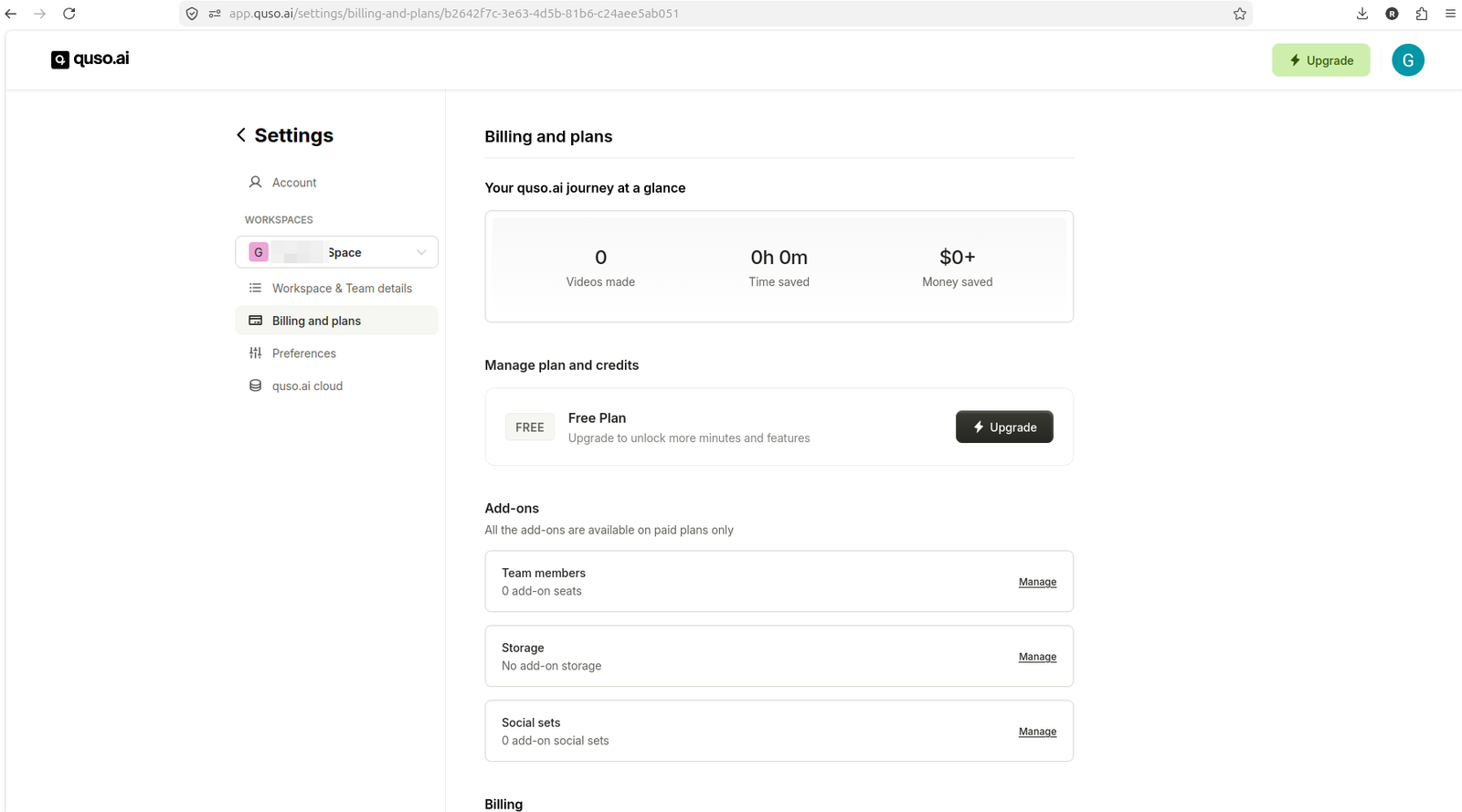
The billing page confirmed Free Plan status, but the tested account did not clearly show the advertised 75-credit balance.
YouTube link test: ~8 credits, then upgrade modal
I entered a YouTube link in the Quso.ai dashboard. The tool imported the video and moved to a pre-generation screen that showed:
- Video thumbnail and duration
- Language selection
- Generate clips button
- Estimated cost of about 8 credits
- Optional caption styles (Elevate, Text Reveal, Slide In)
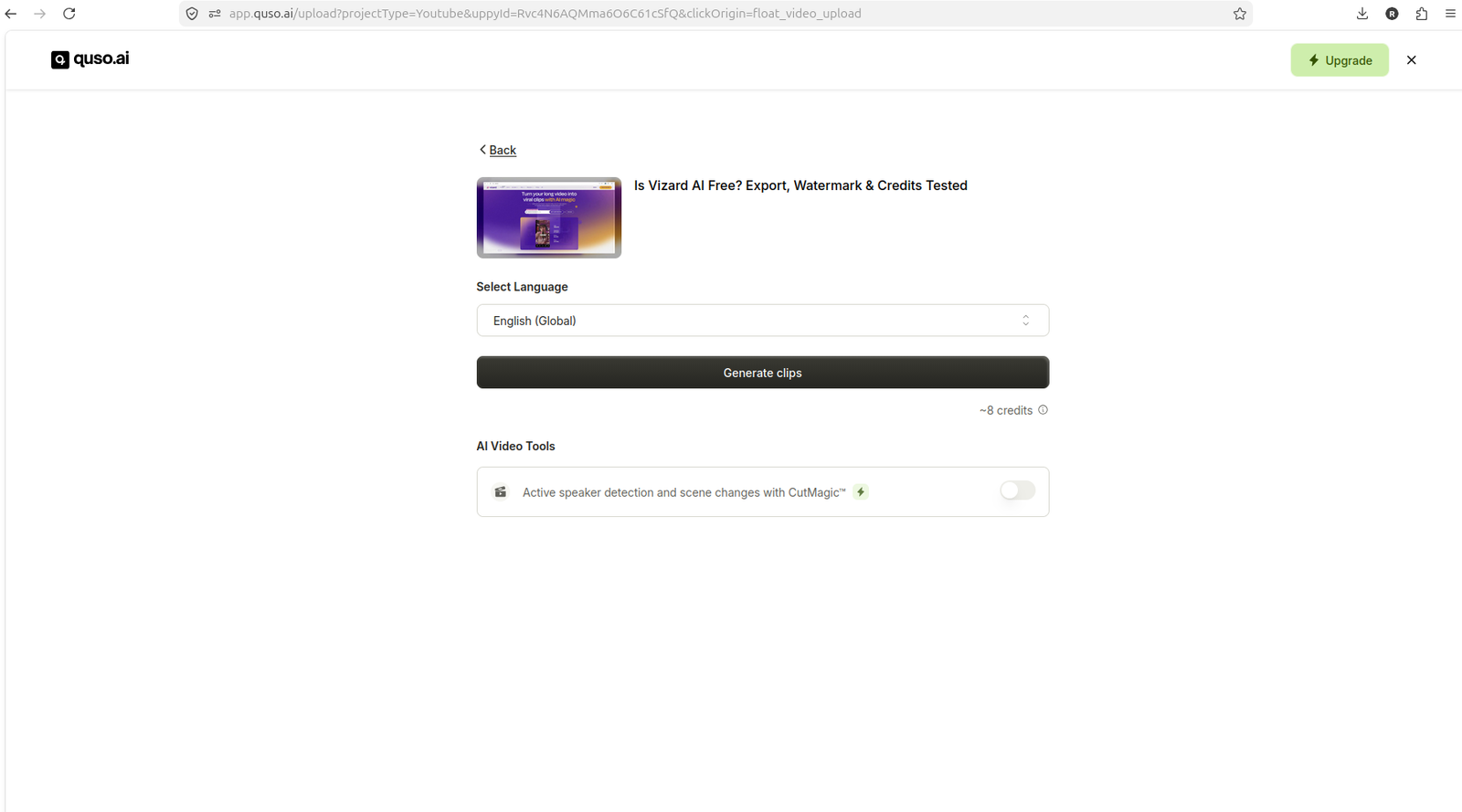
Quso.ai showed an estimated cost of about 8 credits before generation from the YouTube workflow.
When I clicked Generate clips, Quso.ai opened a paid upgrade modal before visible processing started. No clips were generated, and no credits were visibly deducted.
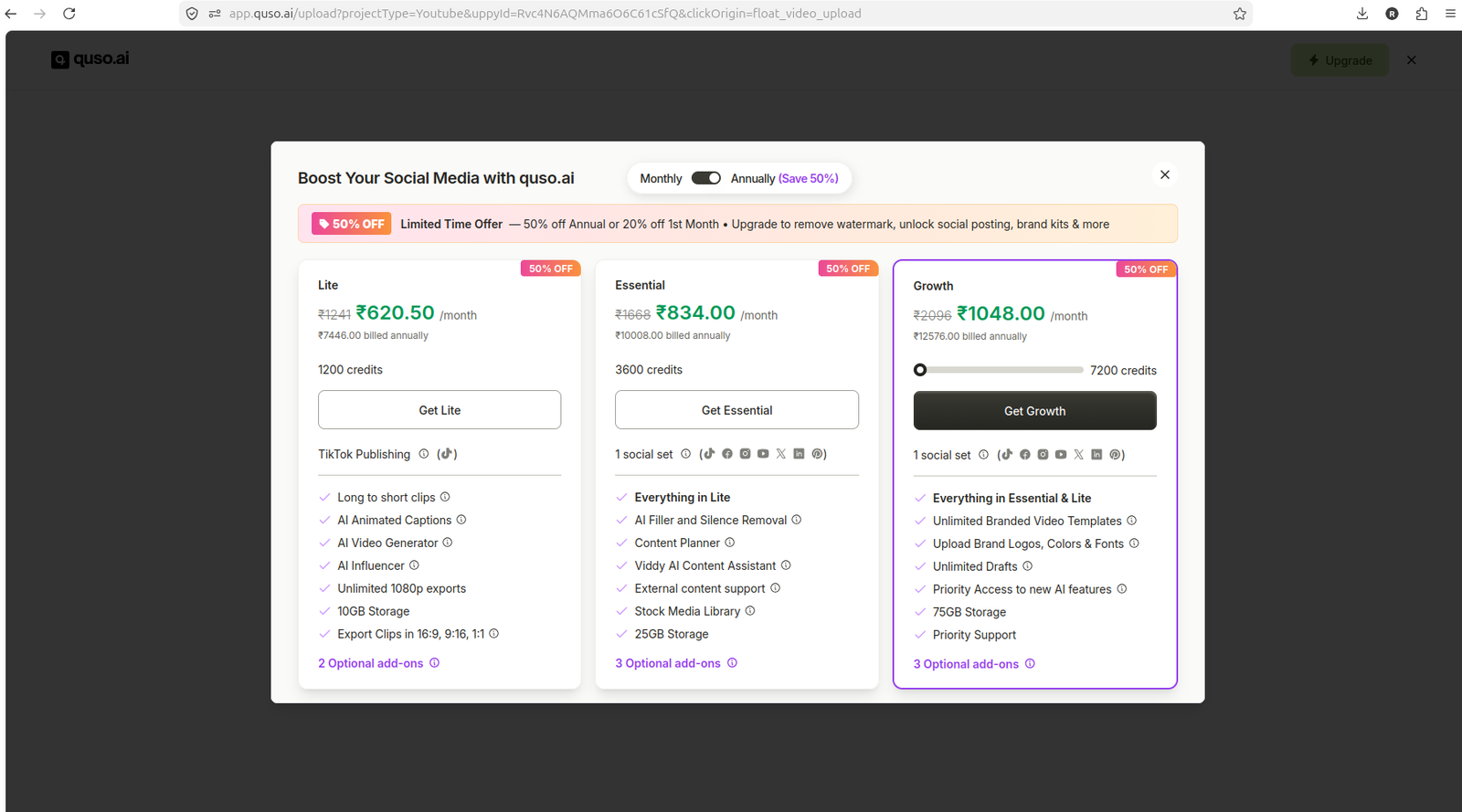
Clicking Generate clips from the YouTube workflow opened a paid upgrade modal before visible processing.
This suggests that the free account allowed YouTube link entry and pre-generation setup, but the generation step triggered an upgrade prompt in this test.
MP4 upload test: ~1 credit, then upgrade modal
I attempted to upload a local video file. Quso.ai rejected an MKV file with a warning that only video/mp4, video/webm, and video/quicktime formats are supported.
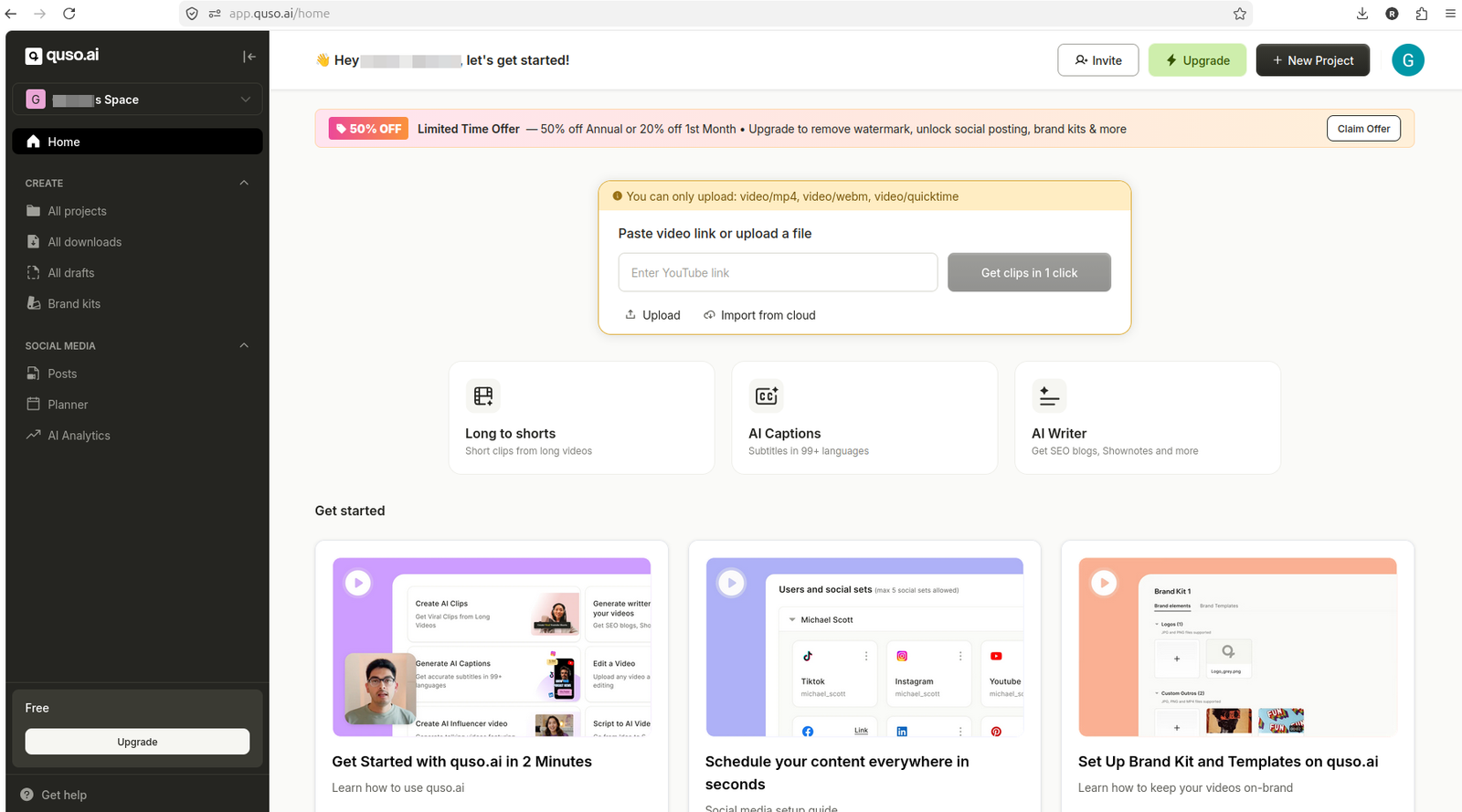
Quso.ai rejected the MKV upload and listed supported formats as MP4, WebM, and QuickTime.
I retried with an MP4 file. Quso.ai accepted the upload and moved to a pre-generation screen that showed:
- File name "output.mp4" with thumbnail and duration
- Language selection
- Generate clips button
- Estimated cost of about 1 credit
- CutMagic option
- Optional caption styles (Elevate, Text Reveal, Slide In)
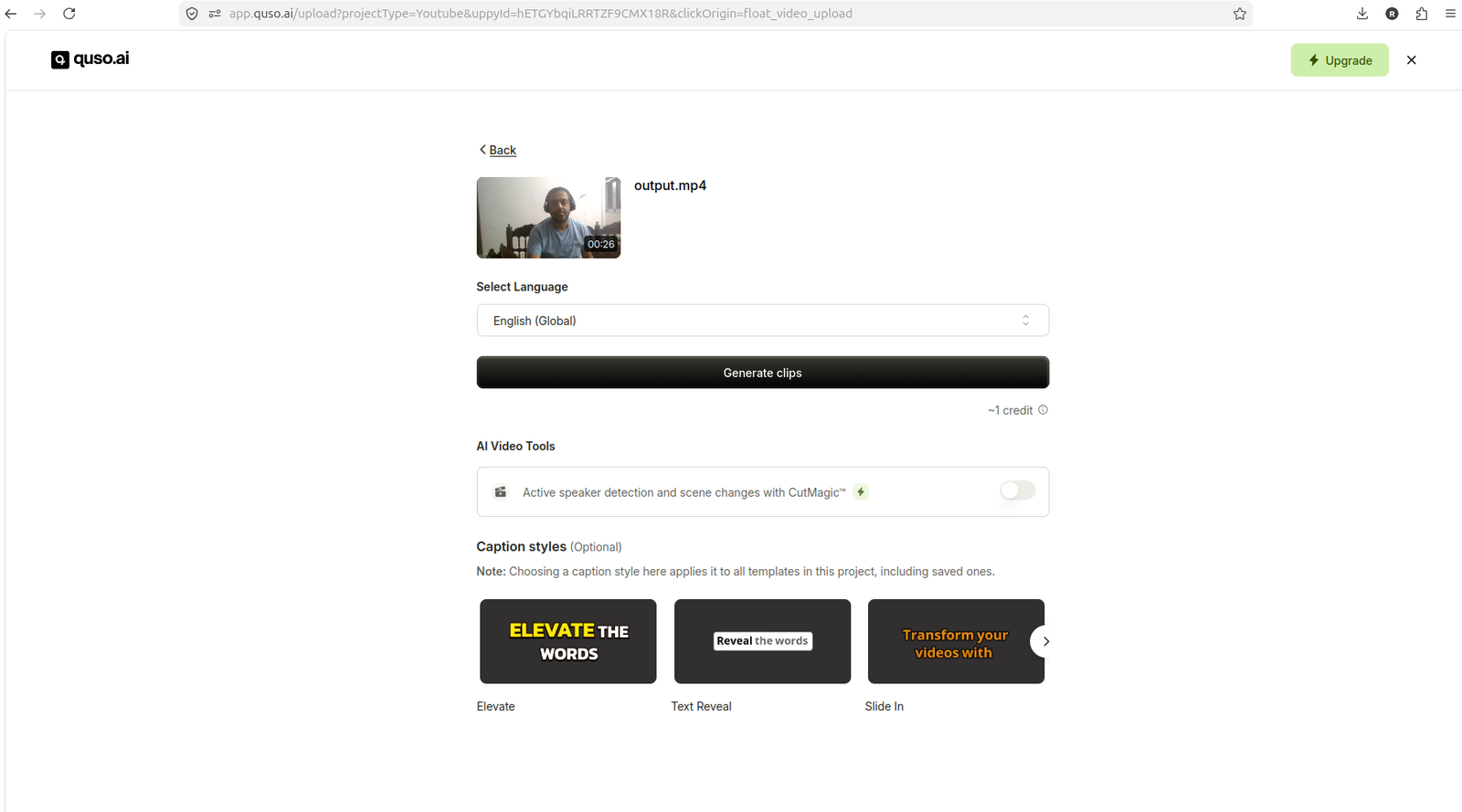
Quso.ai accepted the MP4 upload and showed an estimated cost of about 1 credit before generation.
When I clicked Generate clips, Quso.ai opened a paid upgrade modal before visible processing started. No clips were generated, and no credits were visibly deducted.
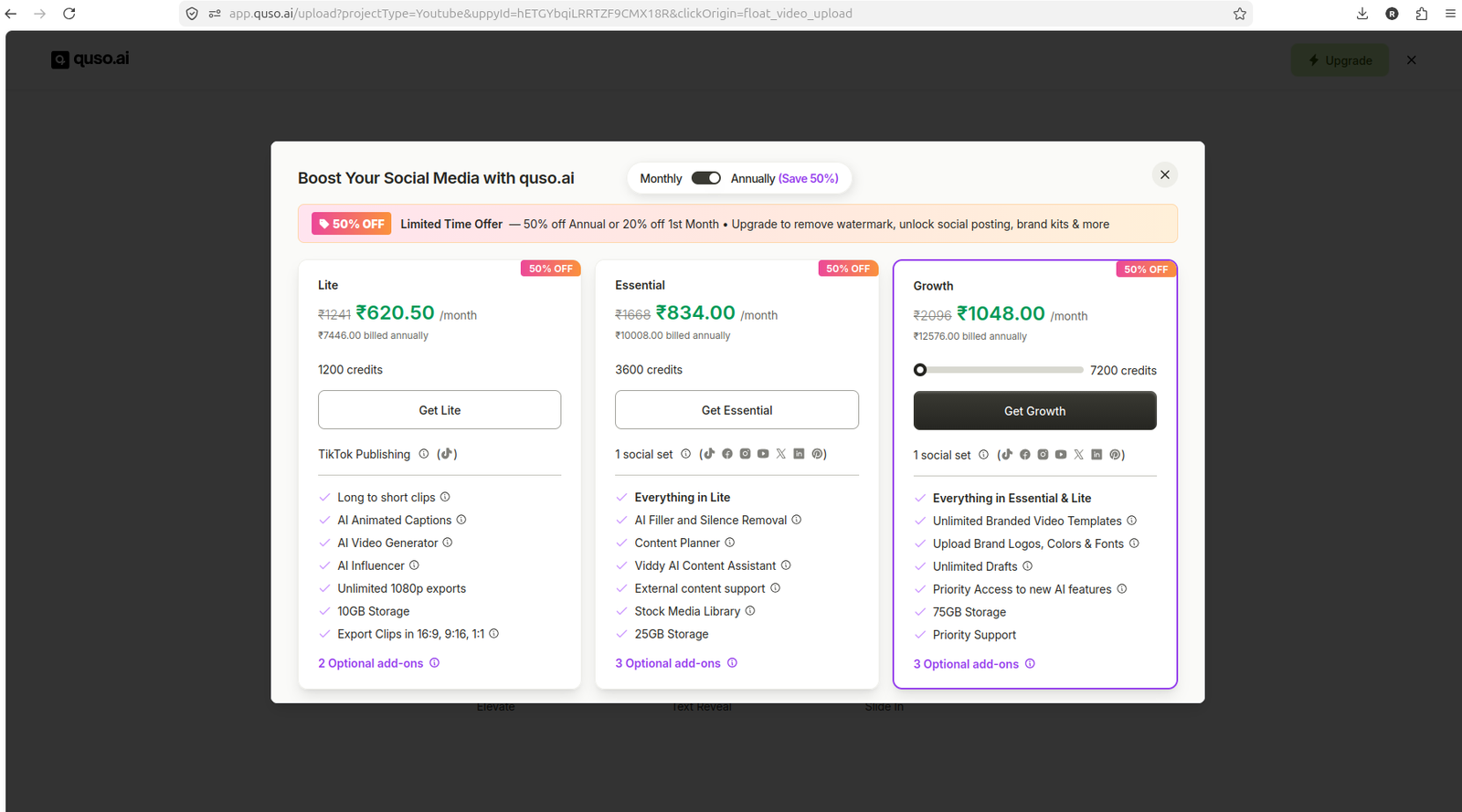
Clicking Generate clips from the MP4 workflow opened a paid upgrade modal before visible processing.
This matches the YouTube link test: the free account allowed MP4 upload and pre-generation setup, but the generation step triggered an upgrade prompt in this test.
Quso.ai credits and upload limits
Quso.ai's public pricing page says the free plan includes 75 credits per month. The homepage FAQ says free users can upload files up to 5GB, and paid users can upload files up to 15GB.
In this test, the billing page confirmed Free Plan status but did not clearly display a 75-credit balance. Credit estimates appeared during the YouTube link and MP4 upload workflows (about 8 credits for YouTube, about 1 credit for MP4), but clicking Generate clips in both workflows opened a paid upgrade modal before visible processing.
The pricing FAQ says the top-up feature for extra credits is currently exclusive to all paid plans.
Because generation did not complete, I could not verify whether the free account would have deducted credits, whether the 75-credit allowance would have been visible after generation, or whether the free account would have allowed multiple generation attempts within the 75-credit limit.
Export, download, and watermark: could not verify
Because clip generation did not complete in either the YouTube link or MP4 upload workflow, I could not reach the export, download, or final output stages.
Quso.ai's public pricing page says the free plan includes a Watermark, but I could not verify watermark placement, size, or behavior because no generated output was produced in this test.
I also could not verify:
- Whether free export is accessible after generation
- Whether free download is accessible after generation
- Whether the free plan allows editing generated clips before export
- Whether caption accuracy is reliable across different video types
- Whether generated clip quality is publish-ready without manual review
If you need to verify export, download, or watermark behavior before paying, sign up for a free account and test the workflow with your own video.
Other features that showed upgrade friction
During the test, I accessed several other Quso.ai features from the dashboard. The following tools showed paywall, upgrade, or limited-sample behavior:
- Social Media Posts: Opened an upgrade modal
- Planner: Showed upgrade friction
- AI Analytics: Showed upgrade friction
- AI Captions: Showed upgrade friction
- AI Writer: Showed upgrade friction
These findings suggest that the free account in this test allowed dashboard access and pre-generation setup for AI Clips, but other AI tools and social media management features required a paid plan.
Pros and Cons
Pros
- No credit card required for signup: In this test, I signed up with a Google account and accessed the dashboard without entering payment details.
- YouTube link entry worked: The free account allowed YouTube link import and reached a pre-generation screen with an estimated credit cost.
- MP4 upload worked: The free account accepted MP4 upload and reached a pre-generation screen with an estimated credit cost.
- Pre-generation credit estimates visible: Both workflows showed estimated credit costs (about 8 credits for YouTube, about 1 credit for MP4) before the upgrade modal appeared.
- Dashboard access confirmed: The free account allowed access to the main dashboard, import options, and billing page.
Cons
- Generation did not complete: In both the YouTube link and MP4 upload workflows, clicking Generate clips opened a paid upgrade modal before visible processing started.
- Export and download could not be verified: Because generation did not complete, I could not reach the export, download, or final output stages.
- Final watermark behavior could not be verified: Quso.ai's pricing page says the free plan includes a watermark, but I could not verify watermark placement, size, or behavior because no generated output was produced.
- Credit balance not clearly visible: The billing page confirmed Free Plan status but did not clearly display a 75-credit balance, even though credit estimates appeared during the generation workflows.
- MKV upload rejected: Quso.ai rejected an MKV file and only accepted video/mp4, video/webm, and video/quicktime formats in this test.
- Other AI tools gated: Social Media Posts, Planner, AI Analytics, AI Captions, and AI Writer showed paywall or upgrade friction during the test.
Is the Quso.ai free plan enough for small creators?
The Quso.ai free plan in this test allowed dashboard access, YouTube link entry, and MP4 upload setup, but both generation workflows opened a paid upgrade modal before visible processing started.
The free plan is useful if:
- You want to inspect Quso.ai's dashboard, import options, and pre-generation setup before paying.
- You want to see estimated credit costs for YouTube link and MP4 upload workflows.
- You want to verify that Quso.ai accepts your video format and file size before committing.
The free plan is not enough if:
- You need to verify generated clip quality, caption accuracy, export behavior, download success, or final watermark status before paying.
- You need to test end-to-end AI clipping and repurposing workflows without hitting an upgrade prompt.
- You need access to Social Media Posts, Planner, AI Analytics, AI Captions, or AI Writer on the free plan.
Before paying, verify:
- Whether generation completes with your own video on the free account.
- Whether export and download are accessible after generation on the free account.
- Whether the watermark placement and size are acceptable for your publishing workflow.
- Current pricing, because plan details can change.
If you need confirmed free export or download before committing, consider testing Vizard.ai or OpusClip alongside Quso.ai to compare free-plan workflows and export behavior.
For a broader comparison of AI video repurposing tools, see AI video repurposing tools for small creators.
FAQ
Does Quso.ai require a credit card for the free plan?
In this test, I signed up for a Quso.ai free account with a Google login and accessed the dashboard without entering payment details. However, signup flows can change, so verify the current signup requirements before creating an account.
How many credits does the Quso.ai free plan include?
Quso.ai's public pricing page says the free plan includes 75 credits per month. In this test, the billing page confirmed Free Plan status but did not clearly display a 75-credit balance. Credit estimates appeared during the YouTube link and MP4 upload workflows (about 8 credits for YouTube, about 1 credit for MP4), but clicking Generate clips in both workflows opened a paid upgrade modal before visible processing. Verify current credit allowances before relying on the free plan for production workflows.
Can I export videos on the Quso.ai free plan?
I could not verify free export behavior in this test because clip generation did not complete. Quso.ai's pricing page says the free plan includes a watermark, which suggests export may be possible, but I could not reach the export stage to confirm. Sign up for a free account and test the workflow with your own video to verify export and download behavior before paying.
Does the Quso.ai free plan add a watermark?
Quso.ai's public pricing page says the free plan includes a watermark. However, I could not verify watermark placement, size, or behavior in this test because clip generation did not complete and no output was produced. If watermark behavior matters for your publishing workflow, test the free plan with your own video before paying.
What video formats does Quso.ai accept?
In this test, Quso.ai rejected an MKV file and displayed a warning that only video/mp4, video/webm, and video/quicktime formats are supported. The homepage FAQ also mentions support for mp4, m4v, mov, and webm. If you need to upload a different format, verify current format support before signing up.
Can I upload YouTube links on the Quso.ai free plan?
Yes. In this test, the free account allowed YouTube link entry and reached a pre-generation screen with an estimated credit cost of about 8 credits. However, clicking Generate clips opened a paid upgrade modal before visible processing started. Verify whether generation completes with your own YouTube link before relying on the free plan.
Can I upload local video files on the Quso.ai free plan?
Yes. In this test, the free account accepted MP4 upload and reached a pre-generation screen with an estimated credit cost of about 1 credit. However, clicking Generate clips opened a paid upgrade modal before visible processing started. Verify whether generation completes with your own video file before relying on the free plan.
What is the file size limit for the Quso.ai free plan?
Quso.ai's homepage FAQ says free users can upload files up to 5GB, and paid users can upload files up to 15GB. Verify current file size limits before uploading large files.
Are Quso.ai captions accurate?
I could not verify caption accuracy in this test because clip generation did not complete and no output was produced. Quso.ai's pricing page and homepage advertise AI Captions as a feature, but caption accuracy depends on audio quality, speaker clarity, and language. If caption accuracy matters for your publishing workflow, test the free plan with your own video and review captions manually before publishing.
Can I use Quso.ai's social media tools on the free plan?
In this test, Social Media Posts, Planner, AI Analytics, AI Captions, and AI Writer showed paywall or upgrade friction. Quso.ai's pricing page shows that social media scheduling, analytics, and advanced tools are included in paid plans. Verify current feature access before relying on the free plan for social media management.