
Compare
TubeBuddy vs vidIQ 2026: Which Is Better for Free?
TubeBuddy vs vidIQ for small YouTubers: free plans, pricing, keyword tools, and AI ideas compared. vidIQ edged ahead on free—see which fits you.
Note: initial testing predates the CreatorIntelHQ evidence database; a logged retest is planned.
Small creators usually do not have time to master two YouTube optimization platforms at once. The practical question is which tool helps you choose better video ideas and improve your workflow faster without forcing a paid commitment too early.
This comparison is for small YouTube-first creators deciding between TubeBuddy and vidIQ in 2026. If you want the standalone first-experience write-ups before reading this comparison, see TubeBuddy Review 2026 and vidIQ Review 2026.
For most small creators, I would start with vidIQ first. In my testing, vidIQ felt easier to use, gave more useful free-plan access, and made ideas and optimization easier to test before paying. TubeBuddy still looks useful if you want a more structured YouTube optimization toolkit, but more of its deeper value appeared tied to paid access.
Quick verdict: vidIQ felt easier to start with and more useful on the free plan because it gave limited credits to test ideas, SEO, and optimization workflows. TubeBuddy felt more like a structured YouTube optimization toolkit, but more of its deeper value appeared locked behind paid features.
Disclosure: This page may contain affiliate links. If you choose a tool through those links, CreatorIntelHQ may earn a commission at no extra cost to you. Comparisons are written to focus on practical fit, workflow value, and real creator use.
Based on hands-on testing · How we test creator tools
Quick Comparison
| Area | Better choice |
|---|---|
| Easier first use | vidIQ |
| Free plan usefulness | vidIQ |
| Ideas and AI help | vidIQ |
| Optimizing existing videos | vidIQ |
| Structured optimization toolkit | TubeBuddy |
| Clearer upgrade path | vidIQ |
| Better first tool for small growing channels | vidIQ |
Best Choice By Creator Need
| If your main need is... | Start with... | Why |
|---|---|---|
| You want easier onboarding | vidIQ | It felt cleaner and easier to understand during first use. |
| You want AI idea help | vidIQ | The dashboard surfaced AI prompts, video ideas, and channel context faster. |
| You want to test free features before paying | vidIQ | The free plan gave limited credits to test parts of the workflow. |
| You want a structured YouTube optimization toolkit | TubeBuddy | TubeBuddy felt more like a deeper workflow system for YouTube optimization. |
| You already know you need paid SEO workflows | TubeBuddy or vidIQ | Both may be worth testing once the channel has a repeatable publishing workflow. |
| You want to turn long videos into Shorts | Neither is the best fit | Start with OpusClip Review 2026 or Vizard AI Review 2026. |
Why I Compared TubeBuddy and vidIQ
TubeBuddy and vidIQ are two of the most common tools small YouTube creators look at when they want help with ideas, SEO, optimization, and channel growth.
On paper, both tools seem to solve similar problems. They both talk about keywords, optimization, video performance, and creator growth. But after testing both from the perspective of a small creator in the early stages of building a channel, they did not feel the same.
TubeBuddy felt more like a structured optimization and workflow toolkit. vidIQ felt more beginner-friendly, AI-led, and easier to explore on the free plan.
That difference matters because most small creators are not trying to build a complex software stack on day one. They want to know which tool helps them take action faster.
If you want the deeper first-impression write-up focused only on TubeBuddy, read TubeBuddy Review 2026.
First Impressions: vidIQ Felt Easier To Start With
The first thing I noticed with vidIQ was how clean and simple the dashboard felt.
After connecting the YouTube channel, vidIQ imported the videos and showed a dashboard with channel context, AI prompts, feed-style suggestions, optimization areas, keywords, and outliers. The interface did not feel confusing. For a small creator, that matters because the first few minutes inside a tool decide whether you want to keep exploring or leave.
vidIQ also made the free plan more visible. It clearly showed that I was on the free plan and gave limited credits to test some features. That made the product easier to understand.
TubeBuddy was also polished, but vidIQ felt easier to use immediately.
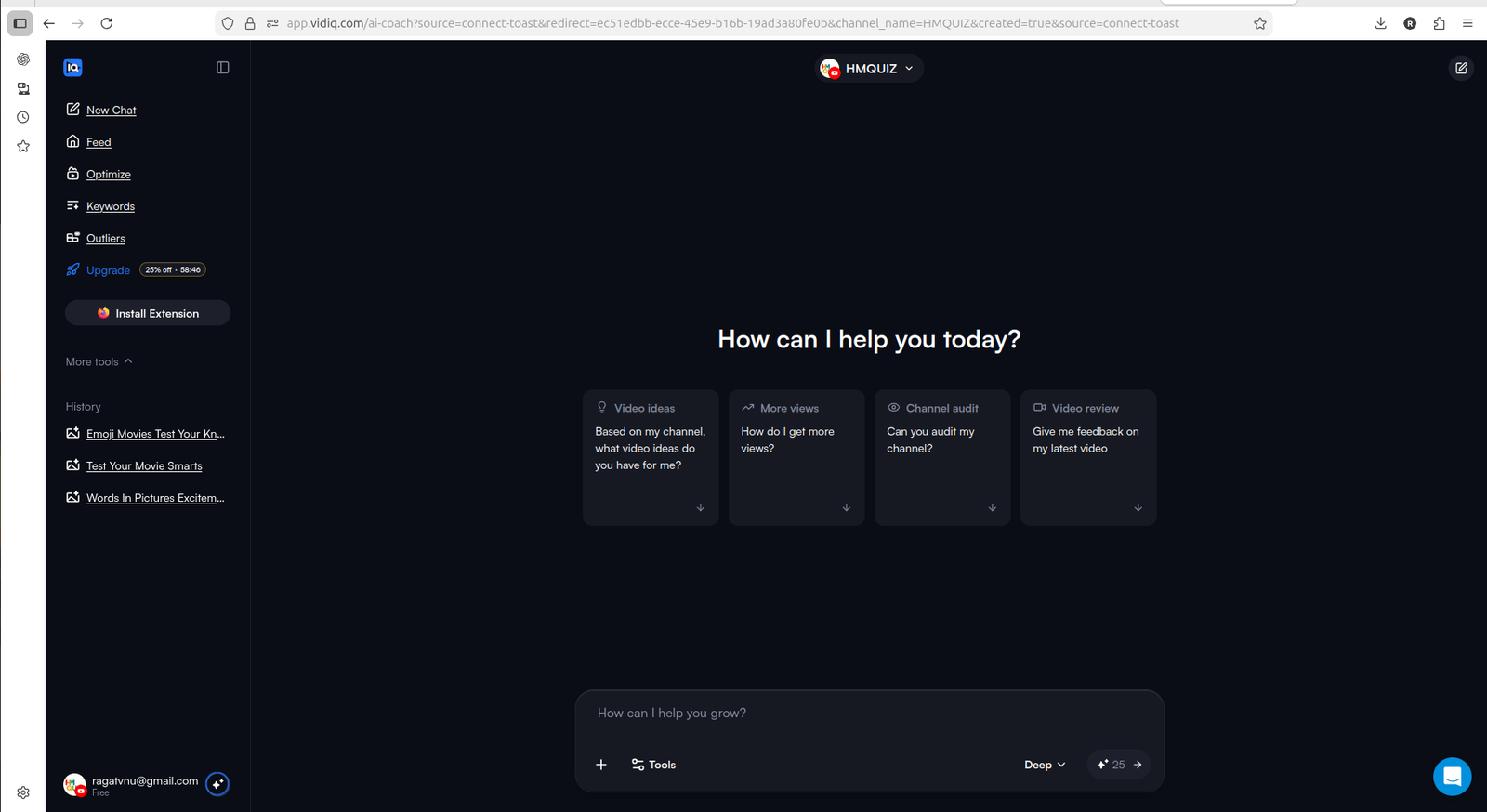
vidIQ felt beginner-friendly because the dashboard immediately offered AI-style prompts like video ideas, channel audit, and feedback.
Free Plan: vidIQ Felt More Useful
This was one of the biggest differences.
With TubeBuddy, I could see a lot of the platform, but many useful-looking features quickly led to license walls or extension requirements. It gave me a strong preview of the product, but the free experience felt more like looking around than actively using the deeper tools.
vidIQ also had limits, but it gave me credits to test parts of the workflow. During my testing, vidIQ showed limited AI credits, daily ideas, keyword research, outlier research, and optimization-related access on the free plan.
The free plan was not enough for ongoing serious work, but it was enough to understand how the tool behaves. That made vidIQ feel more useful for a small creator who wants to test before paying.
If your main question is how the free plans compare with the paid side, see TubeBuddy Free vs Paid and vidIQ Free vs Paid.
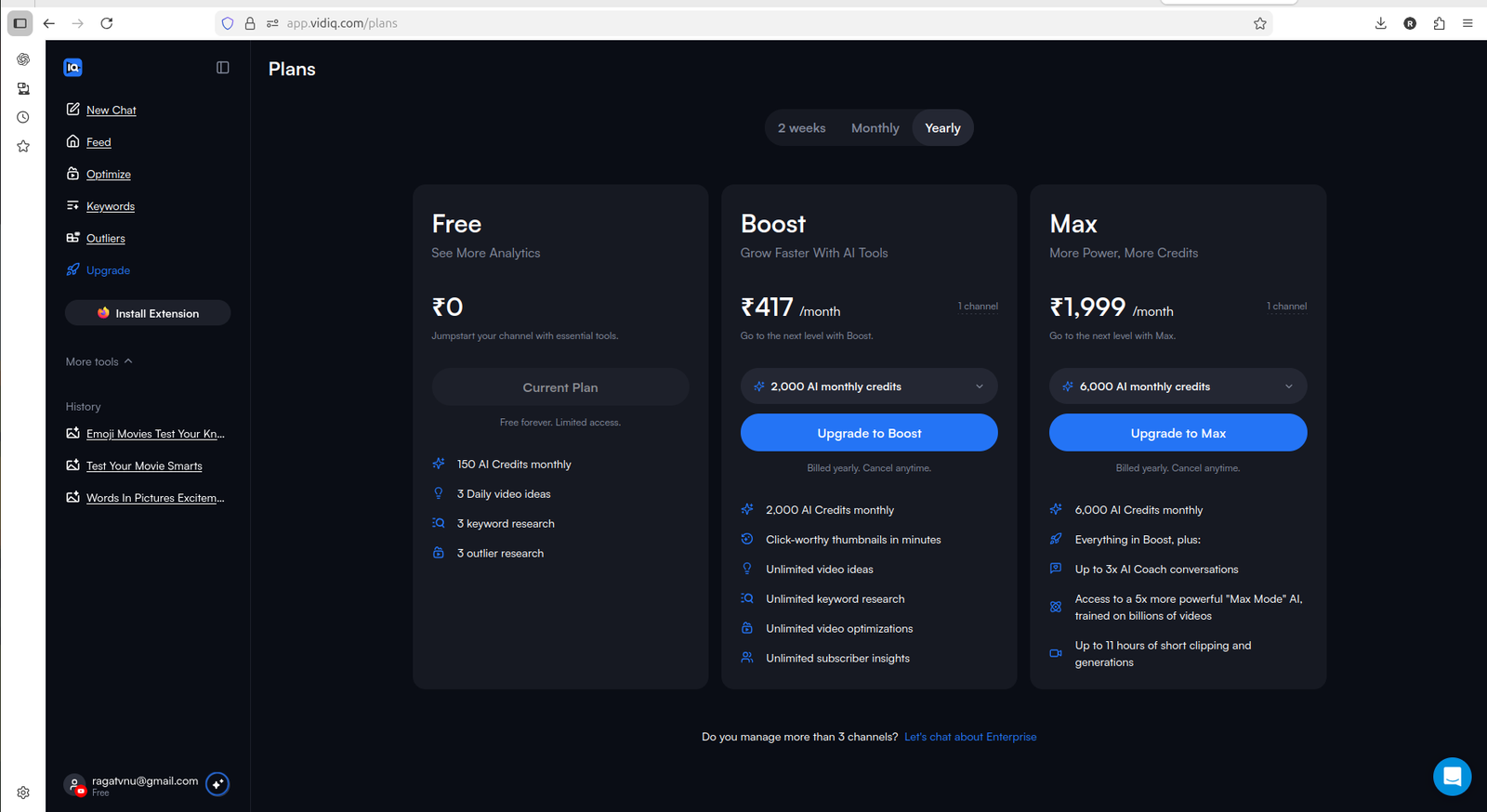
vidIQ made the free plan and paid upgrade path easier to understand, with limited credits on free and more usage on Boost and Max.
Ideas and AI Help: vidIQ Was Stronger
For idea generation, vidIQ felt clearly stronger.
The dashboard included AI-style prompts such as asking for YouTube ideas, getting more views, auditing the channel, and reviewing videos. This made the tool feel more conversational and easier to use when I was not sure what to do next.
I liked that vidIQ combined automated suggestions with AI chat. It was not only showing ideas; it also gave a way to ask follow-up questions around the channel and the suggestions.
TubeBuddy also showed recommendations and growth opportunities, but vidIQ felt more direct for idea exploration.
For a small creator, this is important. Sometimes the biggest problem is not editing or uploading. It is deciding what to make next.
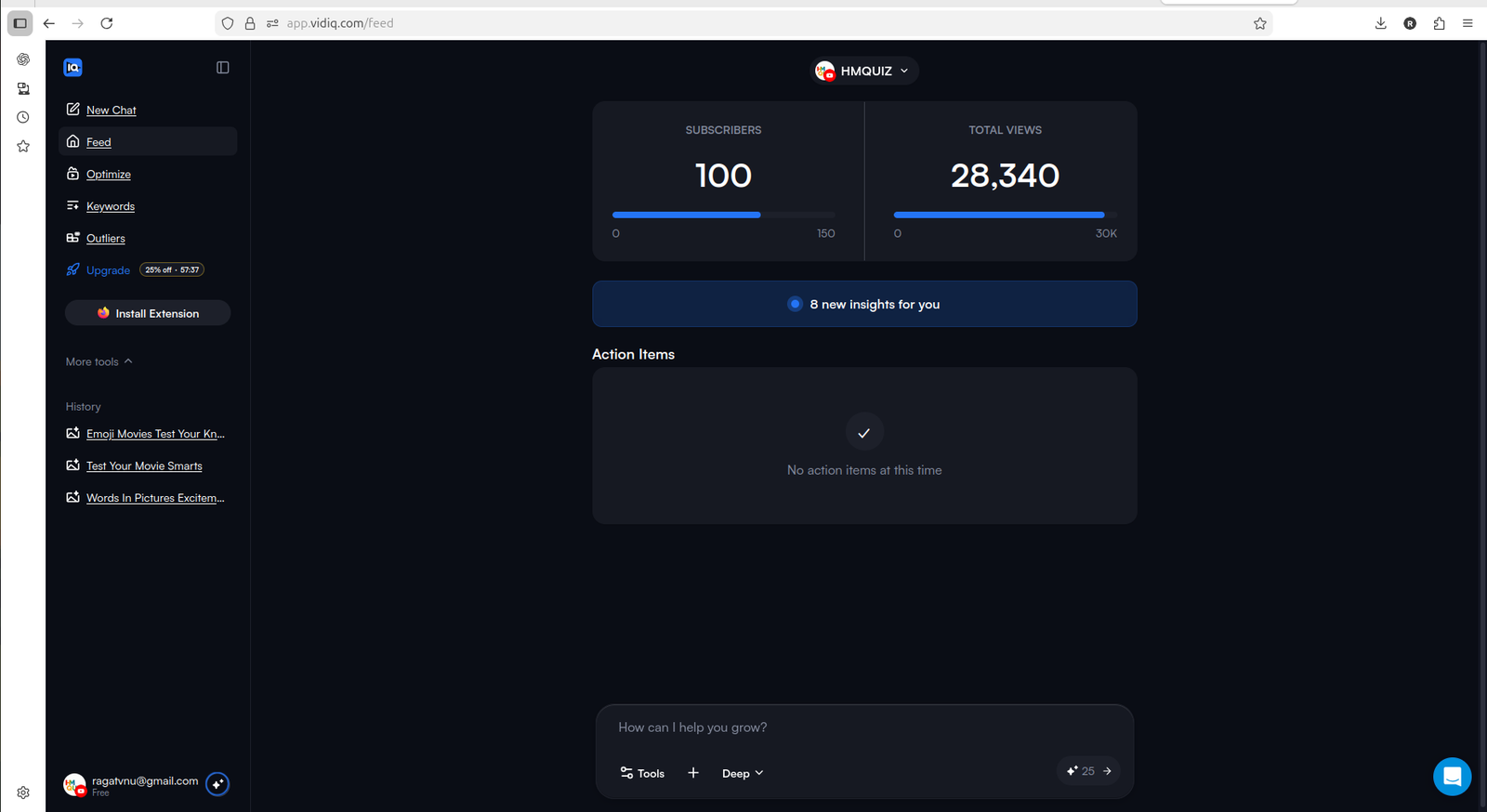
vidIQ connects channel context with suggested action items, which makes the product feel easier to use early.
Optimizing Existing Videos: vidIQ Was Easier To Try
Both tools point toward optimizing existing videos.
TubeBuddy has useful-looking analytics and optimization features, including deeper tools like retention analysis, but some of the stronger paths appeared locked during testing. That made it harder to judge the full value without upgrading.
vidIQ showed existing channel videos inside its Optimize section and gave a clearer way to start improving them with limited credits. That is not perfect, because credits can run out quickly if you have many videos. But it still gave a more practical free test of the optimization workflow.
For small creators with older videos, that matters. Many channels already have content published but do not know which videos need attention first.
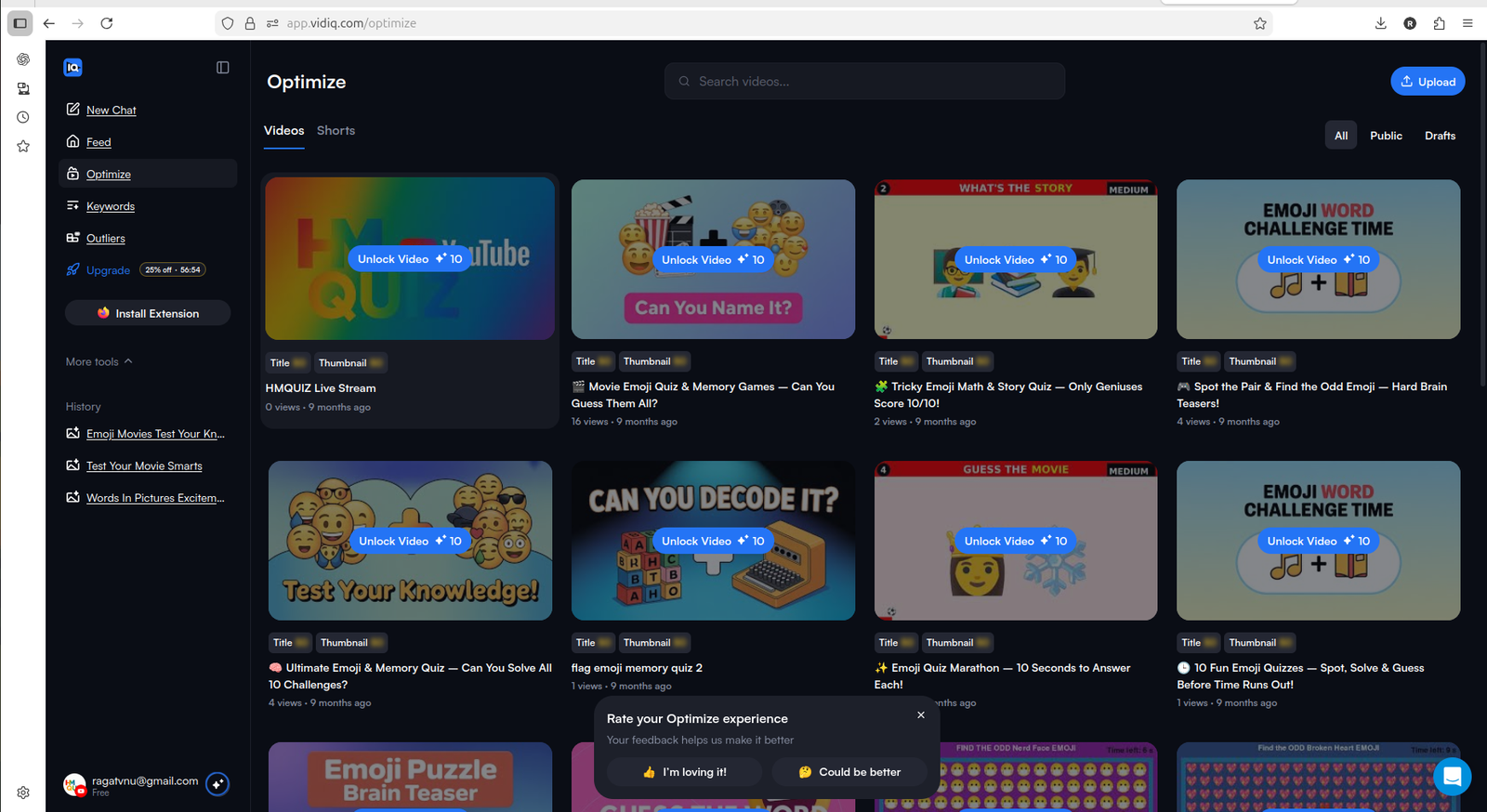
vidIQ's Optimize section made it easier to see existing videos that could be improved, even though credits limit how much you can do for free.
TubeBuddy Still Feels More Like A Structured Toolkit
TubeBuddy should not be dismissed.
Compared with vidIQ, TubeBuddy felt more like a structured YouTube workflow system. Its dashboard gave a serious first impression, and the platform surfaced tools around analytics, ranking, retention, competitor scorecards, title and thumbnail workflows, and broader optimization.
The issue is that many of the more interesting TubeBuddy paths seemed to become useful only after upgrading or installing the extension. That made it feel less generous as a free starting point.
So my view is this: TubeBuddy may still be strong for creators who already know they want a deeper optimization toolkit. But for a small creator trying to test value before paying, vidIQ felt easier to evaluate.
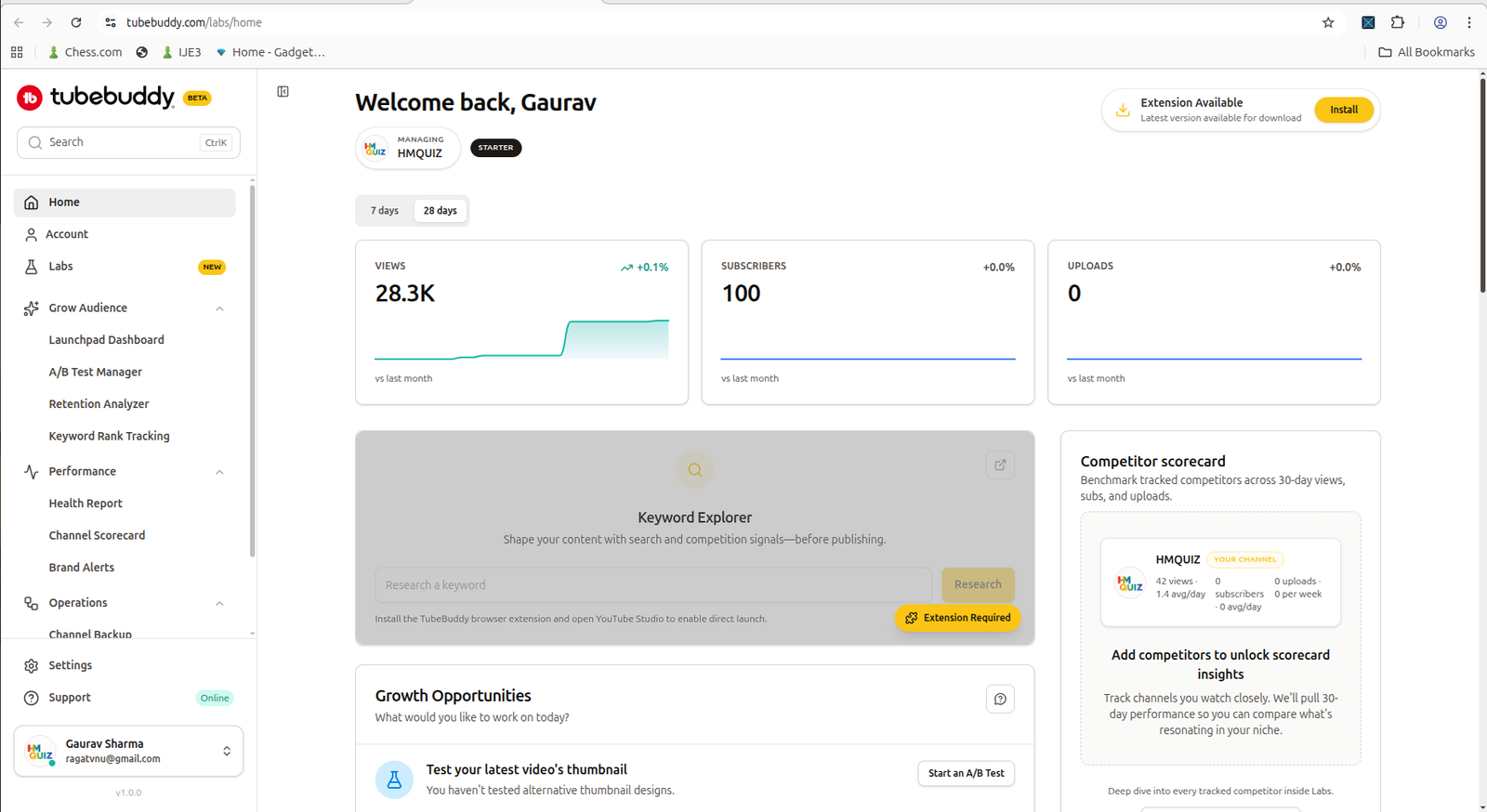
TubeBuddy feels more like a structured optimization toolkit, but its deeper workflows were harder to test freely.
Upgrade Pressure: vidIQ Felt Clearer
Both tools push users toward paid plans.
TubeBuddy showed multiple locked features and upgrade prompts across different areas. That made the free experience feel more restricted as I explored deeper workflows.
vidIQ also had upgrade pressure, especially around Boost features, outliers, keyword access, and unlimited usage. But the upgrade path felt clearer because the free plan and paid plans were easier to understand from the dashboard and pricing screen.
One detail I noticed: vidIQ showed pricing in local currency during my test, while TubeBuddy appeared more dollar-based. For creators outside the US, that can make vidIQ feel easier to evaluate financially.
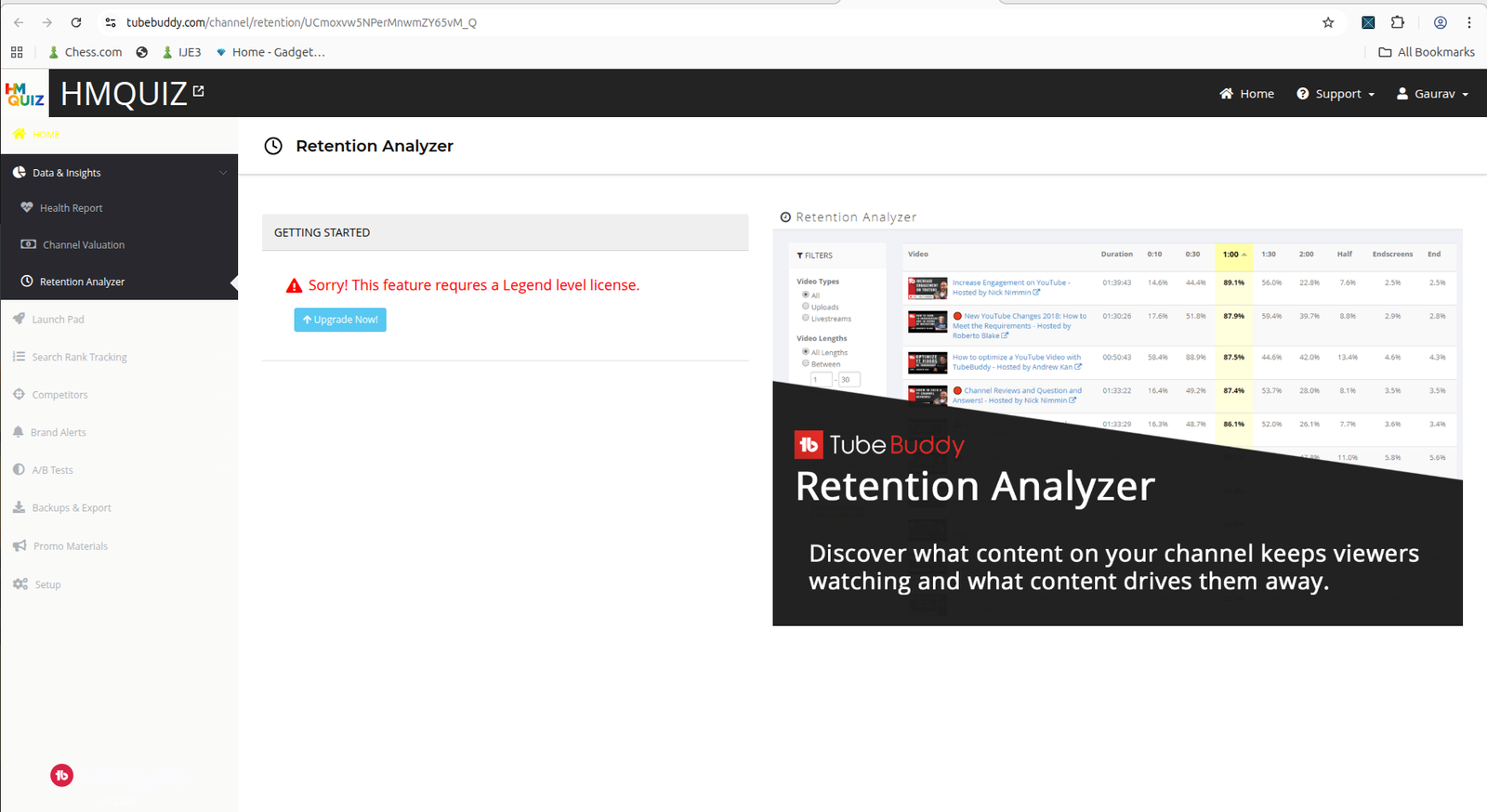
TubeBuddy showed serious-looking workflows, but some of the stronger features were locked behind higher-tier access.
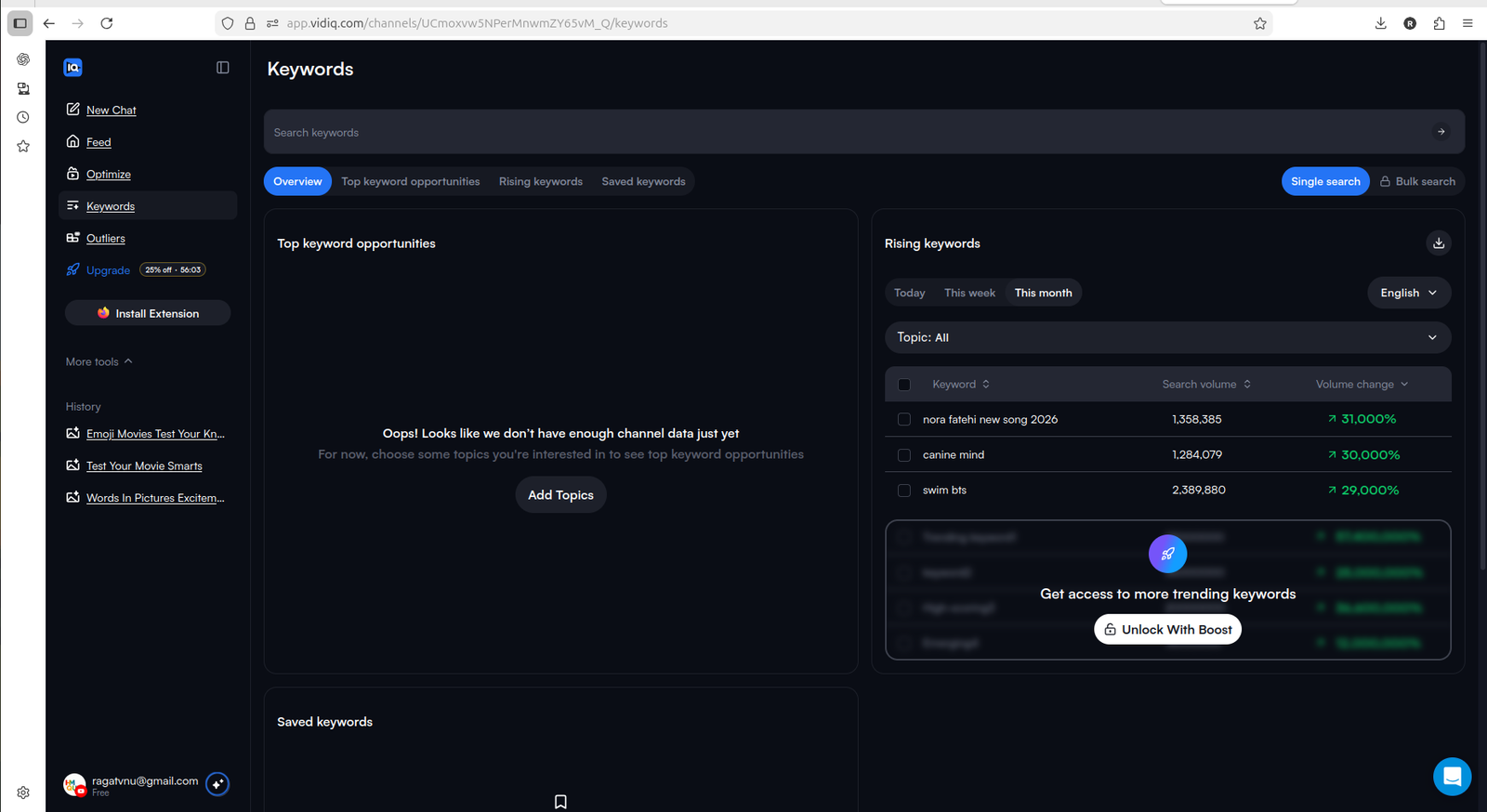
vidIQ also gates deeper keyword access, but the free-to-paid path felt easier to understand during testing.
Pricing and Paid Plans
Understanding the actual cost difference helps before committing to either tool.
vidIQ pricing (as of 2026):
- Free — limited AI credits, basic keyword research, limited daily ideas
- Boost — $16.58/month (annual billing), unlocks full keyword data, unlimited video ideas, AI optimization, trend alerts, and deeper analytics
- Coaching + Boost — $99/month, adds one-on-one YouTube coaching and a custom growth plan
TubeBuddy pricing (as of 2026):
- Free — basic SEO tools, limited keyword access
- Pro — $9/month ($4.50/month for channels under 1,000 subscribers), unlocks core SEO toolkit, keyword explorer, and most optimization tools
- Star — $19/month, adds bulk processing tools and A/B testing
- Legend — $49/month, adds priority support and advanced features for larger channels
The key difference for small creators: TubeBuddy's Pro plan at $9/month ($4.50/month for channels under 1,000 subscribers) is noticeably cheaper than vidIQ's Boost at $16.58/month. However, vidIQ's free plan gave more practical testing access in my experience, making it easier to understand the product's value before paying.
The important point is not that the free plan is enough forever. It is not.
The important point is that vidIQ gives a clearer path from testing to upgrading. You can try parts of the workflow, see whether it fits your channel, and then decide whether the paid plan makes sense.
TubeBuddy's Pro plan is worth considering for budget-conscious creators once they are ready to pay, especially if the channel has fewer than 1,000 subscribers and qualifies for the discount.
Which Tool Is Better For Small Creators?
If I had to choose one tool to start with as a small creator, I would start with vidIQ.
The reason is simple: vidIQ felt easier to use, clearer on the free plan, and more helpful for idea generation. It gave me limited credits to test the workflow before paying. That made it easier to understand the product's value.
TubeBuddy still looks useful, especially for creators who want a more structured optimization toolkit or are budget-conscious and ready to pay. The Pro plan at $9/month ($4.50/month for channels under 1,000 subscribers) is strong value. But based on my testing, vidIQ felt like the better first step for a small creator who wants to explore ideas, test optimization, and understand the tool before committing.
If you are still deciding whether you need a YouTube growth tool at all, start with the YouTube Tool Match Finder or the Best YouTube Tools for Small Creators page before comparing paid platforms more deeply.
If your main workflow problem is turning existing long videos into Shorts rather than researching ideas or YouTube SEO, our OpusClip Review 2026 is a better next read.
Final Verdict: TubeBuddy vs vidIQ
TubeBuddy and vidIQ are not the same kind of experience.
Neither tool is mainly built for repurposing long videos into Shorts, so if that is your main workflow need, read our OpusClip Review 2026.
TubeBuddy feels more like a structured YouTube workflow and optimization system. It shows serious tools, but more of the useful depth appears tied to paid features. Its Pro plan at $9/month is the more affordable paid entry point, with a 50% discount for channels under 1,000 subscribers.
vidIQ feels more beginner-friendly and AI-assisted. It gives a cleaner starting experience, more useful free testing, and stronger idea support. Boost starts at $16.58/month, which is higher than TubeBuddy Pro, but the free plan gave more working access before committing.
For small creators still in early growth, I would start with vidIQ first. Then, once the channel workflow becomes more structured and optimization becomes a bigger need, TubeBuddy may still be worth testing — especially at the Pro tier price.
My practical verdict:
- choose vidIQ first if you want easier onboarding, AI idea help, and a more useful free test
- choose TubeBuddy Pro if you are budget-conscious and ready to pay, especially with the sub-1k subscriber discount
- compare both if you are already serious about YouTube SEO, packaging, and video optimization
Related Pages
- TubeBuddy Review 2026
- vidIQ Review 2026
- OpusClip Review 2026
- Vizard AI Review 2026
- Vizard AI vs OpusClip
- vidIQ Free vs Paid
- TubeBuddy Free vs Paid
- Best YouTube Tools for Small Creators
FAQ
Is vidIQ better than TubeBuddy?
For small creators starting for free, vidIQ felt easier to use and more useful in my testing because it gave limited credits to test ideas, SEO, and optimization workflows before paying. TubeBuddy still looks useful for creators who want a more structured YouTube optimization toolkit, and its Pro plan at $9/month is more affordable than vidIQ Boost once you are ready to pay.
Is TubeBuddy better than vidIQ?
TubeBuddy may be better if you already know you want a structured YouTube optimization workflow and are ready to evaluate paid features. Its Pro plan starts at $9/month ($4.50/month for channels under 1,000 subscribers), making it the more budget-friendly paid option. In my free-side testing, however, more of TubeBuddy's deeper value appeared tied to paid access or extension-based workflows.
Which tool has the better free plan, TubeBuddy or vidIQ?
Based on my testing, vidIQ had the more useful free starting point. It showed limited credits, ideas, keyword research, and optimization-related access. TubeBuddy gave a strong preview, but more useful-looking paths led to license walls or extension requirements.
Which tool is better for small YouTubers?
For most small YouTubers, I would start with vidIQ because it felt easier to explore, clearer on the free plan, and stronger for idea generation. TubeBuddy is still worth testing later if you want a deeper YouTube optimization toolkit, especially at the Pro tier price point.
Which tool is better for keyword research?
Both tools offer keyword and optimization features, but vidIQ felt easier to test from the free side. TubeBuddy's Keyword Explorer becomes more useful at the Pro plan, which starts at $9/month ($4.50/month for channels under 1,000 subscribers), and above, especially for creators who want to track keyword trends over time.
Should I use both TubeBuddy and vidIQ?
Most small creators should not try to master both tools at the beginning. Start with one tool, test whether it improves your video ideas or optimization workflow, and only compare both later if your channel has a repeatable publishing process.
Are TubeBuddy and vidIQ good for making YouTube Shorts?
TubeBuddy and vidIQ are better suited for YouTube ideas, SEO, optimization, and channel research. If your main goal is turning long videos into Shorts, tools like OpusClip, Vizard AI, or other AI video repurposing tools are a better fit.
How much does vidIQ cost?
vidIQ offers a free plan with limited credits. The Boost plan costs $16.58/month with annual billing and unlocks full keyword research, unlimited video ideas, AI optimization, and deeper analytics. The Coaching + Boost plan costs $99/month and adds one-on-one YouTube mentorship.
How much does TubeBuddy cost?
TubeBuddy offers a free plan with basic SEO tools. The Pro plan costs $9/month ($4.50/month for channels under 1,000 subscribers) and unlocks the core SEO toolkit and keyword explorer. The Star plan is $19/month and adds A/B testing and bulk processing tools. The Legend plan is $49/month for larger channels needing advanced features.