
Review
TubeBuddy Review 2026: Tested on a Small Channel
Hands-on TubeBuddy review for 2026: Keyword Explorer access, what the free plan actually unlocks, pricing, and whether upgrading pays off.
Note: re-verified on 2026-08-27 on a fresh account. Pricing, plan names and free-plan limits below were measured in-product, not taken from marketing pages.
This review is based on my first hands-on experience testing TubeBuddy from the perspective of a small YouTube creator.
⚠️ Is TubeBuddy Free?
Yes, there is a free tier — TubeBuddy calls it Starter — but it works as a preview, not a working plan. We re-tested it on a fresh account on 27 August 2026.
- Before you can use it: link a YouTube channel and install the browser extension; the tools open inside YouTube Studio.
- Keyword Explorer: gave full data for roughly five searches in our test, then showed an upgrade prompt.
- Extension panels: Channel Insights shows "Upgrade to gain full access", with the full set marked for Legend.
- Cheapest paid plan: Pro at $15/month, or $12/month billed annually ($144/year) — US prices.
Based on hands-on testing · How we test creator tools
Why I Tested TubeBuddy
I tested TubeBuddy from the perspective of a small creator, not from the perspective of a large channel with a team or a big budget. What I wanted to understand was simple: does TubeBuddy actually feel useful when you get inside it, and does it deliver enough value to justify paying for it later?
This review is not a broad "I tested every feature deeply" article. It is a grounded first-experience review based on what I could actually see, use, and verify — including Keyword Explorer testing, dashboard observations, and where access friction appears.
For small creators still comparing options, this review fits best as part of a larger decision process alongside Best YouTube Tools for Small Creators.
What TubeBuddy Does Well Right Away
The first thing TubeBuddy does well is presentation. It knows how to look like a serious creator platform. The homepage messaging emphasises growth, creator focus, data-backed decisions, and workflow support. There are trust signals and creator-oriented claims that help the platform feel established rather than experimental.
That matters because first impressions are part of the product experience. For a small creator still deciding whether a tool deserves time and money, the product has to make its value legible quickly. TubeBuddy does that well.
The dashboard itself is structured and clean. After connecting a YouTube channel, TubeBuddy surfaces channel analytics, growth opportunities, and workflow tools across a left-side navigation. It does not feel minimal or unfinished. It feels like a tool that has been built around a real creator workflow.
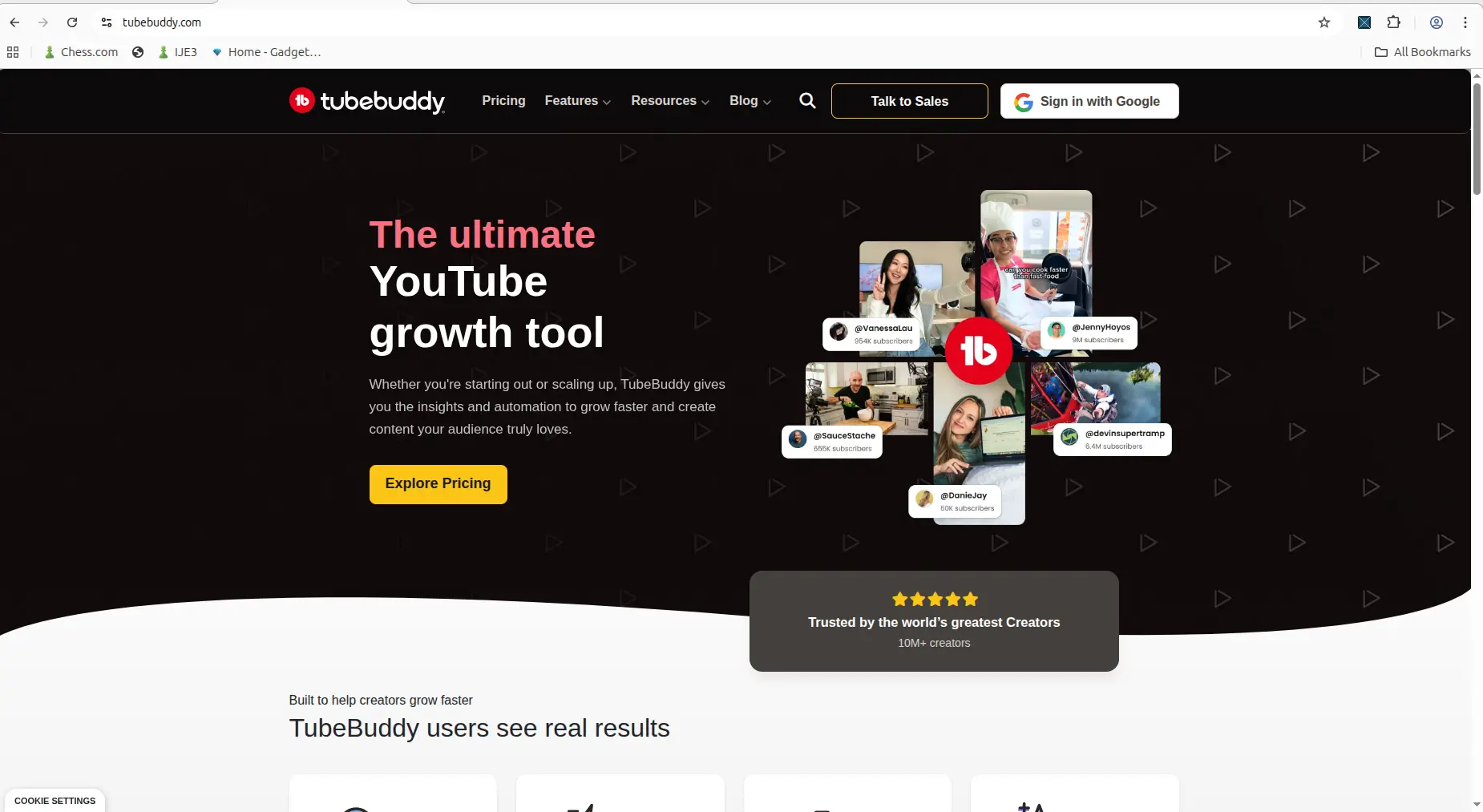
TubeBuddy makes a strong first impression by positioning itself as a YouTube growth tool rather than a narrow one-feature utility.
My Hands-On Experience With Keyword Explorer
The most meaningful hands-on evidence I collected was around Keyword Explorer. I connected a channel, installed the extension, and entered keywords to evaluate.
Keyword Explorer gives a structured summary view that includes an overall score, search volume, unweighted competition score, and optimization strength. That combination is more useful than a single number because it helps you understand whether a keyword is worth pursuing — not just whether people search for it, but whether you can realistically rank for it.
The results view was the most useful part. It shows ranking videos related to the keyword and surfaces whether your own channel or competitors already have content on that topic. For a small creator, that can directly influence a content decision. Instead of guessing whether a topic is crowded, you can see exactly which channels already own it.
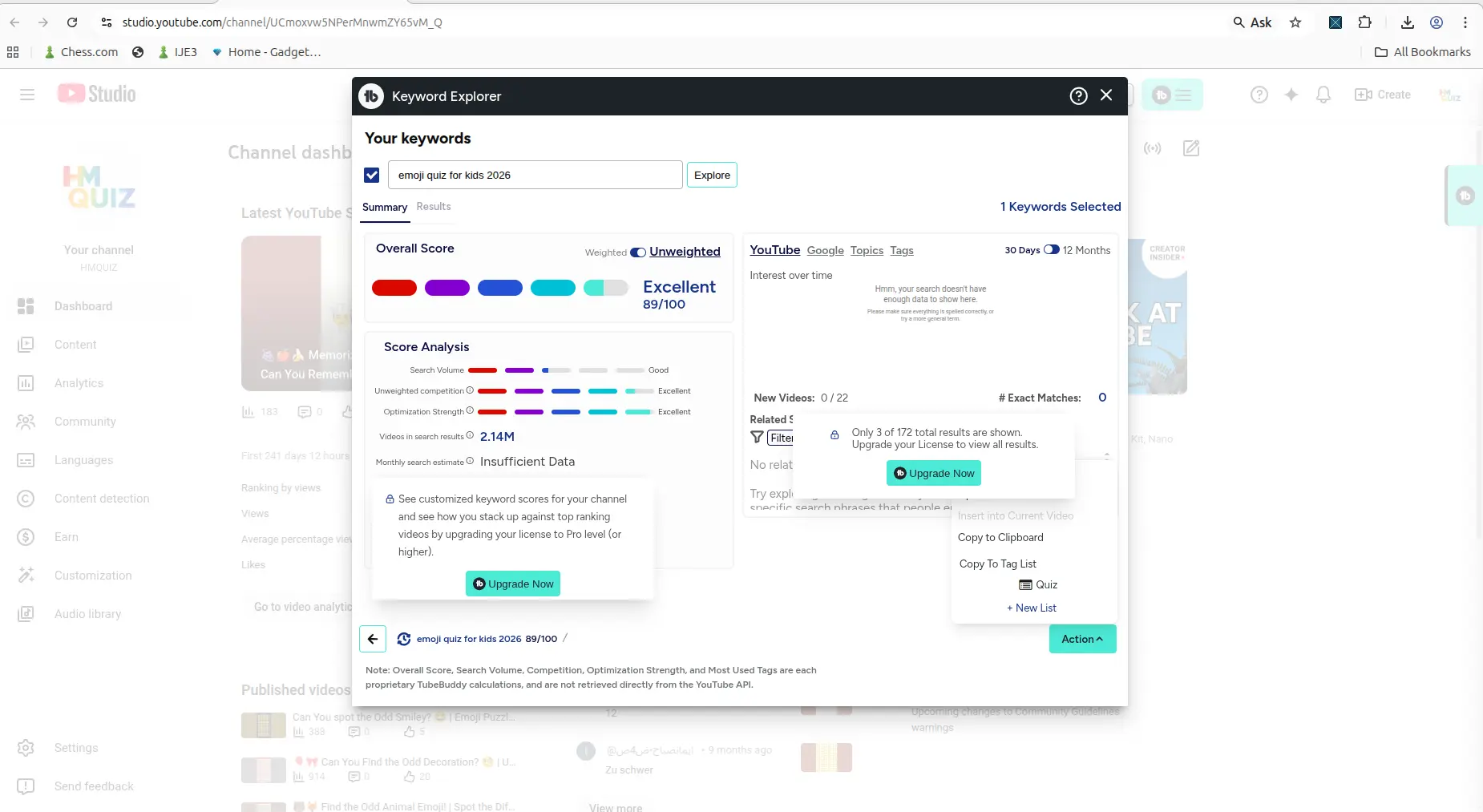
Keyword Explorer gives a structured summary view instead of just throwing out random keyword ideas.
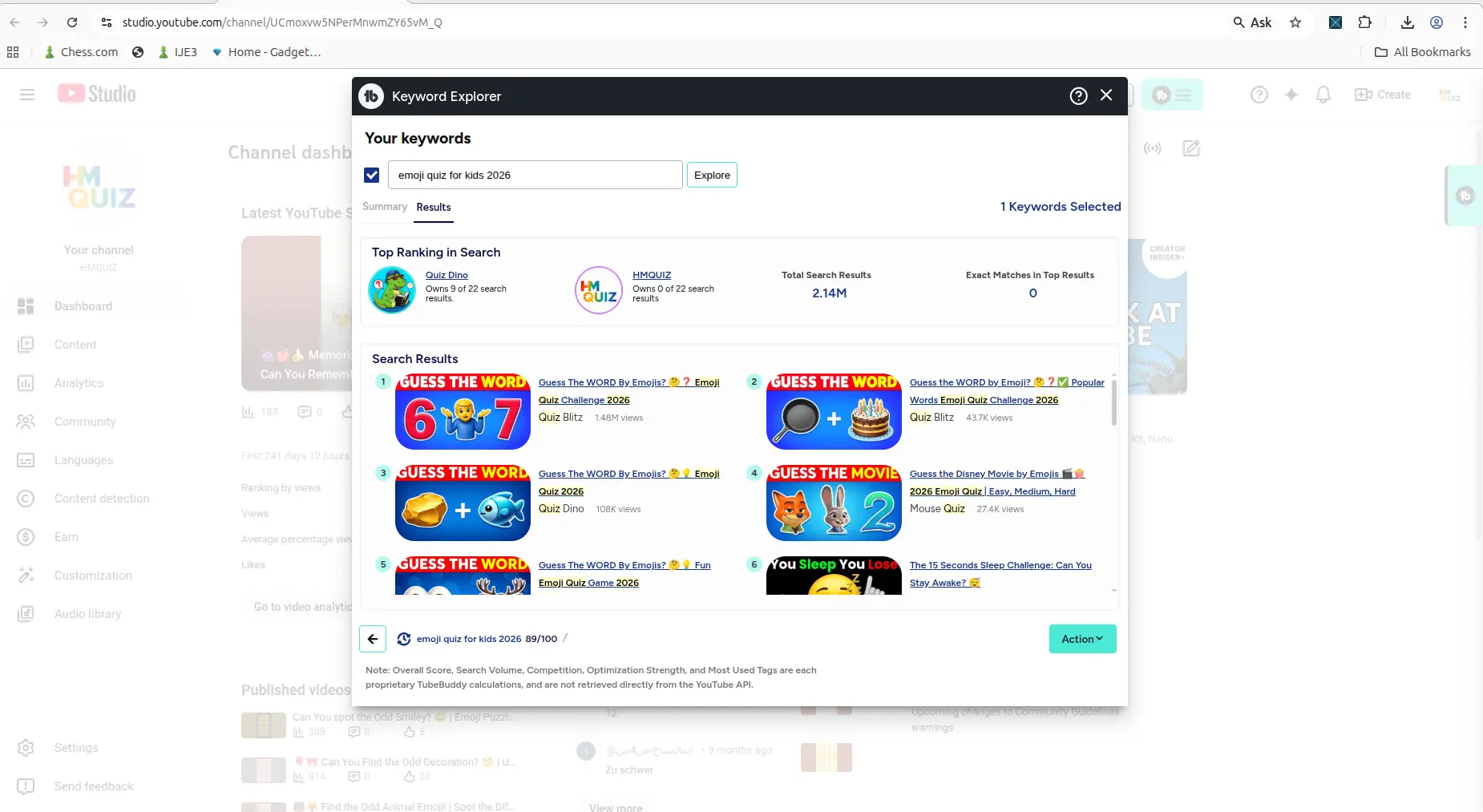
The results tab connects keyword research to actual ranking videos and channel relevance — that is where TubeBuddy starts to feel genuinely useful.
Is TubeBuddy Free? What the Starter Plan Allows (tested August 2026)
The free tier has a name: Starter. TubeBuddy's own
badge reads STARTER, not "Free".
Three gates stand between you and the product:
- Link a YouTube channel. Before you do, TubeBuddy's web app shows a sidebar and nothing else — the setup dialog cannot be dismissed and the menu items do not respond.
- Install the browser extension. It is step 2 of setup, not an optional extra. In the web app, Keyword Explorer is greyed out behind an "Extension Required" badge reading "Install the TubeBuddy browser extension and open YouTube Studio to enable direct launch."
- Work inside YouTube Studio. The tools open as an overlay on YouTube itself rather than in TubeBuddy's own app.
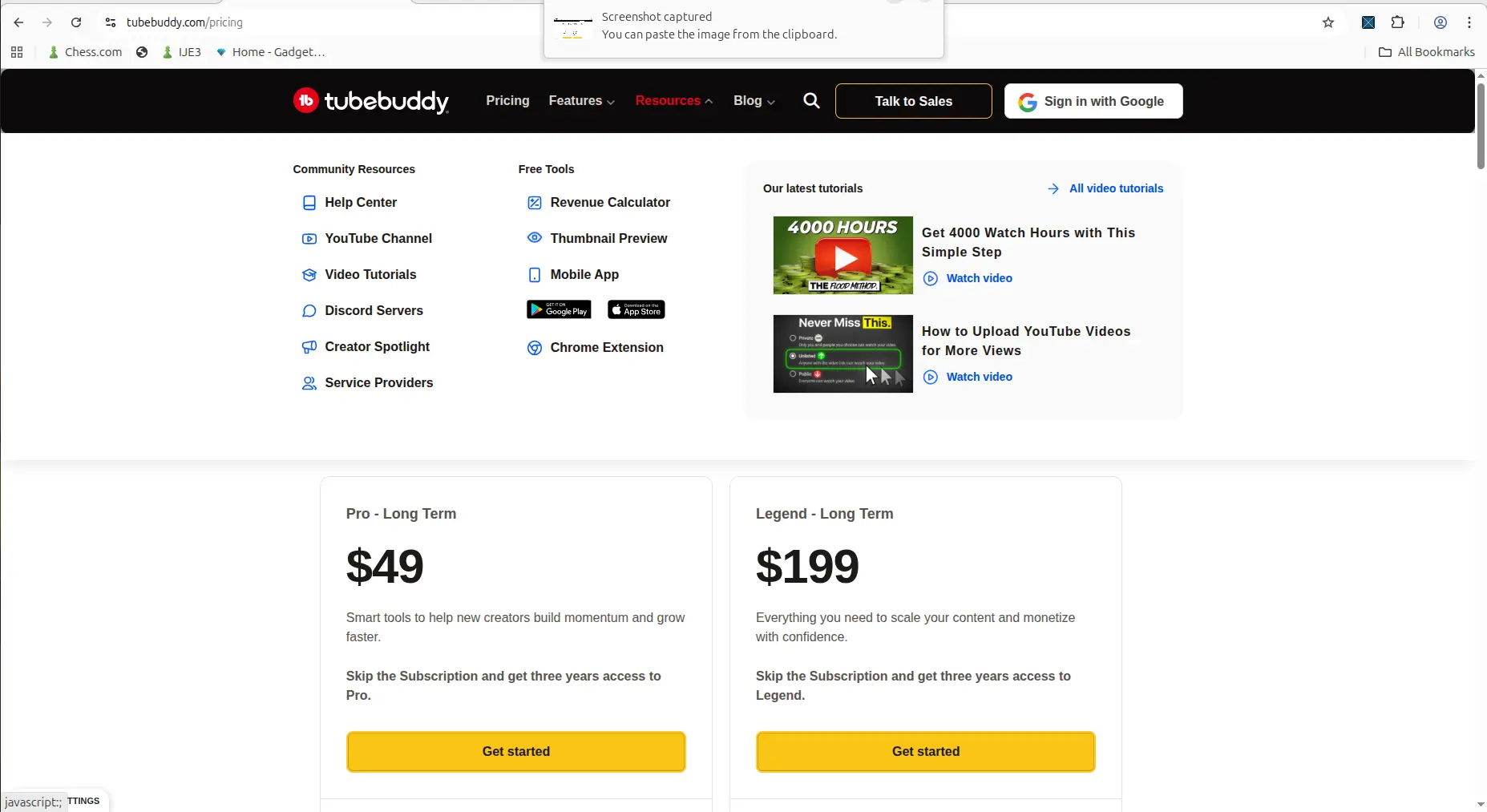
Some workflows depend on the browser extension, which adds friction if you expect the web interface alone to do the job.
Then the best feature runs out. Keyword Explorer gave full data on the first few searches — overall score, search volume, competition, optimization strength, the complete top-20 results and a breakdown of which channels own them. After a handful of searches, an upgrade prompt appeared:
"Unlock Keyword Explorer! This feature is available only on Pro, Star, Legend and Enterprise plans."
So Keyword Explorer is a paid feature that free users get to sample, not a free feature with a cap. We are not publishing an exact allowance because our test did not pin the number down precisely enough — it was around five searches, and TubeBuddy does not state whether it resets.
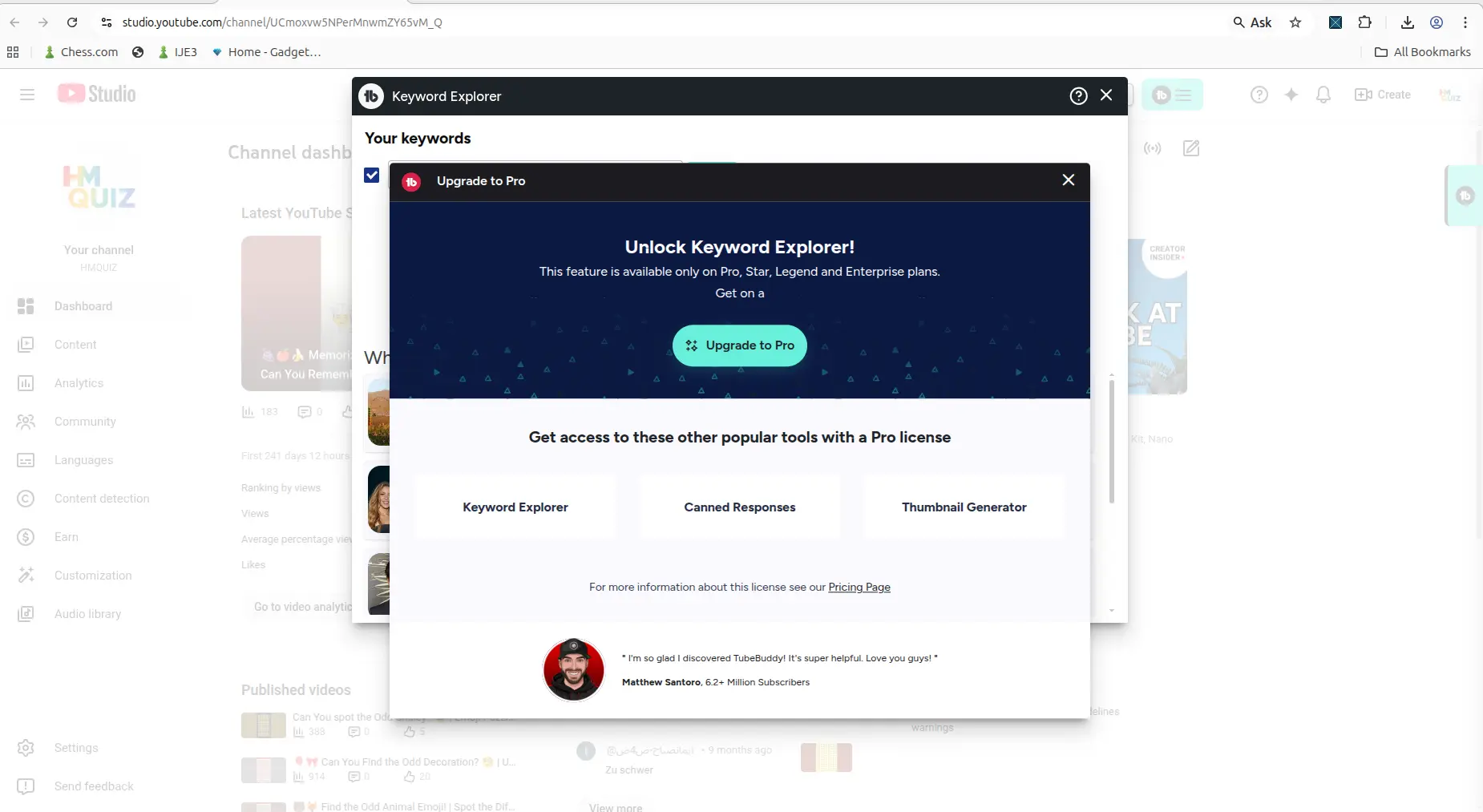
The upgrade prompt that replaced Keyword Explorer after the first few searches.
The extension is gated too. Its Channel Insights panel shows "Upgrade to gain full access", with the full feature set marked "FULL ACCESS WITH LEGEND" — the top tier. Elsewhere, keyword rank tracking is visible in the navigation but locked, Retention Analyzer requires a Legend licence, and Competitor Scorecard is presented as a Legend feature.
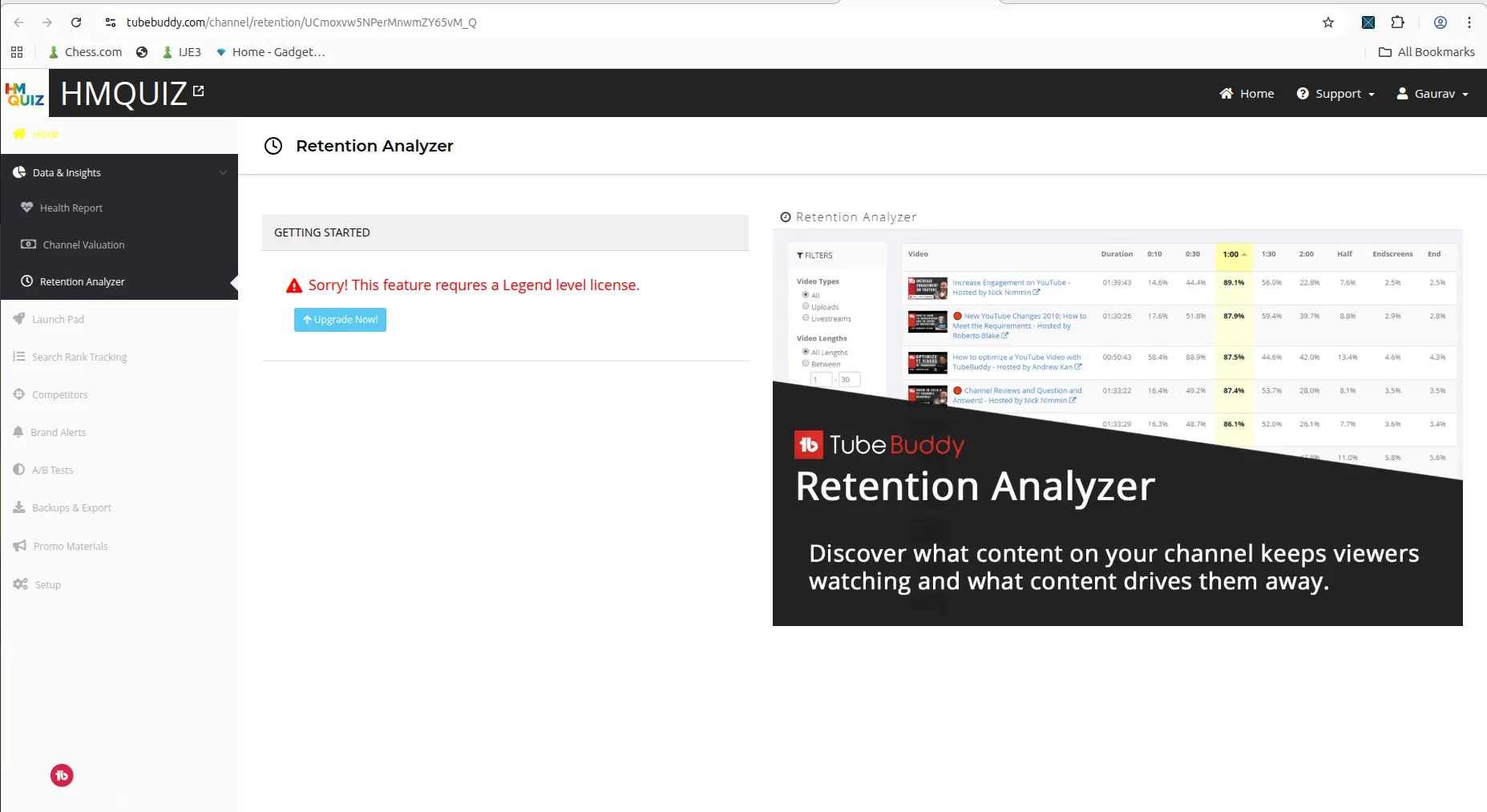
Useful-looking workflows are visible on the free side, but locked behind a higher plan.
The line between "what I can test" and "what I have to pay for" arrives early. For what TubeBuddy costs against the other five tools we track, see our current pricing tables.
Want a free plan that does not run out? vidIQ's free tier keeps working indefinitely — 150 AI credits a month plus unlimited keyword searches that cost no credits, capped at three related results per search rather than a total number of searches. We measured both on fresh accounts in August 2026.
Every free plan runs out somewhere. Know where first.
The Free-Plan Reality Check: what OpusClip, Vizard AI, Submagic and Quso.ai actually let you do for $0 - from real signups, real uploads and real paywall hits.
TubeBuddy Pricing in 2026
Understanding the actual cost helps before committing to any plan.
TubeBuddy plans as of 2026:
| Plan | Monthly | Annual | One-time | Best for |
|---|---|---|---|---|
| Free | $0 | — | — | Basic SEO, limited keyword access |
| Pro | $15/month | $144/year ($12/month) | — | Core SEO toolkit, keyword explorer, most optimization tools |
| Legend | $32.99/month | $316.68/year ($26.39/month) | — | Advanced reporting, bulk processing, larger channels |
TubeBuddy restructured its plans during 2026. Two changes matter if you read an older review:
- The Star tier no longer exists. The lineup is now Free, Pro and Legend only. What used to sit in the middle has been folded into the two remaining paid tiers.
- The 50% sub-1,000-subscriber discount is gone from the pricing page. Pro is now $15/month for everyone, or $12/month on annual billing.
On the annual tab TubeBuddy offers to "Save $36.00 with a one-time payment of $144.00". That is not a lifetime licence. It buys one year. The pricing page opens on the annual tab by default, so $12/month is the first number most visitors see — the monthly rate is $15.
A three-year "Longterm" term existed when we checked from India on 2026-08-27 ($49 Pro, $199 Legend). It does not appear on the US pricing page as of 2026-09-21.
For most small creators, Pro is the right starting point if you decide to pay. Legend is for established channels with large video catalogs that benefit from bulk processing and advanced reporting.
TubeBuddy vs vidIQ: Key Differences
If you are deciding between TubeBuddy and vidIQ, the main difference comes down to approach.
| Area | TubeBuddy | vidIQ |
|---|---|---|
| First use feel | Structured toolkit | Beginner-friendly assistant |
| Free plan usefulness | Limited quickly | More working access |
| AI idea generation | Not tested | Conversational AI Coach, tested on the free plan |
| Keyword research (free tier) | About 5 full searches, then locked behind an upgrade | Unlimited searches, 3 related results shown per search |
| Pricing entry point | $15/month, or $12/month annual (Pro) | $19/month, or $16.58/month annual (Boost) |
| Best for | SEO-focused creators | Idea-first creators |
For the full comparison, read TubeBuddy vs vidIQ.
Want the easier free-plan test first? Of the two, vidIQ gave more working access before paying — useful if you want to try a YouTube tool on your own channel before committing to TubeBuddy's paid tiers.
What TubeBuddy Seems Best At
Based on my testing, TubeBuddy seems strongest at three things.
First, keyword discovery and evaluation. The Keyword Explorer experience tied summary scoring, competition context, and ranking-video visibility into one interface. That is useful because it moves beyond generic keyword brainstorming into something closer to content decision support.
Second, YouTube SEO workflow. TubeBuddy is built around the idea that every video should be optimised before and after publishing. The platform surfaces tag suggestions, title scoring, and SEO recommendations in a structured way.
Third, making creators feel there is a system behind the product. The homepage, trust elements, and feature previews all work together to make the platform feel more complete than a single-purpose utility.
Is TubeBuddy safe?
People ask this about TubeBuddy more than about the video tools, and there is a concrete reason: it is not a website you paste a link into. Using it means installing a browser extension and connecting it to your YouTube channel, which is a real permission grant against an account you presumably care about. That is worth pausing on regardless of the vendor.
On whether the product itself is real: yes, re-verified 27 August 2026 on a fresh Starter account. The channel connected, the extension installed, and Keyword Explorer returned genuine structured data — an overall score, search volume, an unweighted competition score and optimization strength — until it stopped at the paywall.
What I did not test is TubeBuddy's security practices, and no hands-on review can. What I can tell you is exactly what access it asks for, which is the part you can actually decide about.
Who TubeBuddy Feels Right For
TubeBuddy feels more suitable for creators who are actively thinking about YouTube SEO, packaging, and keyword research than for creators who only want a simple dashboard or idea generator.
It is a good fit if you:
- care about keyword scoring and competition data
- want to understand which videos already rank for a topic
- are willing to pay Pro ($15/month, or $144 for the year) to unlock the core toolkit
- publish consistently and want a structured optimization workflow
It is less ideal if you:
- want a long, fully usable free experience before paying
- mainly need AI-generated video ideas
- are still experimenting with your content format
If your main goal is turning existing long videos into Shorts rather than doing YouTube SEO research, our OpusClip Review 2026 is a better next read.
Final Verdict
My first experience with TubeBuddy was mixed in a useful way.
On the positive side: the platform presents itself well, feels credible, and gives a strong impression that it is built for creators who care about YouTube SEO and channel growth. The Keyword Explorer feature looked practical and grounded enough to be genuinely interesting.
Where TubeBuddy falls short is that the deeper value starts to feel gated before a small creator can fully judge it. The paywall showed up fast enough that my review has to stay honest: I saw real potential, but not enough unrestricted access to claim that TubeBuddy fully proved itself across broader workflows.
Verdict: TubeBuddy looks like a credible YouTube SEO tool with a promising Keyword Explorer. The Pro plan is $15/month billed monthly, or $12/month on annual billing ($144/year) — slightly below vidIQ's equivalent rather than dramatically under it. The free experience really is a preview rather than a working tool: we confirmed in August 2026 that Keyword Explorer itself is paid-only, and free users get a small handful of searches before the tool locks behind an upgrade prompt.
If I had to choose between TubeBuddy and vidIQ as a first tool, I would start with vidIQ for the more useful free experience, then consider TubeBuddy Pro once I was ready to commit to a YouTube SEO workflow.
Starting with vidIQ? Its free plan gives 150 AI credits a month plus unlimited keyword searches that cost no credits — enough to judge the workflow on your own channel before paying for either tool.
FAQ
Is TubeBuddy free to use?
Yes. The free tier is called Starter. You have to link a YouTube channel and install the browser extension before you can use it, and in our August 2026 test Keyword Explorer gave full data for roughly five searches before showing an upgrade prompt. It is better treated as a preview than a working tool.
Do you need the browser extension to use TubeBuddy for free?
Yes. Installing the extension is step 2 of setup, and in the web app Keyword Explorer is greyed out behind an "Extension Required" badge until you do.
How much does TubeBuddy cost?
TubeBuddy Pro costs $15/month, or $144/year which works out at $12/month. Legend costs $32.99/month, or $316.68/year which works out at $26.39/month, and adds bulk processing and advanced reporting for larger channels. TubeBuddy calls the $144 annual charge a "one-time payment" — it buys one year, not permanent access. These are US prices, read 2026-09-21; TubeBuddy shows different pricing in some other countries.
The public pricing page shows only Pro and Legend, but TubeBuddy's own in-product upgrade prompt names four paid tiers: Pro, Star, Legend and Enterprise. Star still appears there, so it likely persists for existing subscribers even though it is no longer sold to new customers. The old 50% discount for channels under 1,000 subscribers is no longer on the pricing page — Pro's standard price is now lower than that discount was.
Is TubeBuddy good for small YouTube creators?
It can be, especially if you care about YouTube SEO and keyword research. The Pro plan at $15/month is mid-range for this category. The challenge is that the free experience is limited, so you need to be willing to pay to properly evaluate the tool.
What is the most useful feature in TubeBuddy?
The most useful feature I tested was Keyword Explorer. It gave a structured summary view and a results view that connected keyword research to actual ranking videos, which is more actionable than a simple keyword score.
What is the biggest drawback of TubeBuddy?
The main drawback from my first experience was that access friction arrived early. The product looked promising, but the paywall showed up before I could fully test broader workflows over time.
Is Tube Buddy the same as TubeBuddy?
Yes — it is one product, often searched as "Tube Buddy". The official name is written as one word, TubeBuddy.
TubeBuddy or vidIQ — which should I start with?
For most small creators, I would start with vidIQ because the free plan gives more working access. TubeBuddy is worth considering once you are ready to pay and want a more structured YouTube SEO workflow.
Related Pages
More on vidIQ
- vidIQ Review 2026 — the full hands-on walkthrough: AI prompts, Optimize, Keywords and Outliers on a connected channel
- vidIQ Free Plan — 150 credits a month, and the 50-credit action that ends most free plans
More on TubeBuddy
Head to head
- TubeBuddy vs vidIQ — both free tiers side by side, and which one lets you work before paying
If optimization is not your bottleneck
- OpusClip Review 2026 — for turning long videos into Shorts rather than optimizing the ones you have
- AI Subtitle Tools for YouTube Creators — captions and burned-in subtitles, tested across four tools
Wider guides