Quso.ai Review: Free Plan, Credits, Upload and Export Limits Tested

If you’re a small creator evaluating AI video repurposing tools, you need to know what actually works on the free plan before you commit time or money. This Quso.ai review documents a hands-on test of the free account workflow, focusing on what I could verify—and what I could not.

In this test, I completed signup, accessed the dashboard, entered a YouTube link, uploaded a local MP4 file, and reached pre-generation screens that displayed estimated credit costs. However, clicking Generate clips in both the YouTube and MP4 workflows triggered a paid upgrade modal before visible clip generation started. Because clip generation did not complete, I could not verify free export, download, final output quality, caption accuracy, or final watermark behavior.

This review is useful if you want to understand Quso.ai’s onboarding flow, upload setup, credit estimates, and upgrade prompts. It is not a complete benchmark of generated clip quality or export behavior.

Disclosure: This page may contain affiliate links. If you choose a tool through those links, CreatorIntelHQ may earn a commission at no extra cost to you. Reviews are written to focus on practical fit, workflow value, and real creator use. This article is based on hands-on testing and documented evidence.

Quick verdict: Quso.ai is worth inspecting if you want an AI clipping workflow dashboard, but the tested free account did not complete clip generation. YouTube link entry and MP4 upload setup were accessible, and credit estimates appeared before generation (about 8 credits for the YouTube workflow, about 1 credit for the MP4 workflow). Clicking Generate clips in both tests opened a paid upgrade modal before visible processing. I could not confirm free export, download, generated output quality, editor result, or final watermark behavior because no output was generated in the tested workflow. Small creators should verify generation and export with their own file before paying.

By CreatorIntelHQ Editorial Team · Last updated May 14, 2026 · Evidence status: Partial hands-on evidence

Based on CreatorIntelHQ methodology · How we test creator tools

Decision guide

Try Quso.ai if: You want to test an AI video repurposing dashboard that accepts YouTube links and MP4 uploads, and you’re comfortable verifying whether clip generation completes on your own account before paying.

Compare first if: You need confirmed free export or download behavior before testing. Consider reviewing Vizard.ai or OpusClip for alternative AI clipping workflows with documented free-plan export paths.

Do not pay yet if: You have not tested Quso.ai with your own video to confirm that clip generation, export, download, and watermark behavior meet your workflow needs. The tested free account hit an upgrade prompt at the generation step, so export and download were not verified.

Best next step: Sign up for a free Quso.ai account, upload a short test video or YouTube link, and verify whether clip generation completes and whether export/download are available before upgrading. If generation or export are blocked, compare Quso.ai vs Vizard.ai or Quso.ai vs OpusClip to find a better fit for your workflow.

Evidence snapshot

Test area What I could verify What I could not verify
Signup and onboarding Completed Google login, workspace setup, and creator-type selection Whether all account types see the same onboarding flow
Dashboard access Accessed dashboard and billing page showing Free Plan status Whether the 75 credits/month advertised on the pricing page were visible in the dashboard
YouTube link workflow Entered a YouTube link, reached pre-generation screen, saw estimated cost of about 8 credits Whether clip generation completed, whether export/download were available, whether a watermark appeared on final output
MP4 upload workflow Uploaded a local MP4 file, reached pre-generation screen, saw estimated cost of about 1 credit Whether clip generation completed, whether export/download were available, whether a watermark appeared on final output
Upload format support MKV upload was rejected; supported formats shown were video/mp4, video/webm, and video/quicktime Whether all supported formats generate clips successfully on the free plan
Upgrade prompts Clicking Generate clips in both YouTube and MP4 workflows opened a paid upgrade modal before visible processing Whether some free users can generate clips without hitting an upgrade prompt
Export and download Not tested—clip generation did not complete Whether free accounts can export or download clips, whether a watermark is applied, whether download is available without upgrade
Output quality Not tested—no generated clips were produced Clip quality, caption accuracy, reframing quality, or editor result

What is Quso.ai?

Quso.ai positions itself as an all-in-one AI video repurposing platform for creators, podcasters, and marketers. According to the homepage, Quso.ai offers AI Clips, AI Subtitles, AI Video Editor, Brand Kit, and Social Media Scheduling in one dashboard. The platform advertises features including AI Clips Generator, AI Content Repurposing, AI Influencer, AI Subtitle Generator, and tools for silence/filler word removal and CutMagic.

Quso.ai homepage showing social media AI positioning

Quso.ai positions itself as an AI video repurposing and social media workflow platform.

The homepage also claims Quso.ai can replace multiple tools across content repurposing, AI video clipping, social media management, AI video editing, and AI video repurposing. Additional advertised features include a Social Media Scheduler, AI Content Planner, Social Media Analytics, and AI Social Captions, with support for scheduling and managing content across seven social platforms.

These are official claims from the Quso.ai homepage and pricing page. In this test, I verified dashboard access, upload setup, and credit estimates, but I did not verify that all advertised features worked on the free plan or that generated output met the quality standards suggested by the marketing copy.

How I tested Quso.ai

I tested Quso.ai to answer one practical question for small creators: Can a free account complete an AI clipping workflow from upload to export, and what limits appear along the way?

Here’s what I did:

  1. Signed up using a Google account and completed the onboarding flow, which asked for workspace name, creator role, creator type, and workflow goals.
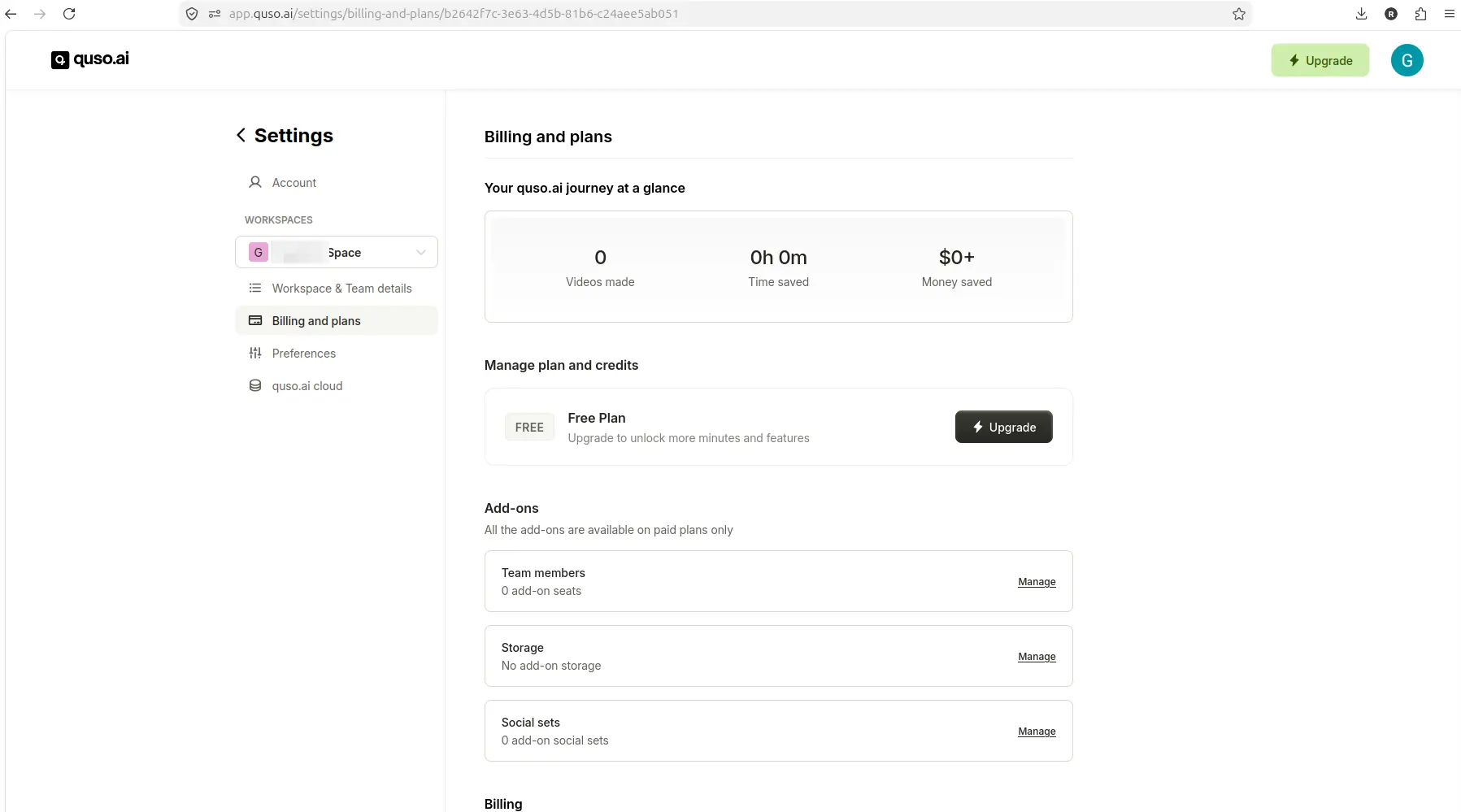
  2. Accessed the dashboard and reviewed the billing page, which confirmed Free Plan status but did not clearly display a credit balance.
  3. Entered a YouTube link and reached a pre-generation screen showing an estimated cost of about 8 credits.
  4. Clicked Generate clips in the YouTube workflow, which opened a paid upgrade modal before visible processing started.
  5. Attempted to upload a local MKV file, which was rejected with a format error.
  6. Uploaded a local MP4 file, which was accepted and reached a pre-generation screen showing an estimated cost of about 1 credit.
  7. Clicked Generate clips in the MP4 workflow, which opened a paid upgrade modal before visible processing started.

Because clip generation did not complete in either workflow, I could not test export, download, final output quality, caption accuracy, reframing quality, or final watermark behavior.

This test is strong evidence for onboarding, dashboard access, upload setup, credit estimates, and upgrade-prompt behavior. It is not a complete benchmark of Quso.ai’s clip generation, export, or output quality.

Free plan and pricing observations

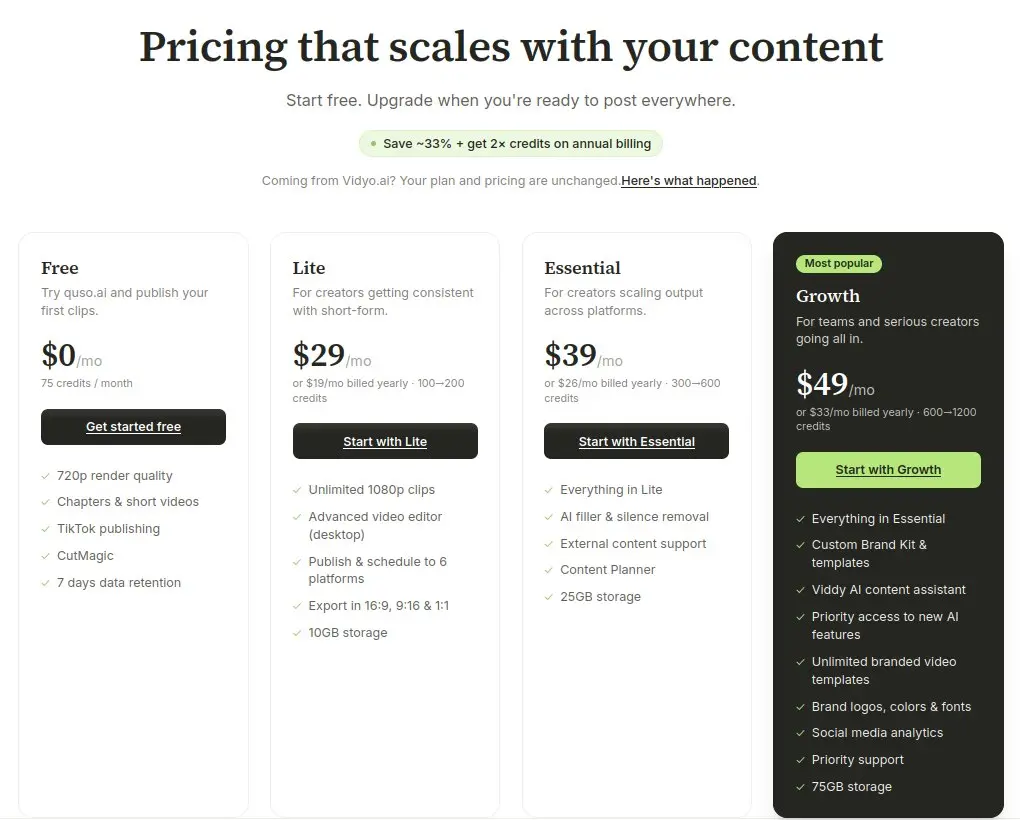
Quso.ai’s public pricing page shows four plans: Free, Lite, Essential, and Growth.

According to the pricing page:

  • Free: $0/month with 75 credits per month, 720p render quality, AI Clips & Captions, YouTube Chapters, Direct TikTok Publishing, and Watermark.
  • Lite: $15/month with AI Clips & Captions, AI Video Generator, resizing, and 1080p exports.
  • Essential and Growth: Additional tools, scheduling, analytics, templates, and support.

The pricing comparison table shows that Lite includes 100 credits and 10GB storage, Essential includes 300 credits and 25GB storage, and Growth includes 600–1800 credits and 75GB storage. AI Filler and Silence Removal is unavailable for Lite and available for Essential and Growth. AI Editor, AI Influencer, AI Chapters, AI Text to Video, AI CutMagic, AI Captions, AI Clips, and AI Writer are shown as available across Lite, Essential, and Growth.

Social Media Tools and Advanced Tools show that AI Content Planner is available across all three paid plans. Lite shows TikTok Publishing only for Social Media Set, while Essential and Growth show 1 Social Set. One-Click Publishing and Unlimited Social Post Scheduling are not included in Lite but are included in Essential and Growth. Bulk Publishing/Scheduling and Analytics are only shown for Growth. Stock Media Library is shown for Essential and Growth, while Full Video Transcript and Clip Transcripts are shown only for Growth.

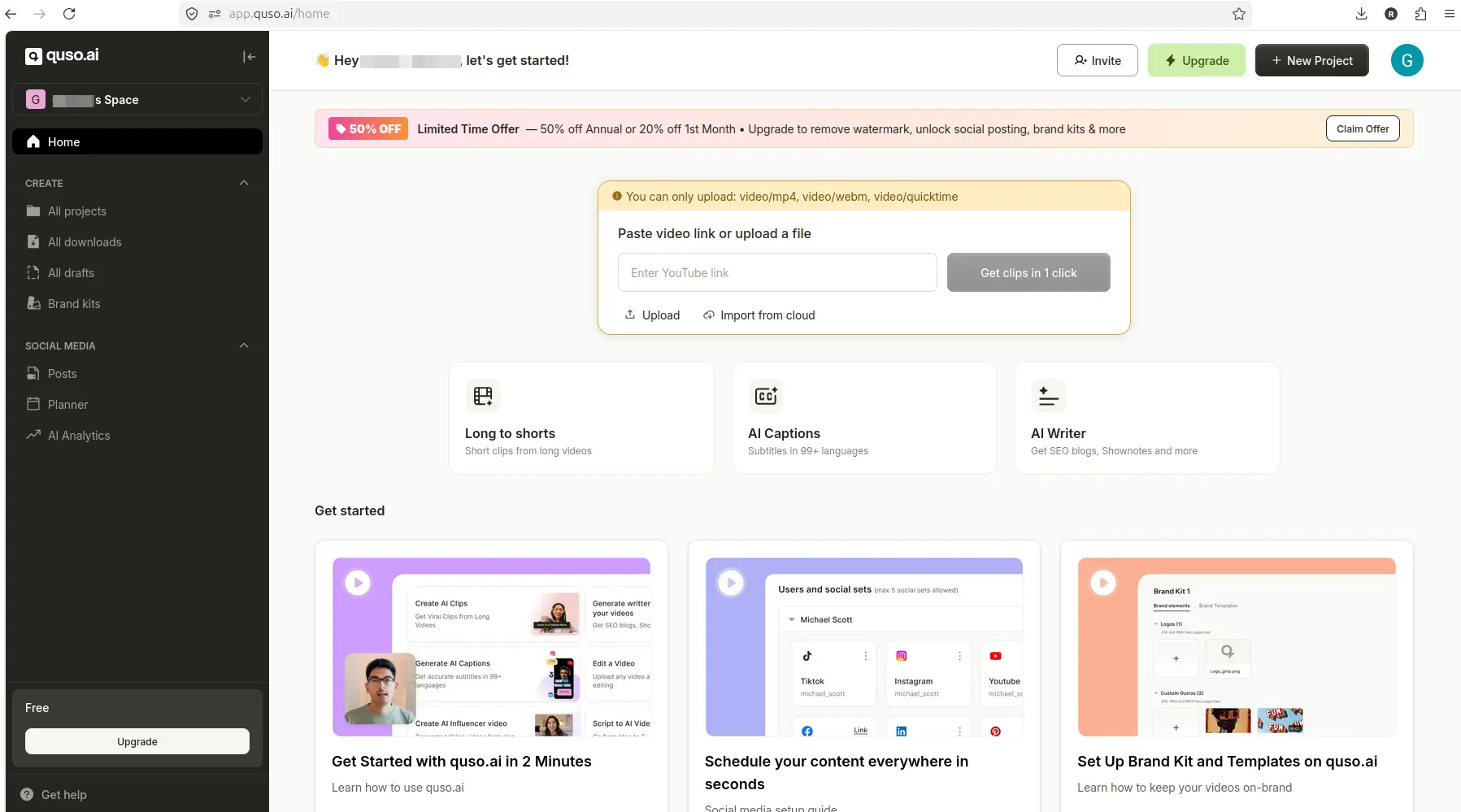
Important limitation: In the tested account, the billing page confirmed Free Plan status but did not clearly display the 75 credits/month allowance advertised on the public pricing page. Credit estimates appeared later in the generation workflow, but the dashboard did not show a visible credit balance before I started the workflow.

Quso.ai billing page showing Free Plan without a visible credit balance

The tested Quso.ai account showed Free Plan status, but the billing page did not clearly show the advertised 75-credit balance.

The pricing FAQ says the top-up feature for extra credits is currently exclusive to all paid plans. The homepage FAQ says Quso.ai offers a free trial with limited credits and that free users can upload 5GB files while paid users can upload 15GB files.

Pricing should be verified before purchase because plan details, credit allowances, and feature availability can change.

After completing onboarding and accessing the dashboard, I tested the YouTube link import workflow.

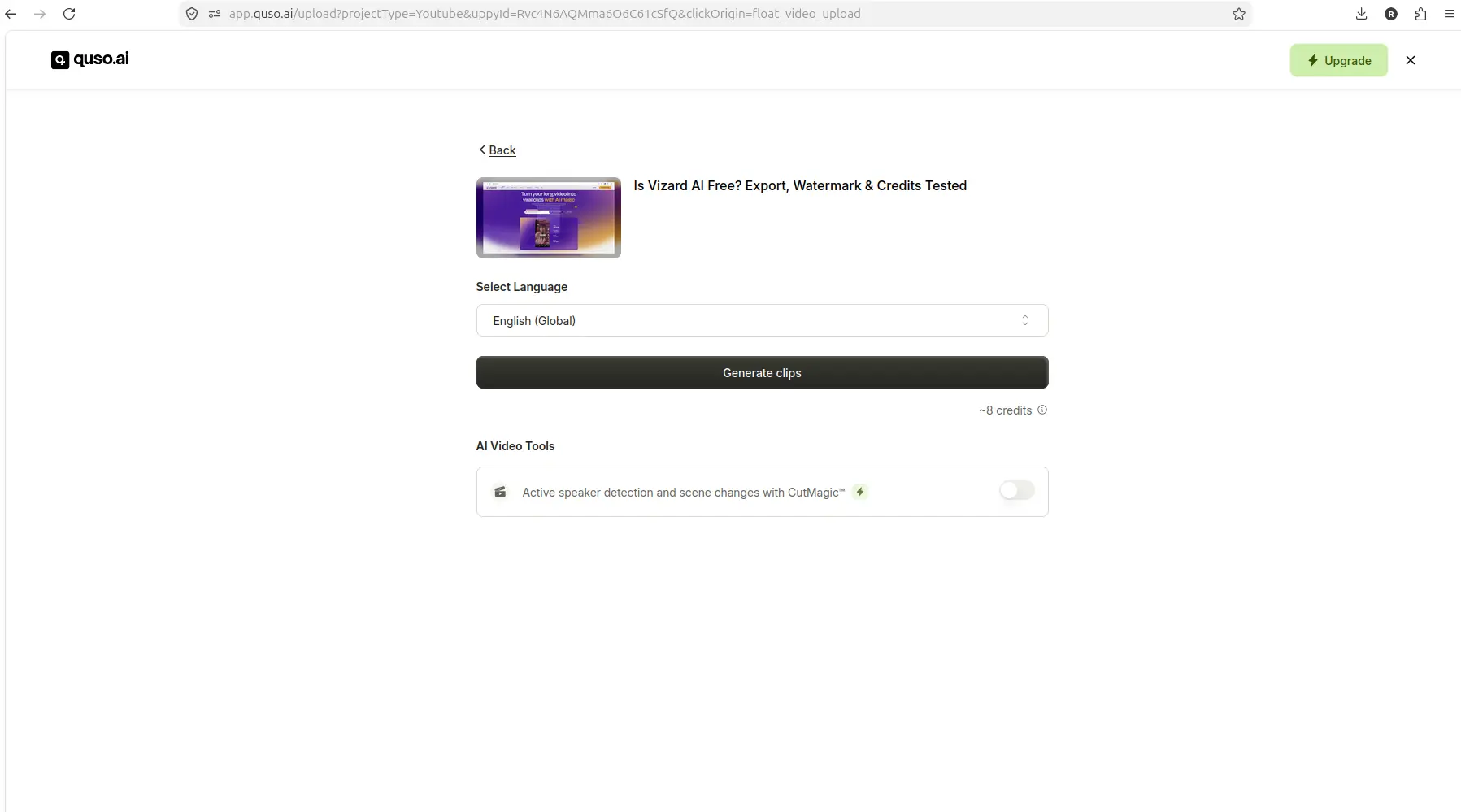
I entered a YouTube URL into the import field. Quso.ai accepted the link and moved to a pre-generation screen showing:

  • The imported video thumbnail and title
  • Language selection
  • A Generate clips button
  • An estimated cost of about 8 credits
  • Optional caption styles such as Elevate, Text Reveal, and Slide In

Quso.ai YouTube import screen showing about 8 credits before generation

The YouTube-link workflow reached a pre-generation screen with an estimated cost of about 8 credits.

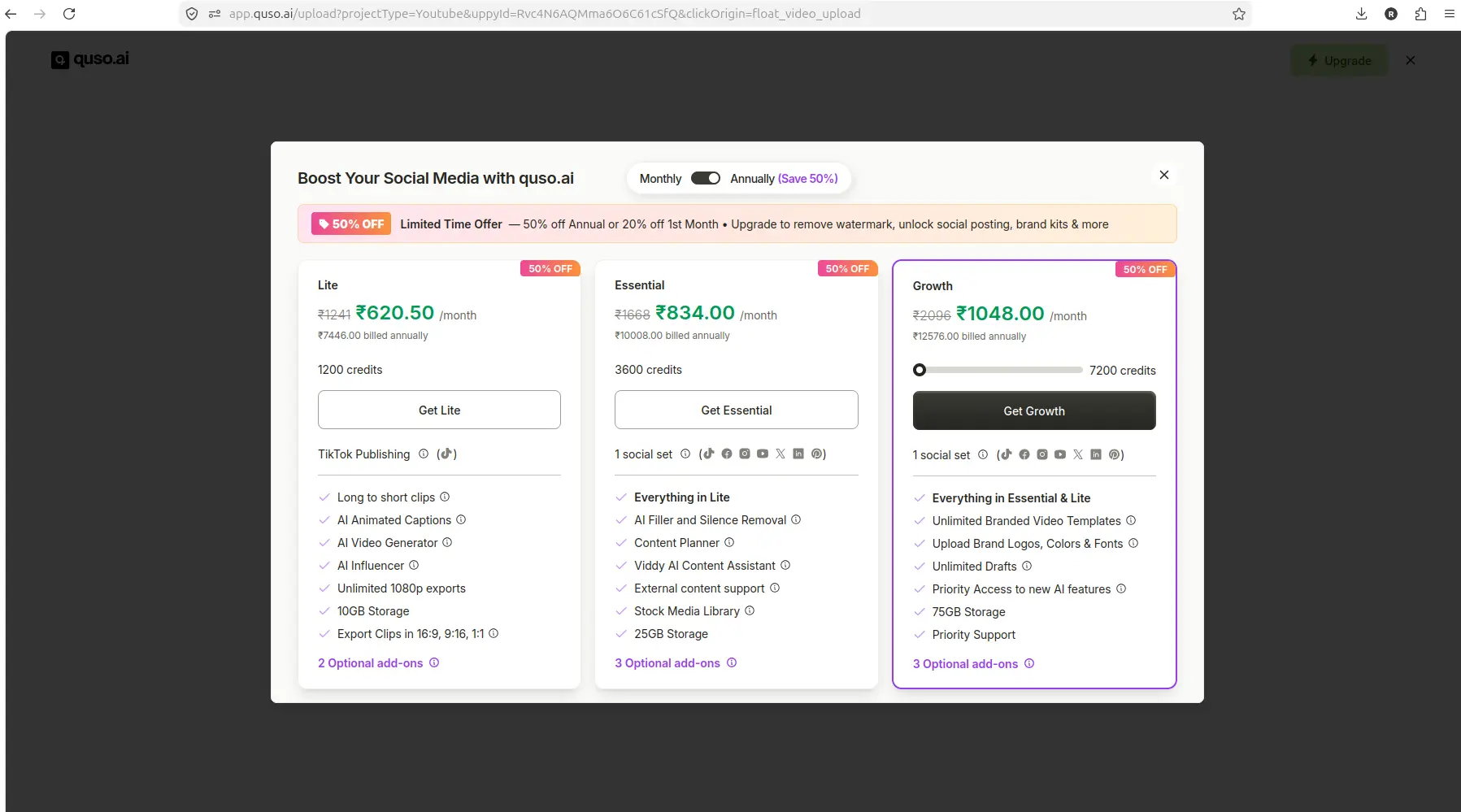
When I clicked Generate clips, Quso.ai opened a paid upgrade modal before visible processing started. The modal did not show processing, credits being deducted, or clips being generated.

Quso.ai paid upgrade modal after clicking Generate clips for YouTube import

After clicking Generate clips from the YouTube workflow, Quso.ai showed a paid upgrade modal before visible processing.

This is strong evidence that the tested Free account could reach the pre-generation screen but could not visibly start clip generation without hitting an upgrade prompt. It does not prove that every free user will always see the same blocker, but it does show that the tested workflow stopped at the generation step.

MP4 upload workflow test

After the YouTube link test, I tested local file upload.

I first attempted to upload a local MKV file. Quso.ai rejected the upload with a warning stating that only video/mp4, video/webm, or video/quicktime formats are supported. This is useful upload-format evidence: MKV was not supported in this test.

I then uploaded a local MP4 file. Quso.ai accepted the upload and moved to a pre-generation screen showing:

  • The uploaded file name (“output.mp4”), thumbnail, and duration
  • Language selection
  • A Generate clips button
  • An estimated cost of about 1 credit
  • A CutMagic option
  • Optional caption styles such as Elevate, Text Reveal, and Slide In

Quso.ai MP4 upload screen showing about 1 credit before generation

The MP4 upload workflow reached a pre-generation screen with an estimated cost of about 1 credit.

When I clicked Generate clips, Quso.ai opened a paid upgrade modal before visible processing started. This matches the earlier YouTube-link test: both workflows reached the pre-generation screen but stopped at the generation step with an upgrade prompt.

Quso.ai paid upgrade modal after clicking Generate clips for MP4 upload

After clicking Generate clips from the MP4 workflow, Quso.ai again showed a paid upgrade modal before visible processing.

Together, these tests show that the tested Free account could complete onboarding, access the dashboard, enter a YouTube link, upload a supported MP4 file, and reach credit-estimate screens before generation. Both workflows hit an upgrade prompt at the clip-generation step.

What I could not verify

Because clip generation did not complete in the tested workflows, I could not verify:

  • Generated clip quality: No clips were produced, so I could not evaluate clip selection, pacing, or relevance.
  • Caption accuracy: No captions were generated, so I could not test caption timing, spelling, or formatting.
  • Reframing quality: No reframing was applied, so I could not test speaker tracking or crop quality.
  • Editor result: No editor preview was reached, so I could not test the editing interface or customization options.
  • Export behavior: No export screen was reached, so I could not verify whether free accounts can export clips or whether export requires an upgrade.
  • Download behavior: No download option was reached, so I could not verify whether free accounts can download clips or whether download requires an upgrade.
  • Final watermark behavior: No final output was produced, so I could not verify whether a watermark is applied to exported clips or whether the watermark can be removed on the free plan.

The tested workflow is strong evidence for onboarding, dashboard access, upload setup, credit estimates, and upgrade-prompt behavior. It is not a complete benchmark of Quso.ai’s clip generation, export, or output quality.

If you need confirmed free export or download behavior before testing, consider reviewing Vizard.ai or OpusClip for alternative AI clipping workflows with documented free-plan export paths.

Pros and Cons

Pros

  • Dashboard access on the free plan: The tested account could access the dashboard, billing page, and upload setup without requiring payment upfront.
  • YouTube link and MP4 upload setup worked: Both workflows reached pre-generation screens with visible credit estimates.
  • Clear credit estimates before generation: The YouTube workflow showed about 8 credits, and the MP4 workflow showed about 1 credit, which helps creators understand cost before committing.
  • Supported upload formats are clearly communicated: MKV was rejected with a clear error message, and supported formats (video/mp4, video/webm, video/quicktime) were listed.
  • Advertised feature set is broad: Quso.ai positions itself as an all-in-one platform with AI Clips, AI Subtitles, AI Video Editor, Brand Kit, Social Media Scheduling, and more.

Cons

  • Clip generation did not complete on the tested free account: Both YouTube and MP4 workflows hit a paid upgrade modal at the generation step, so no clips were produced.
  • Free-plan credit balance was not clearly visible in the dashboard: The billing page confirmed Free Plan status but did not display the 75 credits/month advertised on the pricing page.
  • Export, download, and final watermark behavior could not be verified: Because clip generation did not complete, I could not test whether free accounts can export or download clips or whether a watermark is applied.
  • Upgrade prompts appeared before visible processing: Both workflows stopped at the generation step with an upgrade modal, which suggests that free-plan clip generation may be limited or blocked in some cases.
  • No generated output to evaluate quality: Without completed clips, I could not assess clip selection, caption accuracy, reframing quality, or editor result.

Who should use Quso.ai?

Quso.ai may be worth testing if:

  • You want to explore an AI video repurposing dashboard that accepts YouTube links and MP4 uploads.
  • You’re comfortable verifying whether clip generation completes on your own account before paying.
  • You’re evaluating multiple AI clipping tools and want to compare onboarding, upload setup, and credit estimates across platforms.
  • You’re interested in Quso.ai’s advertised all-in-one feature set, including AI Clips, AI Subtitles, AI Video Editor, Brand Kit, and Social Media Scheduling, and you’re willing to test whether those features work on the free plan.

Before paying, verify that clip generation, export, download, and watermark behavior meet your workflow needs. The tested free account hit an upgrade prompt at the generation step, so export and download were not verified.

Who should skip Quso.ai?

Quso.ai may not be the best fit if:

  • You need confirmed free export or download behavior before testing. The tested workflow did not reach export or download, so those features were not verified.
  • You need a tool with a documented free-plan clip-generation workflow that completes without upgrade prompts. The tested account hit an upgrade modal at the generation step in both YouTube and MP4 workflows.
  • You need to evaluate generated clip quality, caption accuracy, or reframing quality before committing. The tested workflow did not produce clips, so output quality was not verified.
  • You prefer tools with a clearly visible credit balance in the dashboard. The tested account’s billing page did not display the 75 credits/month advertised on the pricing page.

If these limitations are blockers for your workflow, consider comparing Quso.ai vs Vizard.ai or Quso.ai vs OpusClip to find a better fit.

Alternatives and comparisons

If Quso.ai’s tested workflow does not meet your needs, consider these alternatives:

For a more detailed comparison of free-plan limits, see Quso.ai free plan limits or Quso.ai free vs paid.

Final verdict

Quso.ai is worth inspecting if you want an AI clipping workflow dashboard that accepts YouTube links and MP4 uploads, but the tested free account did not complete clip generation. YouTube link entry and MP4 upload setup were accessible, and credit estimates appeared before generation (about 8 credits for the YouTube workflow, about 1 credit for the MP4 workflow). Clicking Generate clips in both tests opened a paid upgrade modal before visible processing.

I could not confirm free export, download, generated output quality, editor result, or final watermark behavior because no output was generated in the tested workflow.

Before paying, sign up for a free Quso.ai account, upload a short test video or YouTube link, and verify whether clip generation completes and whether export/download are available. If generation or export are blocked, compare Quso.ai vs Vizard.ai or Quso.ai vs OpusClip to find a better fit for your workflow.

Pricing should be verified before purchase because plan details, credit allowances, and feature availability can change.

FAQ

Does Quso.ai offer a free plan?

Yes. According to the public pricing page, Quso.ai offers a Free plan with $0/month, 75 credits per month, 720p render quality, AI Clips & Captions, YouTube Chapters, Direct TikTok Publishing, and Watermark. In this test, the billing page confirmed Free Plan status, but the 75 credits/month allowance was not clearly visible in the dashboard. Credit estimates appeared during the generation workflow, but clip generation did not complete, so I could not verify whether the free plan allows export or download.

Can I export clips on the Quso.ai free plan?

I could not verify this. In the tested workflow, clicking Generate clips in both YouTube and MP4 workflows opened a paid upgrade modal before visible processing started. Because clip generation did not complete, I could not reach an export screen or test whether free accounts can export or download clips. Before paying, verify export and download behavior with your own file.

Does Quso.ai add a watermark to free exports?

I could not verify this. The public pricing page lists “Watermark” as a feature of the Free plan, which suggests that a watermark may be applied to free exports. However, because clip generation did not complete in the tested workflow, I could not produce a final output or verify whether a watermark appears on exported clips. Before paying, verify watermark behavior with your own file.

How many credits does Quso.ai give on the free plan?

According to the public pricing page, the Free plan includes 75 credits per month. In this test, the billing page confirmed Free Plan status but did not clearly display a credit balance. Credit estimates appeared during the generation workflow: the YouTube workflow showed about 8 credits, and the MP4 workflow showed about 1 credit. However, clip generation did not complete, so I could not verify whether credits were deducted or whether the 75-credit allowance was available for use.

What video formats does Quso.ai support?

In this test, Quso.ai rejected a local MKV upload with a format error. The error message stated that only video/mp4, video/webm, or video/quicktime formats are supported. A local MP4 file was accepted and reached the pre-generation screen. The homepage FAQ also mentions that users can upload videos in mp4, m4v, mov, and webm format.

Yes. In this test, Quso.ai accepted a YouTube link and moved to a pre-generation screen showing the imported video thumbnail, title, language selection, and an estimated cost of about 8 credits. However, clicking Generate clips opened a paid upgrade modal before visible processing started, so I could not verify whether the YouTube workflow completes clip generation on the free plan.

How does Quso.ai pricing compare to Vizard.ai and OpusClip?

I have not completed a controlled same-video benchmark comparing Quso.ai, Vizard.ai, and OpusClip. For a detailed comparison, see Quso.ai vs Vizard.ai or Quso.ai vs OpusClip. Pricing should be verified before purchase because plan details can change.