
Quso.ai vs Vizard AI: Free Plan, Credits, Export and Watermark Compared
Weighing more than two tools? See all 4 tools compared in our AI video repurposing guide.
When you're choosing between AI video repurposing tools like Quso.ai and Vizard AI, the real question isn't which tool has more features on the homepage—it's which tool actually lets you generate, edit, and export usable short clips on the free plan before asking you to pay.
In this comparison, I tested Quso.ai's free workflow from signup through YouTube link entry, MP4 upload setup, and credit estimates. I also reviewed available CreatorIntelHQ evidence for Vizard AI, which includes hands-on testing of AI clip generation, captions, reframing, and watermarked download. This article compares what each tool's free plan actually delivers, where upgrade friction appears, and which tool fits different creator workflows.
Disclosure: This page may contain affiliate links. If you choose a tool through those links, CreatorIntelHQ may earn a commission at no extra cost to you. Reviews are written to focus on practical fit, workflow value, and real creator use. This article is based on hands-on testing and documented evidence.
Based on hands-on testing · How we test creator tools
Quick Winner
Choose Vizard AI if: You want to test the full free workflow from upload through AI clip generation, caption preview, editor access, and watermarked download before deciding whether to pay.
Choose Quso.ai if: You want to explore dashboard features, upload setup, and credit estimates, but be prepared for upgrade friction before clip generation completes.
Use neither blindly: Both tools require manual review of captions and reframing before publishing. Vizard AI's free plan allows you to test output quality with a watermark, while Quso.ai's free workflow hit upgrade modals before generation completed in my test.
Best first test: Start with Vizard AI to confirm the full workflow works with your content type, then compare Quso.ai's paid-plan features if Vizard's free output quality meets your needs.
Decision guide
Choose Quso.ai if: You're willing to explore a dashboard with multiple AI tools (AI Clips, AI Captions, AI Writer, Social Media Planner) and verify whether the free plan allows clip generation and export after the initial upgrade prompts, or if you're ready to evaluate paid plans based on the advertised feature set.
Choose Vizard AI if: You need to test the complete free workflow—upload, AI clip generation, caption preview, editor access, and watermarked download—before committing to a paid plan, and you're comfortable with manual caption review and reframing adjustments.
Compare both first if: You want to verify which tool handles your specific content type (podcast, talking-head, tutorial, multi-speaker) more reliably, or if you need to compare editor features, social publishing integrations, and team collaboration options across both platforms.
Best next step: Sign up for Vizard AI's free plan, upload a representative video, generate one AI clip, review the captions and reframing in the editor, and download the watermarked result. If the output quality and workflow fit your needs, compare Vizard's paid plans against Quso.ai's advertised features and pricing before upgrading either tool.
Checking Quso.ai for yourself? Our test stopped at the upgrade modal before generation finished, so the export and watermark stages are still unverified — worth confirming on your own account.
Evidence Confidence By Tool
| Tool | Evidence Strength | What Was Tested | What Could Not Be Verified |
|---|---|---|---|
| Quso.ai | Strong for signup, dashboard access, upload/import setup, credit estimates, and paywall/blocker behavior | Free account signup, onboarding, dashboard navigation, YouTube link entry with ~8 credit estimate, MP4 upload setup with ~1 credit estimate, MKV format rejection, upgrade modal behavior after clicking "Generate clips" | Generated clip output, export/download behavior, final watermark status, caption accuracy, reframing quality, and whether free-plan generation completes after upgrade prompts |
| Vizard AI | Strong for tested AI Reframe/result-preview workflow, plus a separate 22:48 multi-speaker run | Free account signup, onboarding, dashboard access, 60 credits visible, MP4 upload, AI clip generation, caption preview, 9:16 reframe preview, editor access, watermarked download, and a 22:48 four-person press conference reframed as a three-panel split screen | Caption accuracy on overlapping speech, podcast-format source, same-video benchmark against Quso.ai, and whether paid export fully removes all watermarks |
Quso.ai vs Vizard AI: Comparison Snapshot
| Feature | Quso.ai | Vizard AI |
|---|---|---|
| Free plan available | Yes, advertised as $0/month with 75 credits | Yes, $0 with 60 credits/month |
| Signup tested | Yes, completed with Google account | Yes, completed with Gmail account |
| Dashboard access | Yes, reached after onboarding | Yes, reached after onboarding survey |
| Upload/import options | YouTube link entry and MP4 upload tested; MKV rejected | YouTube link, local MP4 upload tested; MKV rejected |
| Credit visibility | Billing page showed Free Plan but no visible credit balance; pre-generation screens showed ~8 credits (YouTube) and ~1 credit (MP4) | 60 credits visible on dashboard after signup |
| Clip generation | Upgrade modal appeared after clicking "Generate clips" in both YouTube and MP4 workflows before visible processing | AI clip generated from 27-second MP4 test video |
| Caption/transcript | Not confirmed; generation did not complete | Auto-created captions visible in result; manual review needed |
| Reframing | Not confirmed; generation did not complete | 9:16 reframe tested but subject not consistently centered |
| Editor access | Not confirmed; generation did not complete | Editor opened after generation; preview and edit options available |
| Export/download | Not confirmed; generation did not complete | Download allowed after closing upgrade modal; watermark visible in downloaded file |
| Watermark | Not confirmed; final output not reached | Visible watermark in free-plan download |
| Pricing evidence | Human-reviewed pricing page screenshots available | Human-reviewed pricing page screenshots available |
| Best for | Creators who want to explore a multi-tool dashboard and are ready to verify free-plan generation limits or evaluate paid plans | Creators who need to test the full free workflow from upload through watermarked download before paying |
Free Plan Comparison: What You Can Actually Test
Quso.ai Free Plan
In my test, Quso.ai's free plan allowed me to:
- Sign up with a Google account and complete onboarding
- Access the dashboard and see multiple AI tools (AI Clips, AI Captions, AI Writer, Social Media Planner, AI Analytics)
- Enter a YouTube link and reach a pre-generation screen showing an estimated ~8 credits
- Upload an MP4 file and reach a pre-generation screen showing an estimated ~1 credit
- See that MKV uploads were rejected with a clear format error
The Quso.ai billing page confirmed I was on the Free Plan, but it did not clearly display a 75-credit balance. The advertised free plan includes 75 credits per month, 720p render quality, AI Clips & Captions, YouTube Chapters, Direct TikTok Publishing, and a watermark, but I could not verify these claims because clicking "Generate clips" in both the YouTube and MP4 workflows opened a paid upgrade modal before visible processing started.
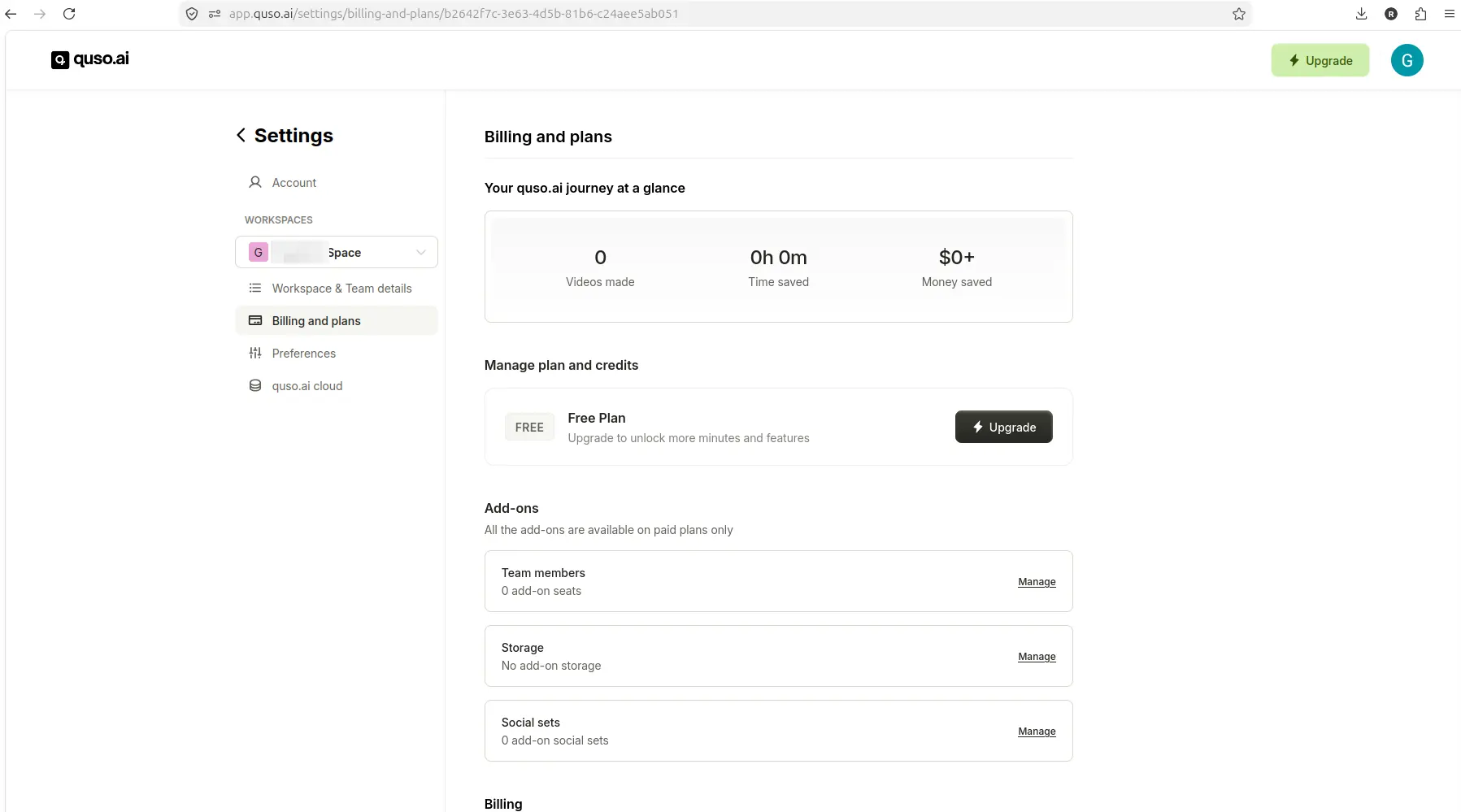
The tested Quso.ai account showed Free Plan status, but the billing page did not clearly show the advertised 75-credit balance.
This suggests that Quso.ai's free plan may require upgrade or referral actions before clip generation completes, but I cannot confirm whether some free users can generate clips without upgrading. For more details on Quso.ai's free-plan behavior, see what Quso.ai's free plan allows.
Vizard AI Free Plan
Based on available CreatorIntelHQ evidence, Vizard AI's free plan allowed:
- Signup with Gmail and a short onboarding survey
- Dashboard access with 60 credits visible
- MP4 upload (MKV rejected with a clear format error)
- AI clip generation from a 27-second test video
- Caption preview and 9:16 reframe preview (though reframing did not consistently center the subject)
- Editor access after generation
- Download after closing an upgrade modal, with a visible watermark in the downloaded file
Vizard AI's advertised free plan includes 60 credits per month, AI-generated clips, 720p export, full editor access, and 3-day storage. The tested workflow confirmed that free users can generate, preview, edit, and download clips with a watermark before paying. For more details, see the Vizard AI review.
Free Plan Winner
Vizard AI offers a more complete free workflow in this comparison. In the tested evidence, Vizard AI allowed clip generation, caption preview, editor access, and watermarked download, while Quso.ai's free workflow hit upgrade modals before generation completed. If you need to test output quality before paying, Vizard AI's free plan is the safer first choice.
Workflow Comparison: Upload to Export
Quso.ai Workflow
In my test, the Quso.ai workflow included:
- Signup and onboarding: Google account signup, workspace setup, and role/goal selection
- Dashboard access: Multiple AI tools visible, including AI Clips, AI Captions, AI Writer, Social Media Planner, and AI Analytics
- YouTube link entry: Paste a YouTube URL, reach a pre-generation screen with language selection, "Generate clips" button, and an estimated ~8 credits
- MP4 upload setup: Upload a local MP4 file, reach a pre-generation screen with language selection, "Generate clips" button, caption style options, CutMagic option, and an estimated ~1 credit
- Upgrade modal: Clicking "Generate clips" in both workflows opened a paid upgrade modal before visible processing
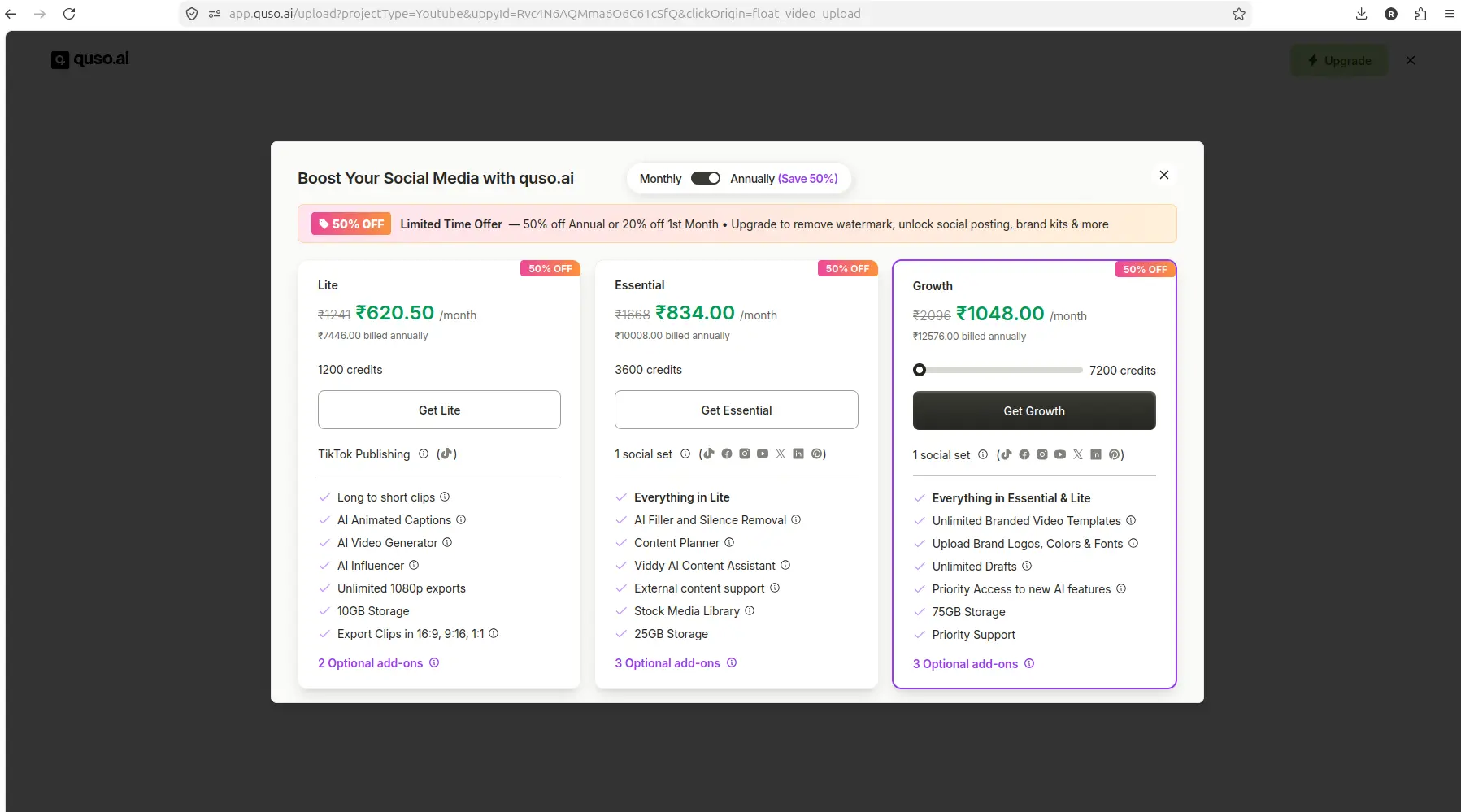
The Quso.ai free workflow hit an upgrade modal after Generate clips in the YouTube-link test.
⚠️ The figures in this modal are ₹ INR, not USD — Quso's in-app upgrade screens render in the local currency of the session they were captured from, and this one also shows a 50% off promotion rather than list prices. Read Quso's USD pricing from its public pricing page, never from a modal like this.
I could not verify the steps after the upgrade modal, including clip generation, caption accuracy, reframing quality, editor access, export options, or final watermark behavior.
Vizard AI Workflow
Based on available CreatorIntelHQ evidence, the Vizard AI workflow included:
- Signup and onboarding: Gmail signup, short onboarding survey asking about role, acquisition source, and goal
- Dashboard access: Free plan with 60 credits visible, clear upload/import options
- MP4 upload: Local MP4 upload accepted (MKV rejected with a clear format error)
- AI clip generation: Vizard generated one AI clip from a 27-second test video
- Result screen: Clip title, 8.0/10 score, 720p label, transcript/caption segments, publish/download/edit options, and a visible watermark
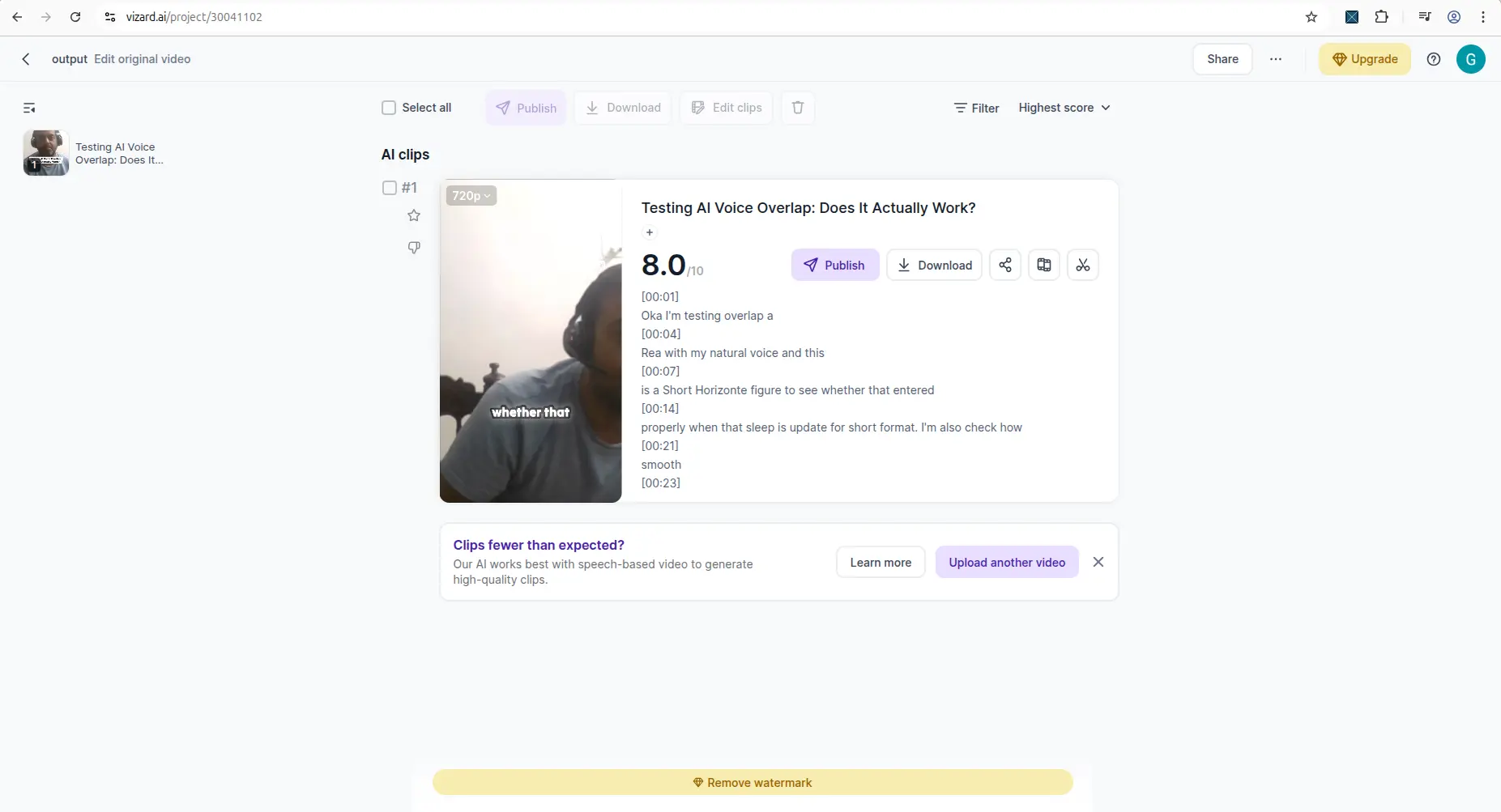
Available CreatorIntelHQ evidence showed Vizard AI reaching a generated clip result with captions and reframing controls.
- Editor access: Editor opened after generation, with preview and edit options
- Download: After closing an upgrade modal, download was allowed, but the downloaded file included a visible watermark
The Vizard AI workflow was more complete in the tested evidence, but caption accuracy and reframing quality still need manual review before publishing.
Workflow Winner
Vizard AI offers a more transparent workflow in this comparison. The tested evidence shows that Vizard AI allows free users to complete the full workflow from upload through watermarked download, while Quso.ai's free workflow stopped at the upgrade modal before generation completed.
Every free plan runs out somewhere. Know where first.
The Free-Plan Reality Check: what OpusClip, Vizard AI, Submagic and Quso.ai actually let you do for $0 - from real signups, real uploads and real paywall hits.
Update: Vizard's 2026 changes
Re-verified on 2026-08-25. Vizard's free plan exports at 720p — confirmed by putting a 1080p source through and inspecting the downloaded clips, with 1080p and above paywalled. Vizard also added a second clipping model in July 2026; both are free-plan selectable and produce noticeably different results, covered in Model v1 vs v2.
Output Quality Comparison
Quso.ai Output Quality
I could not verify Quso.ai's output quality because clip generation did not complete in my test. The pre-generation screens showed caption style options and a CutMagic option, but I did not see generated clips, captions, reframing, or editor previews.
Vizard AI Output Quality
Based on available CreatorIntelHQ evidence, Vizard AI generated one AI clip from a 27-second horizontal MP4 test video. The result screen showed:
- A clip title and 8.0/10 score
- A 720p label
- Transcript/caption segments
- Publish, download, and edit options
- A visible watermark
When the generated vertical clip was played, the captions appeared on the video and were mostly understandable, but not every word looked correct. The 9:16 reframing did not consistently keep the subject centered during playback, and part of the subject's face/body moved toward the edge of the frame.
This suggests that Vizard AI's free-plan output is usable for testing workflow fit and caption/reframing quality, but manual review and editing are still needed before publishing.
Output Quality Winner
Vizard AI is the only tool in this comparison where output quality could be verified. Quso.ai's output quality remains unverified because generation did not complete in the tested workflow.
Credits, Limits, and Pricing Comparison
Quso.ai Credits and Pricing
Quso.ai's advertised free plan includes:
- $0/month
- 75 credits per month
- 720p render quality
- AI Clips & Captions
- YouTube Chapters
- Direct TikTok Publishing
- Watermark
In my test, the billing page confirmed I was on the Free Plan, but it did not clearly display a 75-credit balance. The YouTube pre-generation screen showed an estimated ~8 credits, and the MP4 pre-generation screen showed an estimated ~1 credit, but I could not verify whether credits were deducted or whether generation completed after the upgrade modal.
Quso.ai's advertised paid plans include:
- Lite: $29/month, or $19/month billed yearly (rechecked 26 August 2026), with 100–200 credits, 10GB storage, AI Clips & Captions, AI Video Generator, resizing, and 1080p exports
- Essential: $39/month, or $26/month billed yearly, with 300–600 credits, 25GB storage, and additional tools including AI Filler and Silence Removal, One-Click Publishing, and Unlimited Social Post Scheduling
- Growth: $49/month, or $33/month billed yearly, with 600–1200 credits, 75GB storage, and premium features including priority support, priority access to new AI features, unlimited branded video templates, and Analytics
Pricing should be verified before purchase because plan details can change. For more details, see what Quso.ai's free plan allows.
Vizard AI Credits and Pricing
Vizard AI's advertised free plan includes:
- $0
- 60 credits per month
- AI-generated clips
- 720p export
- Full editor access
- 3-day storage
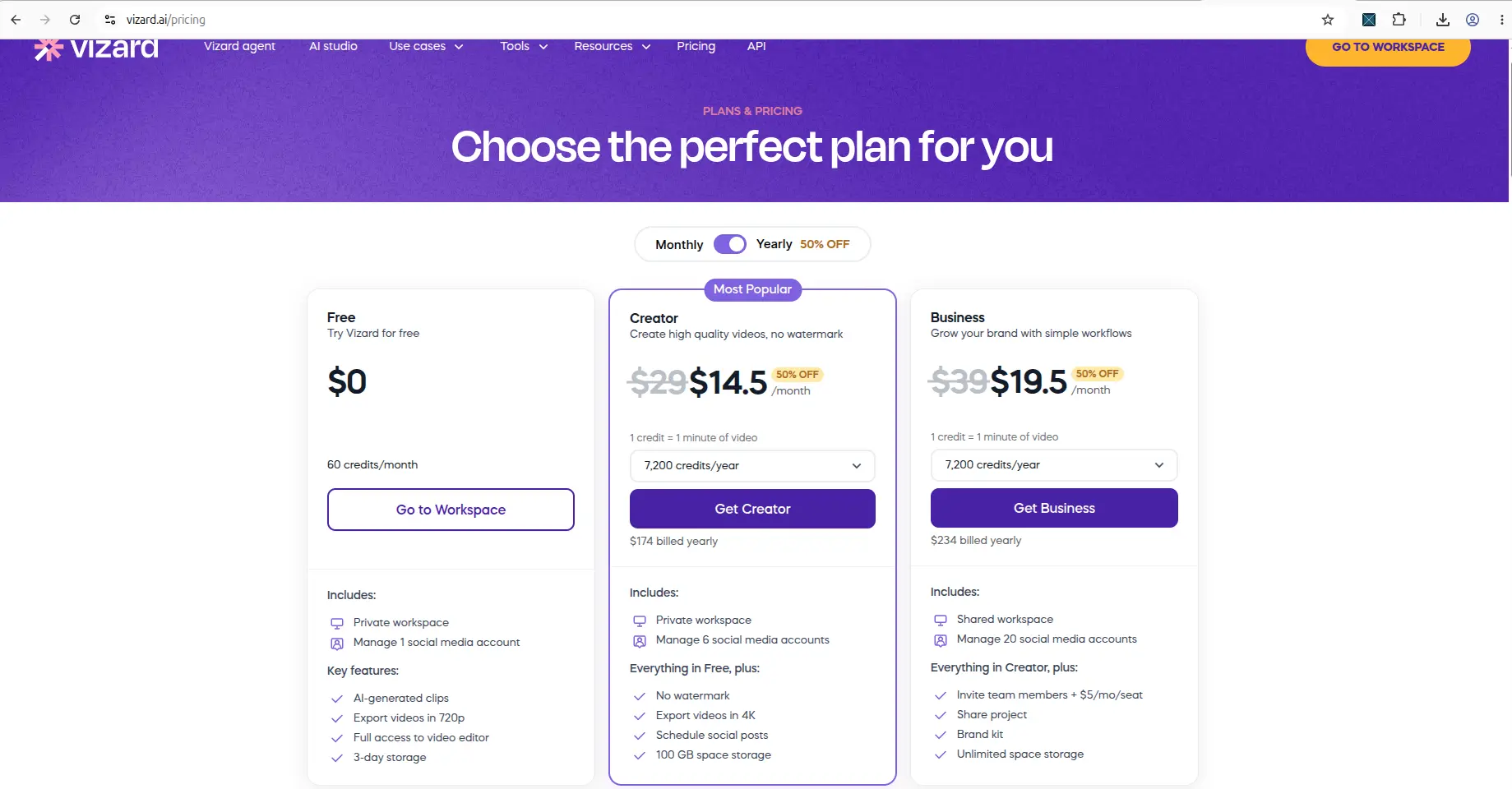
Vizard AI's pricing page as of 12 August 2026, showing Creator at $14.5/month and Business at $19.5/month on yearly billing.
In the tested workflow, 60 credits were visible on the dashboard after signup, and one AI clip was generated from a 27-second test video. The downloaded file included a visible watermark.
Vizard AI's advertised paid plans include:
- Creator: $14.5/month on yearly billing (50% off the $29/month list price) with 7,200 credits/year, no watermark, 4K export, scheduled social posts, and 100GB of storage
- Business: $19.5/month on yearly billing (50% off the $39/month list price) with 7,200 credits/year, unlimited storage, and adds shared workspace, up to 20 social accounts, team members at $5/month per seat, shared project, and brand kit
Pricing should be verified before purchase because plan details can change. For more details, see every Vizard AI free-plan limit, tested.
Pricing Winner
Both tools offer free plans with similar credit allocations (60–75 credits per month) and 720p export quality. Vizard AI is the safer first choice in this comparison because the tested evidence confirms that free users can generate, preview, edit, and download clips with a watermark, while Quso.ai's free workflow hit upgrade modals before generation completed.
Watermark and Export Comparison
Quso.ai Watermark and Export
I could not verify Quso.ai's watermark or export behavior because clip generation did not complete in my test. The advertised free plan includes a watermark, but I did not reach the export or download step.
Vizard AI Watermark and Export
Based on available CreatorIntelHQ evidence, Vizard AI's free-plan download included a visible watermark. After clicking the download icon inside the clip card, an upgrade modal appeared first, asking the user to upgrade to download videos in bulk and showing Creator and Business plan options. After closing the popup and trying again, the download was allowed, but the downloaded video had a visible Vizard watermark. The preview also showed a visible watermark and a "Remove watermark" bar at the bottom of the page.
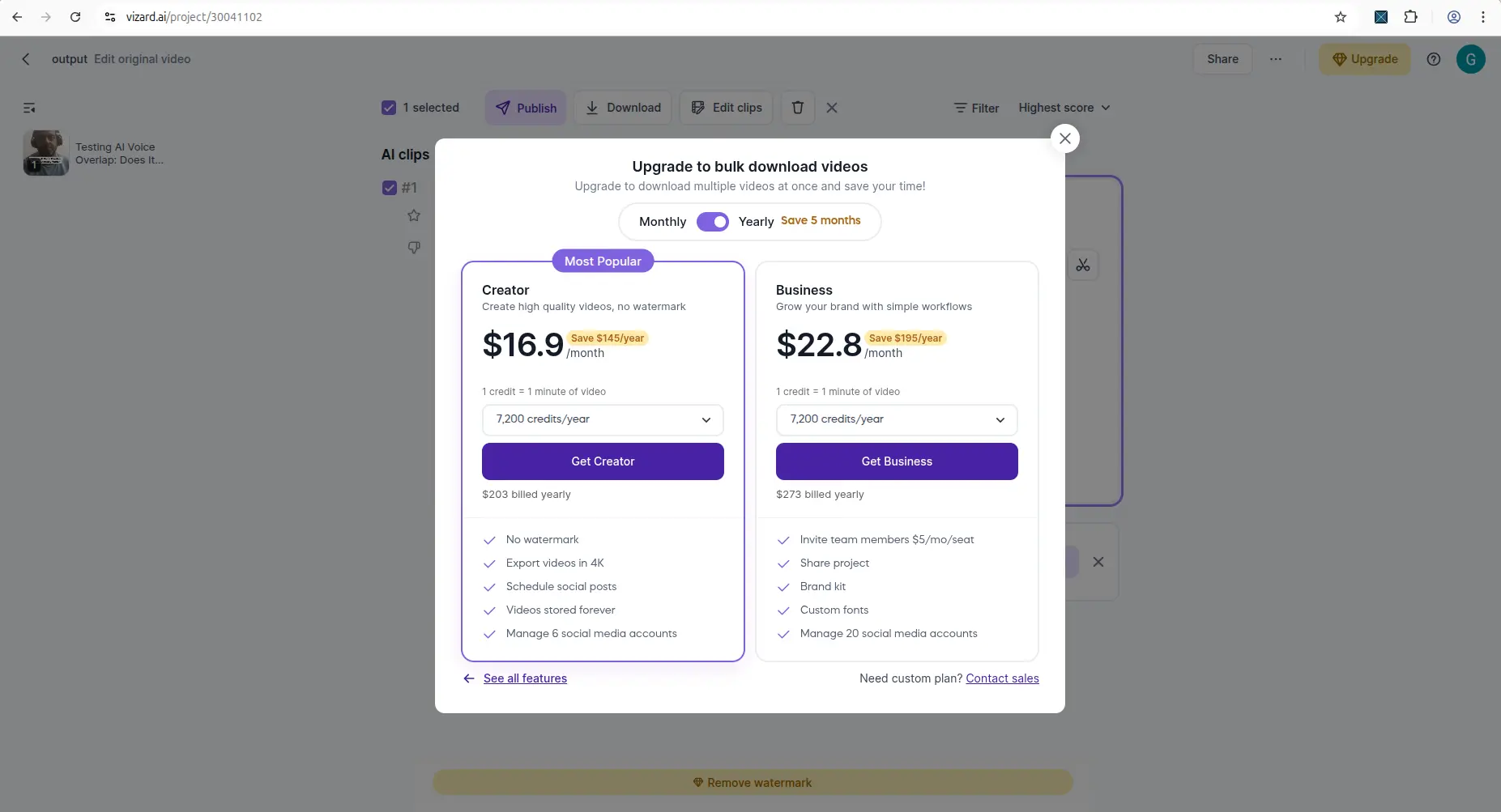
Available CreatorIntelHQ evidence for Vizard AI included a free-download result that surfaced watermark behavior.
Watermark and Export Winner
Vizard AI is the only tool in this comparison where watermark and export behavior could be verified. Vizard AI's free plan allows download with a visible watermark after closing an upgrade modal, while Quso.ai's watermark and export behavior remain unverified because generation did not complete in the tested workflow.
Pros and Cons
Quso.ai
Pros
- Dashboard includes multiple AI tools in one workspace (AI Clips, AI Captions, AI Writer, Social Media Planner, AI Analytics)
- YouTube link entry and MP4 upload setup are straightforward
- Pre-generation screens show estimated credit costs before generation
- Advertised free plan includes 75 credits per month, 720p render quality, AI Clips & Captions, YouTube Chapters, and Direct TikTok Publishing
- Paid plans include advanced features like AI Filler and Silence Removal, One-Click Publishing, Unlimited Social Post Scheduling, and Analytics
Cons
- In my test, clicking "Generate clips" opened a paid upgrade modal before visible processing in both YouTube and MP4 workflows
- Billing page did not clearly display the advertised 75-credit balance
- Generated clip output, caption accuracy, reframing quality, editor access, export options, and final watermark behavior could not be verified
- MKV uploads are not supported
- Free-plan generation limits are unclear based on the tested workflow
Vizard AI
Pros
- Free workflow allowed signup, dashboard access, MP4 upload, AI clip generation, caption preview, editor access, and watermarked download
- 60 credits visible on dashboard after signup
- AI clip generation completed from a 27-second test video
- Editor access allowed preview and editing before download
- Advertised free plan includes AI-generated clips, 720p export, full editor access, and 3-day storage
- Paid plans include no watermark, 4K export, scheduled social posts, 100GB storage on Creator and unlimited on Business, shared workspace, brand kit, and custom fonts
Cons
- Free-plan download includes a visible watermark
- Upgrade modal appeared before download, requiring the user to close the popup before downloading
- In the tested workflow, 9:16 reframing did not consistently keep the subject centered during playback
- Caption accuracy needs manual review before publishing
- MKV uploads are not supported
- Free plan includes only 3-day storage, which may not be enough for creators who need to review clips over several days
Best Choice By Creator Type
Choose Quso.ai if:
- You want to explore a dashboard with multiple AI tools (AI Clips, AI Captions, AI Writer, Social Media Planner, AI Analytics) in one workspace
- You're willing to verify whether the free plan allows clip generation and export after the initial upgrade prompts, or you're ready to evaluate paid plans based on the advertised feature set
- You need advanced features like AI Filler and Silence Removal, One-Click Publishing, Unlimited Social Post Scheduling, or Analytics, and you're ready to pay for a Lite, Essential, or Growth plan
- You prefer a tool that advertises a higher free-plan credit allocation (75 credits per month vs. 60 credits per month)
Choose Vizard AI if:
- You need to test the complete free workflow—upload, AI clip generation, caption preview, editor access, and watermarked download—before committing to a paid plan
- You're comfortable with manual caption review and reframing adjustments before publishing
- You want to verify output quality with your own content type (podcast, talking-head, tutorial, multi-speaker) before paying
- You need a tool where the free-plan workflow is more transparent and predictable based on tested evidence
- You're ready to upgrade to Creator or Business plans if the free output quality meets your needs and you want to remove the watermark, export in 4K, schedule social posts, or add team members
Compare both first if:
- You want to verify which tool handles your specific content type more reliably
- You need to compare editor features, social publishing integrations, and team collaboration options across both platforms
- You're evaluating paid plans and want to compare Quso.ai's Lite/Essential/Growth features against Vizard AI's Creator/Business features
- You want to test the same source video through both tools to compare clip selection, caption accuracy, reframing quality, and export behavior
Where Quso.ai Wins
Quso.ai wins in this comparison if:
- You value a multi-tool dashboard that includes AI Clips, AI Captions, AI Writer, Social Media Planner, and AI Analytics in one workspace
- You prefer a tool that advertises a higher free-plan credit allocation (75 credits per month vs. 60 credits per month)
- You're ready to evaluate paid plans based on advertised features like AI Filler and Silence Removal, One-Click Publishing, Unlimited Social Post Scheduling, and Analytics, even if the free workflow hit upgrade friction in the tested evidence
Where Vizard AI Wins
Vizard AI wins in this comparison if:
- You need to test the full free workflow from upload through watermarked download before paying
- You want to verify output quality, caption accuracy, and reframing behavior with your own content before committing to a paid plan
- You prefer a tool where the free-plan workflow is more transparent and predictable based on tested evidence
- You're comfortable with manual caption review and reframing adjustments before publishing
Final Verdict: Which Tool Should You Choose?
Choose Vizard AI first if you need to test the complete free workflow from upload through watermarked download before deciding whether to pay. In this comparison, Vizard AI's tested evidence shows that free users can generate, preview, edit, and download clips with a watermark, while Quso.ai's free workflow hit upgrade modals before generation completed.
Choose Quso.ai if you're willing to explore a multi-tool dashboard and are ready to evaluate paid plans on the advertised feature set — not on the strength of the free plan, which blocked clip generation in both our tests (May and August 2026). Quso.ai's dashboard includes multiple AI tools in one workspace, and the advertised free plan includes 75 credits per month, but the tested evidence could not confirm whether free-plan generation completes without upgrading.
The safest next step is to sign up for Vizard AI's free plan, upload a representative video, generate one AI clip, review the captions and reframing in the editor, and download the watermarked result. If the output quality and workflow fit your needs, compare Vizard's paid plans against Quso.ai's advertised features and pricing before upgrading either tool. If you need to verify Quso.ai's free-plan generation limits, sign up for a free account and test the workflow with your own content before paying. Our pricing comparison for all six tools carries the current figures for both.
For more detailed reviews, see the Quso.ai review and the Vizard AI review. For broader comparisons, see AI video repurposing tools for small creators and Quso.ai vs OpusClip.
Frequently Asked Questions
Can I generate clips on Quso.ai's free plan without paying?
In my test, Quso.ai's free plan allowed dashboard access, YouTube link entry, and MP4 upload setup, but clicking "Generate clips" in both workflows opened a paid upgrade modal before visible processing started. I could not verify whether free-plan generation completes after the upgrade modal, so the safest next step is to sign up for a free account and test the workflow with your own content before paying.
Can I download clips on Vizard AI's free plan?
Yes, based on available CreatorIntelHQ evidence. Vizard AI's free plan allowed download after closing an upgrade modal, but the downloaded video included a visible watermark. The tested workflow confirmed that free users can generate, preview, edit, and download clips with a watermark before paying.
Does Quso.ai support MKV uploads?
No. In my test, Quso.ai rejected an MKV upload attempt with a clear format error stating that only video/mp4, video/webm, and video/quicktime are supported. If you record with tools like OBS where MKV is a common format, you'll need to convert the video to MP4 before uploading to Quso.ai.
Does Vizard AI support MKV uploads?
No. Based on available CreatorIntelHQ evidence, Vizard AI rejected an MKV upload attempt with a clear format error listing supported formats: MP4, MOV, 3GP, AVI, MP3, WAV, and M4A. If you record in MKV format, you'll need to convert the video to a supported format before uploading to Vizard AI.
Are Vizard AI's captions accurate?
In the tested workflow, Vizard AI auto-created captions that were mostly understandable, but not every word looked correct. Caption accuracy depends on audio quality, speaker clarity, and background noise. Manual review and editing are still needed before publishing.
Does Vizard AI's reframing keep subjects centered?
In the tested workflow, Vizard AI's 9:16 reframing did not consistently keep the subject centered during playback, and part of the subject's face/body moved toward the edge of the frame. Reframing quality may improve with centered talking-head videos, but manual review and adjustments are still recommended before publishing.
How many credits does Quso.ai's free plan include?
Quso.ai's advertised free plan includes 75 credits per month. In my test, the billing page confirmed I was on the Free Plan, but it did not clearly display a 75-credit balance. The YouTube pre-generation screen showed an estimated ~8 credits, and the MP4 pre-generation screen showed an estimated ~1 credit, but I could not verify whether credits were deducted or whether generation completed after the upgrade modal.
How many credits does Vizard AI's free plan include?
Vizard AI's advertised free plan includes 60 credits per month. In the tested workflow, 60 credits were visible on the dashboard after signup, and one AI clip was generated from a 27-second test video.
Should I pay for Quso.ai or Vizard AI before testing the free plan?
No. Start with the free plan to verify that the workflow, output quality, caption accuracy, and reframing behavior meet your needs before paying. In this comparison, Vizard AI's free plan allowed a more complete workflow test, while Quso.ai's free workflow hit upgrade modals before generation completed. Test both tools with your own content before committing to a paid plan.
Can I use the same video to compare Quso.ai and Vizard AI?
Yes, and that's the recommended next step for a fair comparison. The evidence in this article comes from separate tests, so running the same source video through both tools will help you compare clip selection, caption accuracy, reframing quality, and export behavior more directly.