
Review
vidIQ Free Plan: What You Get Without Paying
What vidIQ's free plan includes in 2026 — free credits, AI ideas, keyword and outlier tools — and the point where Boost becomes worth paying for.
Note: re-verified on 2026-08-27 with a fresh free account. Credit costs and result caps below were measured in-app, not taken from vidIQ's own comparison table.
Is vidIQ Free?
Yes — there is a permanently free plan, not a trial. It gives you 150 AI credits a month on a pool that refreshes on a fixed date, 3 video ideas a day on a separate allowance that tops up regardless, and keyword searches that are unlimited and cost no credits at all.
The wall is not where most people expect it. Searching for keywords is free and uncapped — what is capped is how much of each result you are shown. We ran a search that returned three related keywords and blurred the rest behind a prompt naming exactly what was withheld: 164 more related keywords.
And the credit pool does not drain evenly. Unlocking a video moved our balance by 8. One AI title rewrite costs 50 — a third of the month, in a single click. So the free plan does not run out because vidIQ is stingy. It runs out because the expensive action and the cheap one look identical on screen, and nothing warns you which is which.
Spend the pool knowing that, and the free plan covers considerably more than its reputation suggests.
→ Try the vidIQ Free Plan (150 Credits a Month, No Trial Clock)
Disclosure: This page may contain affiliate links. If you choose a tool through those links, CreatorIntelHQ may earn a commission at no extra cost to you. vidIQ did not pay for this page, has not seen it before publication, and had no input into what it says. Every figure here was measured on a free account we opened ourselves — including the two places where vidIQ's own interface understates what the free plan gives you. How we test is documented in our editorial process.
Based on hands-on testing · How we test creator tools
What The vidIQ Free Plan Costs You, Action By Action
This is the table we wanted when we started testing and could not find anywhere, including on vidIQ's own pricing page. Every figure in the right-hand column was read off a fresh free account in August 2026, by recording the credit balance before and after each action rather than trusting the number printed on the button.
| What you do | What vidIQ's interface says | What we measured (August 2026) |
|---|---|---|
| Search for a keyword | Not stated | Unlimited, and costs 0 credits. The searching is never the constraint. |
| Related keywords shown per search | Not stated | 3, with the remainder blurred. One search named what it was holding back: 164 more. |
| Outlier results per search | "3 outlier research" on the plans page; "6/search" in the upgrade modal | 8 — more than either figure vidIQ publishes. Counted twice, on the browse feed and on a real query. |
| Unlock a video | 10 credits | 8 credits. The balance moved 150 → 142 → 134 across two uses. |
| AI title rewrite | 50 credits | 50 credits — one third of your month. This is the action that ends free plans. |
| AI thumbnail rewrite | 50 credits | 50 credits. Same cost, same third of the pool. |
| Video ideas | 3 per day | A separate allowance from the credit pool. It tops up daily whether or not your credits are gone. |
| Monthly credit pool | 150/month — but the same table calls video scoring "2/lifetime" | 150, refreshing monthly. Nothing we tested was lifetime-limited. |
Read down the right-hand column and the shape of the free plan changes. Three of the eight rows are more generous than vidIQ's own interface claims, and the single genuinely restrictive one — the 50-credit rewrite — is the one the interface presents most casually.
If you are comparing vidIQ with broader creator workflow tools, you may also want to read our vidIQ Review 2026, TubeBuddy vs vidIQ, and Best YouTube Tools for Small Creators.
Why I Tested vidIQ For HMQUIZ
I tested vidIQ from the perspective of a small creator running a channel like HMQUIZ.
My goal was simple: I wanted to see whether vidIQ is useful before paying. I wanted to understand what the free plan actually gives, where credits run out, what gets locked behind Boost, and whether the platform feels practical for a small YouTube creator.
After connecting the YouTube channel, vidIQ imported the channel videos and started showing suggestions, AI prompts, optimization areas, keywords, and outlier discovery. The first impression was positive because the interface felt clean and easy to understand.
First Impression: vidIQ Feels Beginner-Friendly
vidIQ felt easier to start with than many creator tools.
The dashboard was clean, the left navigation was simple, and the tool quickly showed areas like Feed, Search, Analytics, Optimize, Keywords, and Outliers. It also suggested installing the browser extension, but the main dashboard itself was still easy to explore.
The most useful early part was the AI-style prompt area. vidIQ suggested questions like:
- video ideas
- how to get more views
- channel audit
- audit my channel
- feedback on a YouTube video
That made the tool feel less like a complicated analytics dashboard and more like a guided assistant.
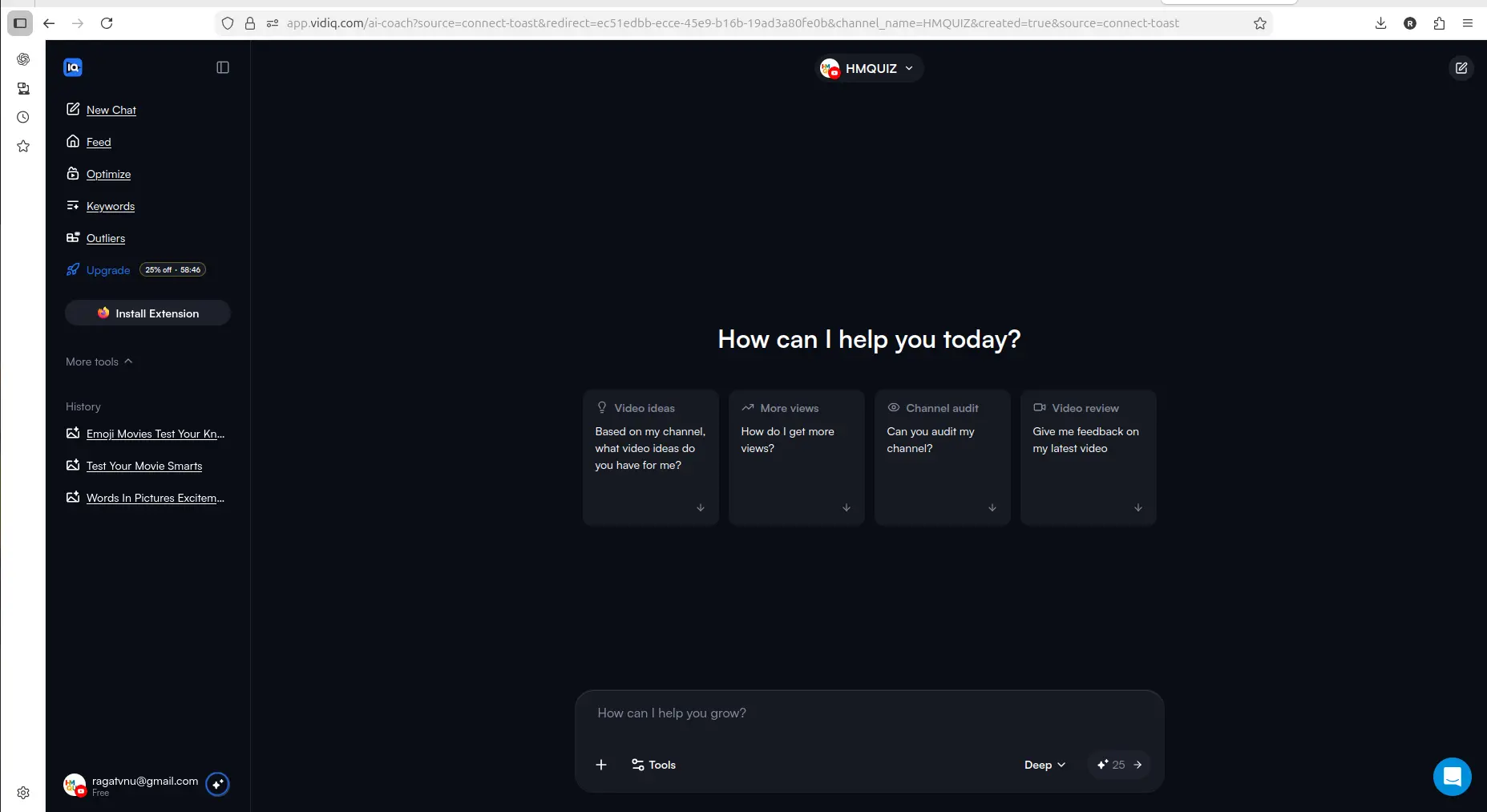
vidIQ feels beginner-friendly because it gives small creators clear AI-style prompts instead of making them search for every feature manually.
What You Can Use On The Free Plan
The free plan is not unlimited, but it does give you enough to test the product.
The free plan runs on two separate allowances. There is a credit pool — 150 AI credits per month, refreshing on a fixed date — and, listed separately on vidIQ's own plans screen, 3 video ideas per day. The credits are the constraint people notice; the daily ideas top up regardless. Credits are what the Optimize workflows spend. On a fresh account in August 2026 the costs were a video unlock at 10 credits (the balance actually moved by 8 both times I used it), and a title or thumbnail rewrite at 50 credits each.
That last number is the one worth sitting with: a single AI title rewrite costs a third of your monthly pool. Three title rewrites and the month is done.
Keyword research works differently and is more generous than the credit system suggests. Searches are unlimited and cost no credits at all — what is capped is how much of each result you see: three related keywords per search, with the rest blurred behind a Boost prompt that tells you exactly what you are missing ("164 more related keywords" on one search I ran). Outlier research showed eight results per search before the same kind of wall.
That makes the free plan useful for:
- understanding the dashboard
- testing AI prompts
- seeing channel-specific suggestions
- checking some optimization workflows
- exploring keyword and outlier sections
- deciding whether the tool fits your style
For a small creator, that matters. You do not want to pay before knowing whether a tool makes sense for your workflow.
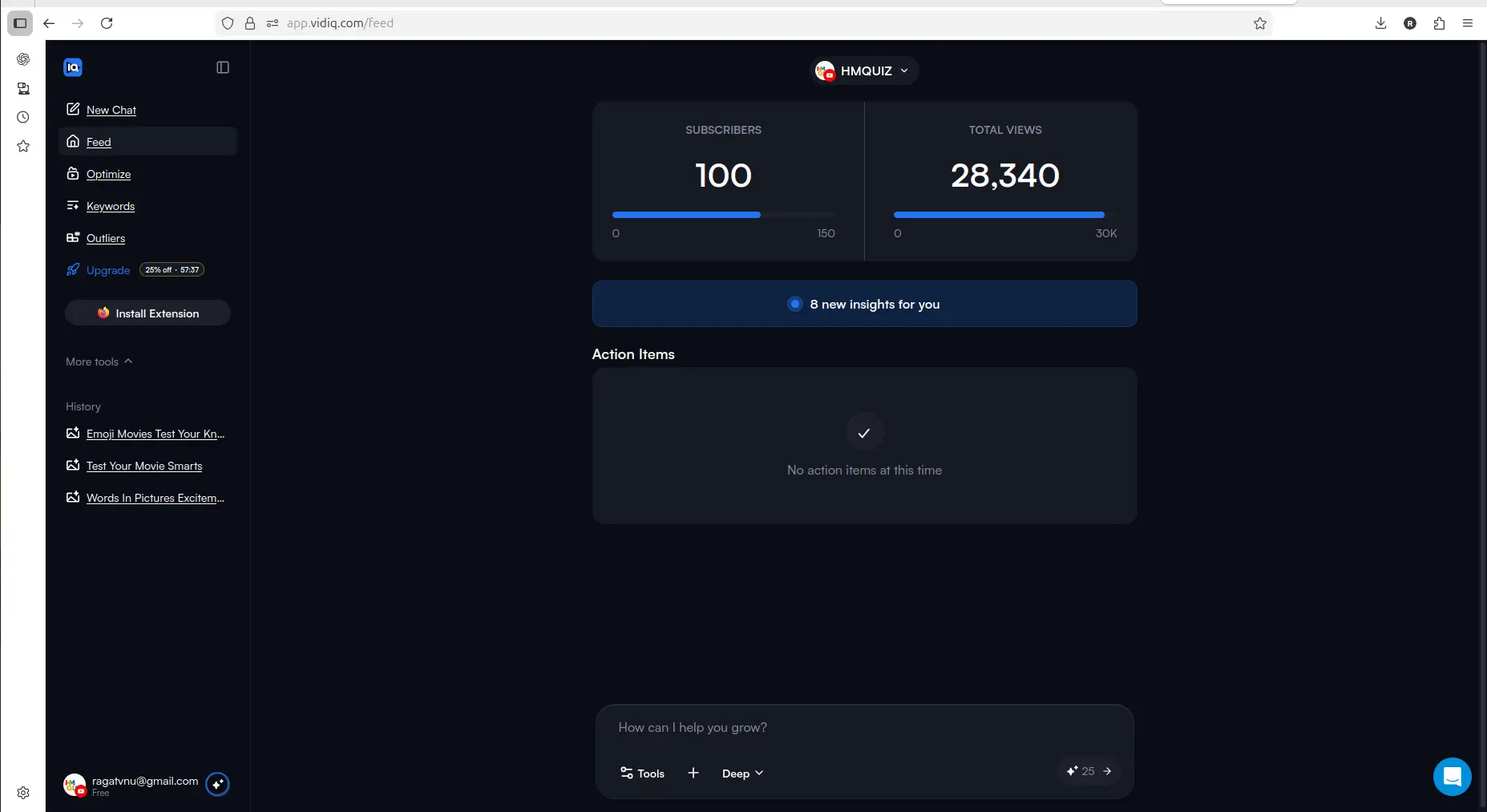
vidIQ starts giving channel-specific signals and action items after connecting the YouTube channel.
Every free plan runs out somewhere. Know where first.
The Free-Plan Reality Check: what OpusClip, Vizard AI, Submagic and Quso.ai actually let you do for $0 - from real signups, real uploads and real paywall hits.
vidIQ's Own Numbers Do Not Match What It Charges
This is the part you will not find on vidIQ's pricing page, and it is the reason we baseline the credit balance instead of reading the buttons.
Outliers: vidIQ gives three different answers, and the real one is the most generous. Its plans page says free users get "3 outlier research". The in-app upgrade modal says "6/search". On a live search we counted eight result cards before the blurred wall reading "Get Unlimited Outlier Videos" — verified twice, once on the browse feed and once on a real query. So the free tier gives more than vidIQ's own marketing claims, on two separate surfaces.
Credits: the button label is not the charge. A video unlock is labelled 10 credits. Both times we used it the balance moved by 8 — 150 to 142 to 134. Again, in your favour, and again not what the interface says.
What that means for you: treat vidIQ's in-app free-vs-Boost comparison table as marketing copy, not a specification. The same table claims video scoring is "2/lifetime", which is also wrong — the credit pool refreshes monthly. If you are deciding whether the free plan covers your workflow, count what actually happens to your balance rather than trusting the numbers printed next to the buttons.
We are pointing this out in vidIQ's favour, which is the point: we measured rather than transcribed. Nobody checks a vendor's numbers hoping to find the vendor was too modest.
Where The Free Plan Starts Feeling Limited
The free plan is useful for testing, but not enough for serious ongoing use.
The biggest limitation is credits. 150 a month sounds generous until you price the actions: an AI title rewrite is 50 credits, so the pool covers three of them. If you have a back catalogue of any size, that runs out fast.
For example, the Optimize section showed existing videos and gave a way to improve them. That is useful, especially for a small channel with older uploads. But limited credits mean you cannot treat the free plan as a complete long-term optimization system.
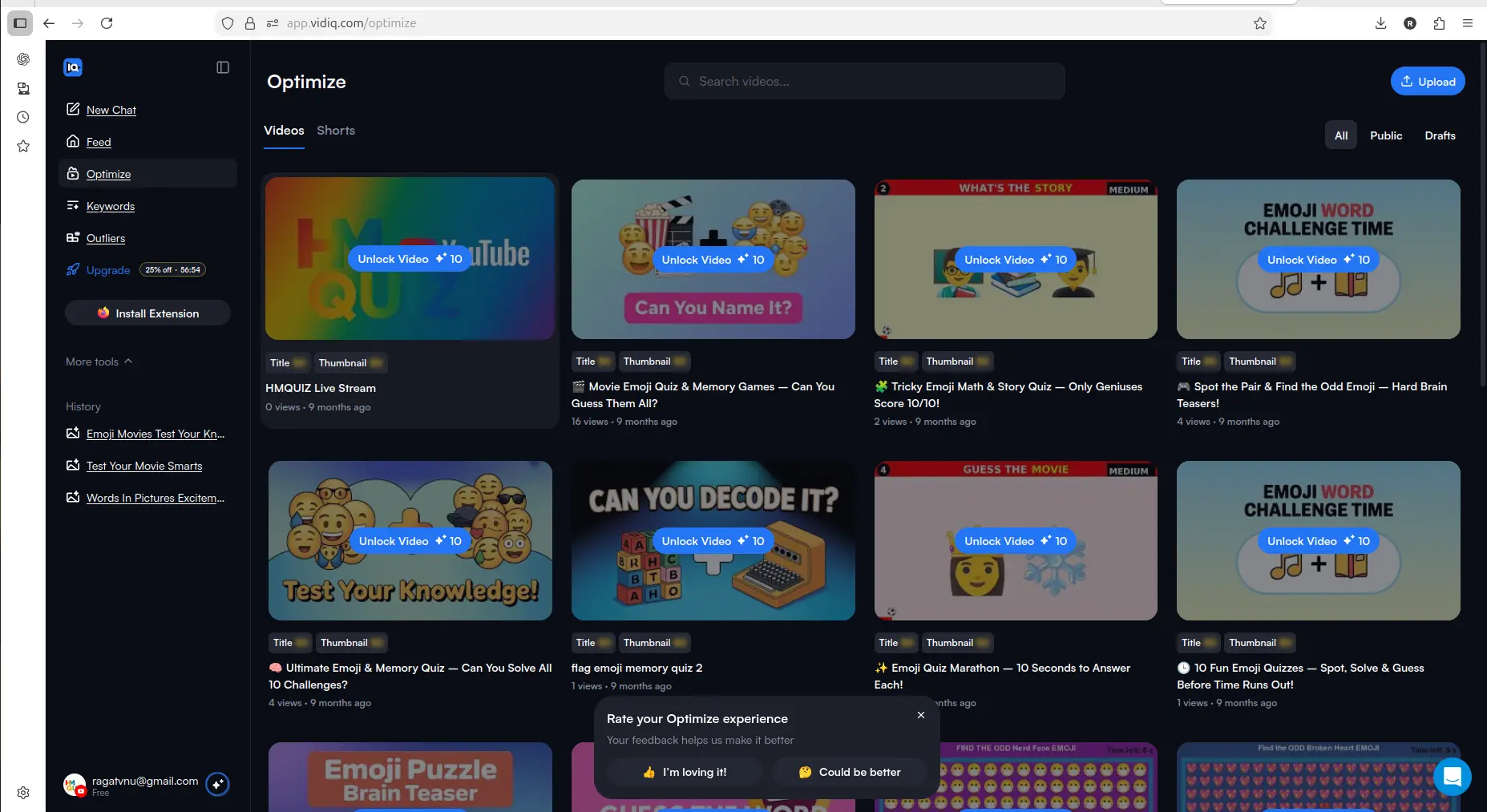
The Optimize section is useful because it shows existing videos that may need improvement, but free credits limit how much you can do.
If your workflow is more about repurposing existing long videos into Shorts than optimizing titles, keywords, and older uploads, our OpusClip Review 2026 is a better next read.
Keywords: Useful Direction, But Boost Matters
The Keywords section looked useful, but deeper access was limited.
In my test, the keyword area showed keyword opportunities and trending keyword sections, but it also showed that more access required Boost. That makes sense from a product point of view, but it also means the free plan is not enough if keyword research is your main reason for using vidIQ.
If you only want to understand how vidIQ handles keyword suggestions, free is enough to explore. But if you want to use keyword research repeatedly for video planning, Boost becomes more relevant.
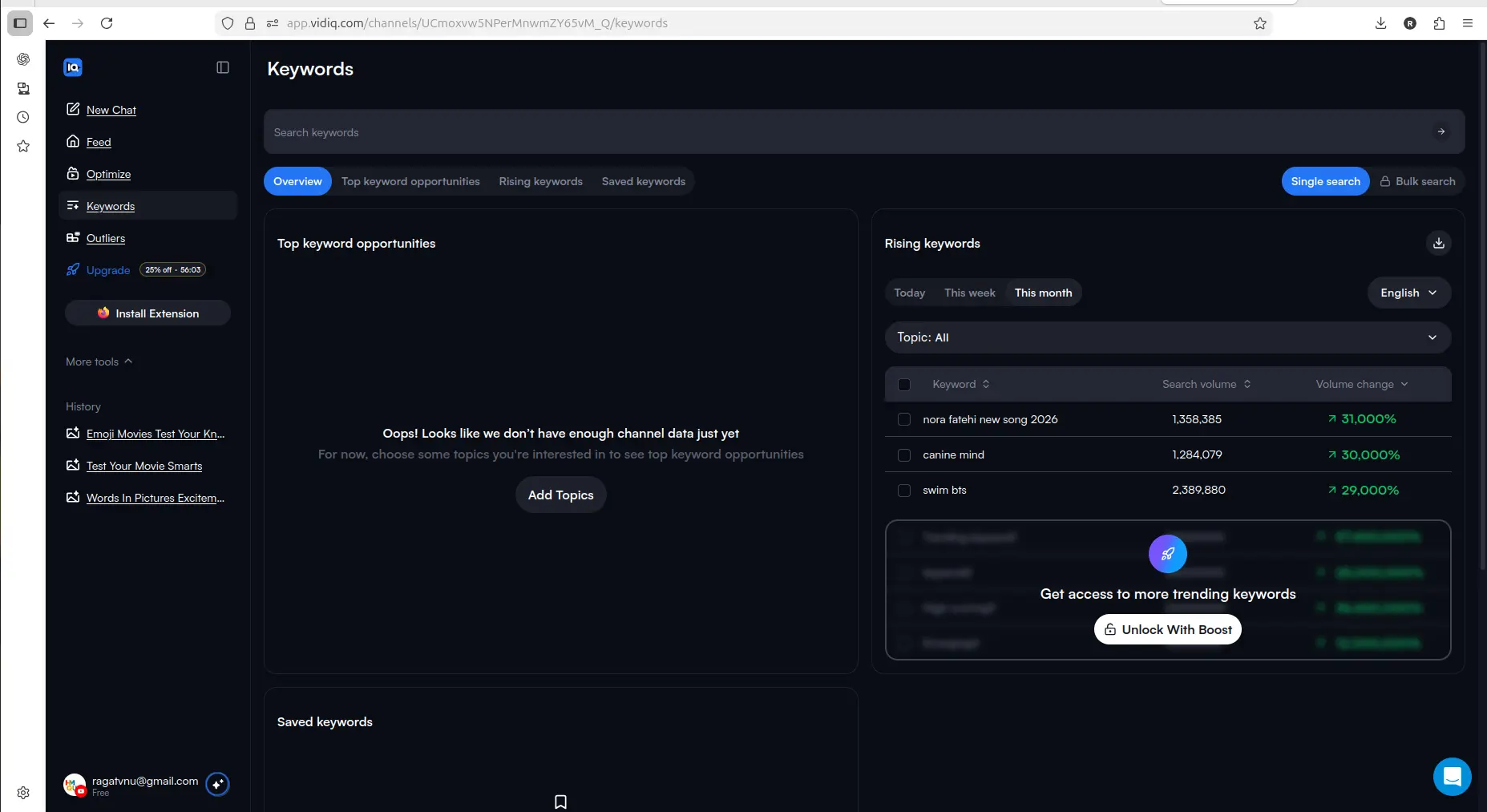
Keyword discovery is visible in vidIQ, but deeper access and more usage push you toward Boost.
Outliers: Helpful For Ideas, But Also Gated
The Outliers section was one of the more interesting parts of vidIQ.
For small creators, outlier discovery can be useful because it helps you see videos that are performing better than expected. That can lead to better topic ideas, thumbnail inspiration, and content angles.
But again, the free experience has limits. vidIQ showed some outlier access, but unlocking more outlier channels required Boost.
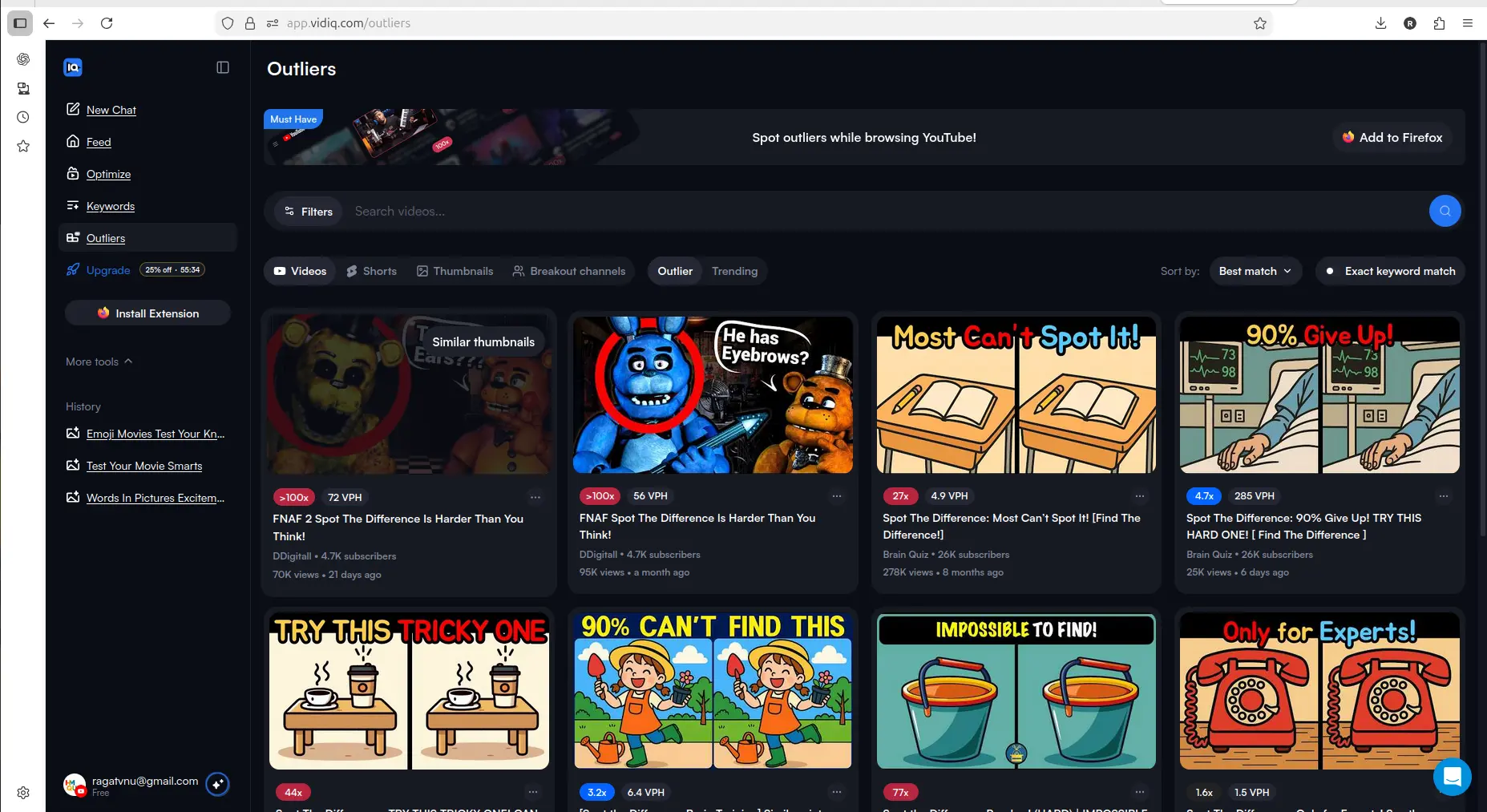
Outliers can help creators find content patterns and topic ideas that are performing better than expected.
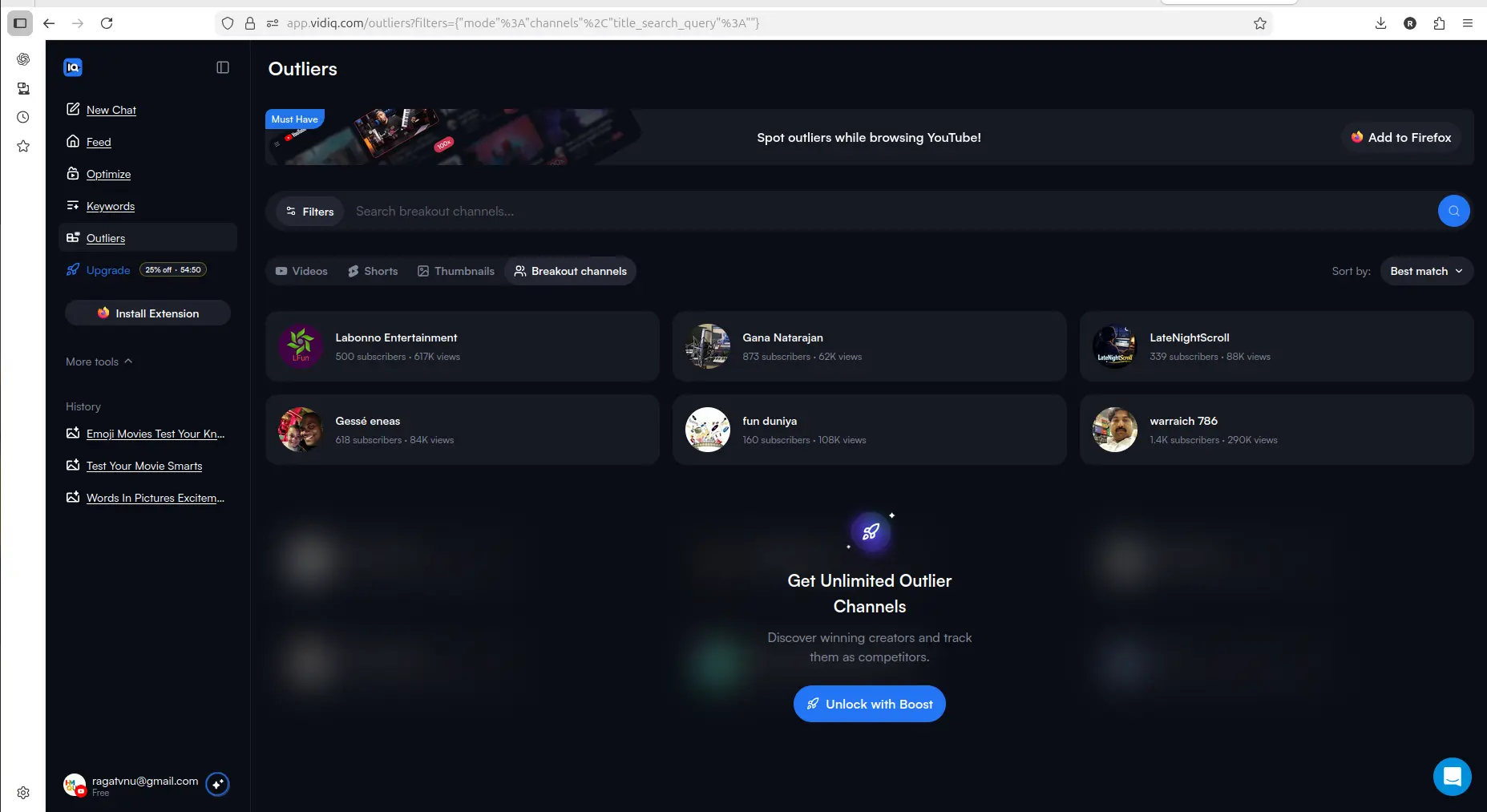
Unlimited outlier access requires Boost, so the free plan is better for testing than ongoing research.
What Boost And Max Appear To Unlock
vidIQ’s pricing screen made the plan difference easy to understand.
The free plan gave 150 monthly AI credits plus 3 video ideas a day, keyword research capped at three related results per search, and outlier research capped at eight. Boost unlocked much more, including higher AI credits, unlimited video ideas, unlimited keyword research, unlimited video optimizations, and subscriber insights. Max added higher AI usage and stronger AI capabilities.
In the app itself the upgrade screen offers two paid tiers, Boost and Max. vidIQ also sells a Boost 1-on-1 Coaching plan, but it appears in the pricing FAQ rather than as a card in the lineup, so you will not see it while upgrading from inside the product.
The important point is that vidIQ makes the upgrade path clear. You can test the tool on free, understand the workflow, and then decide whether Boost is worth it.
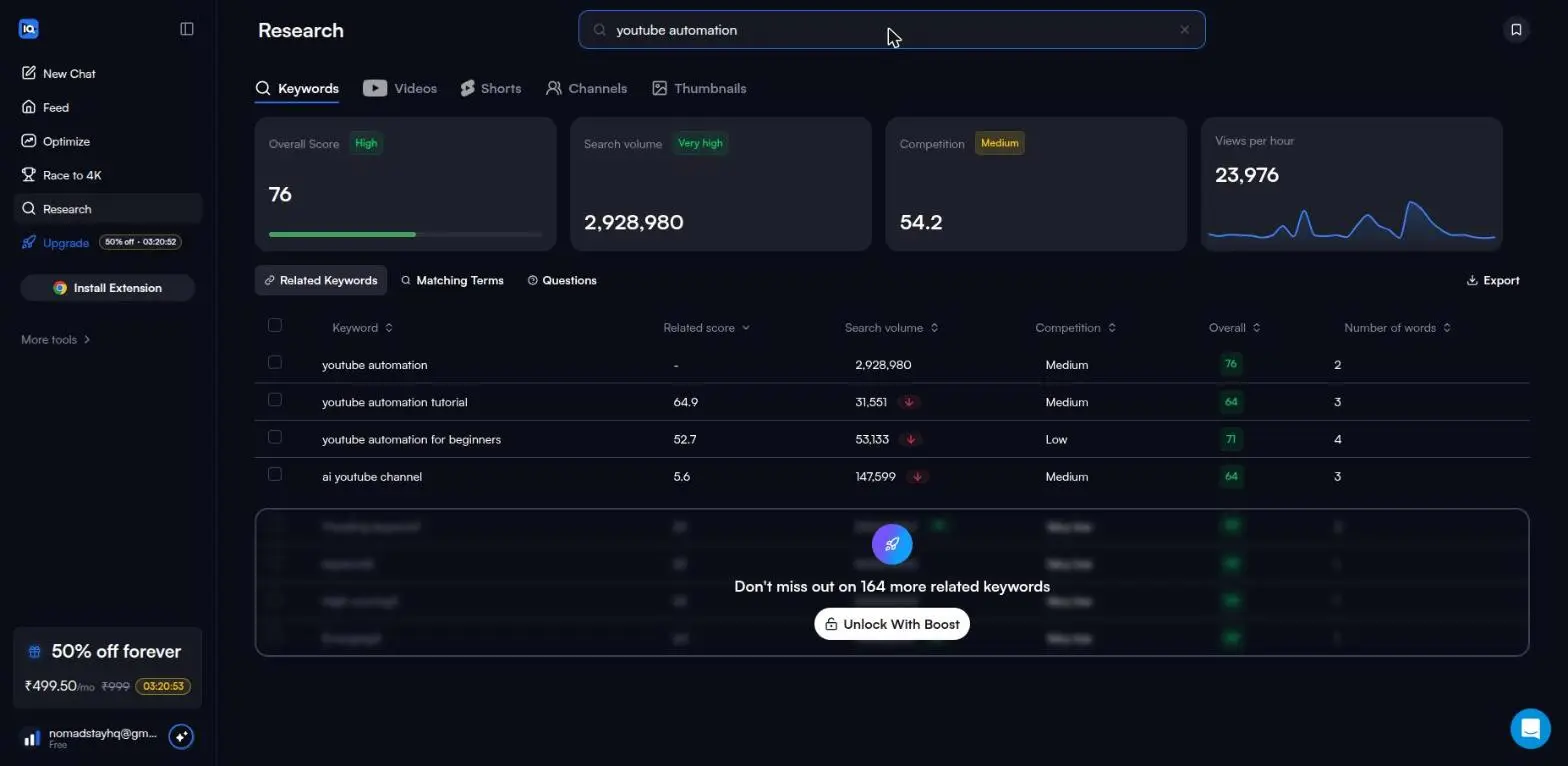
Where the free plan actually stops: three related keywords are shown, and the prompt names exactly what is withheld — 164 more for this search. Captured August 2026.
Who Should Stay Free
Stay on the free plan if you are still exploring vidIQ.
The free plan is enough if you want to:
- understand the dashboard
- test AI prompts
- see how vidIQ thinks about your channel
- try a few optimization workflows
- explore keyword and outlier sections
- decide whether the tool feels useful before paying
For small creators, this is a good starting point. You can learn the interface and test the workflow without committing immediately.
Who Should Consider Boost
Boost starts making sense if you already know you will use vidIQ regularly.
Consider Boost if you want:
- more AI credits
- more video ideas
- repeated keyword research
- more video optimization access
- deeper outlier research
- more subscriber and channel insights
- a more complete workflow instead of occasional testing
The free plan gives a taste. Boost is where vidIQ starts to feel more like an ongoing creator tool.
The honest way to decide: spend one month's 150 credits deliberately — keyword searches cost nothing, so use those freely, and keep the 50-credit rewrites for the two videos that matter most. If you reach the end of the month wanting a third rewrite, that is your answer, and it cost you nothing to find out.
If you are still comparing this upgrade decision with other creator-tool paths, also see our TubeBuddy Review 2026, what TubeBuddy's free plan allows and TubeBuddy vs vidIQ.
Final Verdict: Is vidIQ Free Enough?
vidIQ’s free plan is useful, but it is not enough for serious ongoing channel work.
That is not a bad thing. The free plan does its job well: it lets you test the dashboard, see AI prompts, explore channel suggestions, and try limited optimization features. For a small creator, that is more useful than a free plan that only shows locked screens.
But if you want to use vidIQ repeatedly for ideas, optimization, keyword research, and outlier discovery, Boost is probably where the real workflow begins.
My practical verdict:
- use Free if you want to test vidIQ and understand whether it fits your channel
- consider Boost if you want repeated optimization, keyword research, and idea workflows
- consider Max only if AI usage and deeper creator intelligence become central to your workflow
For HMQUIZ-style creators, I would start with the free plan first, use the credits carefully, and only upgrade if vidIQ becomes part of the regular content planning and optimization process.
If your main bottleneck is short-form repurposing instead of optimization research, read our OpusClip Review 2026. If you want the broader hands-on tool view, see our vidIQ Review 2026.
FAQ
Is vidIQ free?
Yes. vidIQ has a permanently free plan rather than a time-limited trial — we opened a fresh free account in August 2026 and nothing we tested ran on a countdown. The free plan gives 150 AI credits a month on a pool that refreshes on a fixed date, 3 video ideas a day on a separate allowance, and unlimited keyword searches that cost no credits.
How many credits does the vidIQ free plan give you?
150 a month, refreshing monthly. vidIQ's own in-app comparison table describes video scoring as "2/lifetime", which did not match what we measured — the pool refreshed rather than expiring permanently.
What can you do on vidIQ's free plan without spending credits?
Keyword searching is unlimited and costs nothing at all. That surprises most people, because the cap is applied to the results rather than the searches: you see three related keywords per search and the rest are blurred. On one search the prompt named exactly what was being withheld — 164 more related keywords.
What burns through the vidIQ free plan fastest?
A single AI title or thumbnail rewrite costs 50 credits, which is a third of the monthly pool. Three of them and the month is finished. By contrast, unlocking a video moved our balance by only 8 credits, despite the button being labelled 10. The two actions look alike on screen and differ six-fold in cost.
Does vidIQ's free-plan comparison table match what you actually get?
Not in three places we checked, and each time the error was in your favour. The plans page says free users get "3 outlier research" and the in-app upgrade modal says "6/search"; we counted 8 results on a live query, verified twice. A video unlock labelled 10 credits charged 8. Treat the in-app table as marketing copy and count what happens to your balance instead.
Is the vidIQ free plan enough for a small channel?
It is enough to decide, and not enough to work in continuously. It covers learning the dashboard, testing the AI prompts, running as much keyword research as you like, and optimizing two videos properly. It does not cover repeated optimization across a back catalogue, because of the 50-credit rewrite cost.
Related Pages
More on vidIQ
- vidIQ Review 2026 — the full hands-on walkthrough: AI prompts, Optimize, Keywords and Outliers on a connected channel
More on TubeBuddy
- TubeBuddy Review 2026 — Keyword Explorer tested to the search where it walls, and what it returns before that
Head to head
- TubeBuddy vs vidIQ — both free tiers side by side, and which one lets you work before paying
If optimization is not your bottleneck
- OpusClip Review 2026 — for turning long videos into Shorts rather than optimizing the ones you have
- AI Subtitle Tools for YouTube Creators — captions and burned-in subtitles, tested across four tools
Wider guides